|
|
|
|
Customers
Important Contributors
FamilyTrees.GenoPro.com
Translator
GenoPro version: 3.1.0.1
Last Login: Sunday, March 21, 2021
Posts: 716,
Visits: 12,927
|
Have loaded program to a japanese Version Windows XP and have problems to see places when written in japanese (field is entire black), of course in the dropdown list all places are seen normal, but once selected the field is black.
|
|
|
|
|
Customers
Important Contributors
Translator
GenoPro version: 2.5.4.1
Last Login: Tuesday, May 19, 2026
Posts: 334,
Visits: 7,574
|
maru-san (2/21/2006)
Have loaded program to a japanese Version Windows XP and have problems to see places when written in japanese (field is entire black), of course in the dropdown list all places are seen normal, but once selected the field is black.Do you mean that you can see places that were written in English, but not the one written in Japanese or you can't see any values in this field?
|
|
|
|
|
Customers
Important Contributors
FamilyTrees.GenoPro.com
Translator
GenoPro version: 3.1.0.1
Last Login: Sunday, March 21, 2021
Posts: 716,
Visits: 12,927
|
If I select a place written in english I can see it, if I select a place written in Japanese, the entire field becomes black. I can read it in the drop down list and I can edit it (Ctrl + E).
Edited: Monday, February 20, 2006 by
maru-san
|
|
|
|
|
Administrators
Moderators
Customers
Gamma
FamilyTrees.GenoPro.com
Translator
GenoPro version: 3.1.0.1
Last Login: Tuesday, February 3, 2026
Posts: 4,886,
Visits: 22,803
|
Maru-San, can you post a screenshot. I would like to see what the problem look like? By the way, do you think the property Report.TagHyperlink may be useful to you. I think you are using the Alternative Name to store the Japanese names.
Edited: Tuesday, February 21, 2006 by
GenoProSupport
|
|
|
|
|
Customers
Important Contributors
FamilyTrees.GenoPro.com
Translator
GenoPro version: 3.1.0.1
Last Login: Sunday, March 21, 2021
Posts: 716,
Visits: 12,927
|
Sent the screenshot yesterday. I think the height of the field is the problem. I.e. if you have Tokyo in japanese, there is a small stroke at the top, this stroke can not be seen.
Will try the hyperlink suggestion. This is still unsolved for me. Have made a new report and changed FN and LN to japanese and use Second LN for latin. However this gives me the japanese names in the wrong order, which should be LN & FN. I know there is way to do it but I have to change the settings in different files. Hope there will be an easyer way in the future to select the names and the order for reports.
By the way, do you think the property Report. TagHyperlink may be useful to you. I think you are using the Alternative Name to store the Japanese names.
Have tried this one and works nice. So I have to think about which way to go.
Edited: Tuesday, February 21, 2006 by
maru-san
|
|
|
|
|
Administrators
Moderators
Customers
Gamma
FamilyTrees.GenoPro.com
Translator
GenoPro version: 3.1.0.1
Last Login: Tuesday, February 3, 2026
Posts: 4,886,
Visits: 22,803
|
maru-san (2/21/2006)
Sent the screenshot yesterday.The last email I have from you is from Jan 27.
|
|
|
|
|
Administrators
Moderators
Customers
Gamma
FamilyTrees.GenoPro.com
Translator
GenoPro version: 3.1.0.1
Last Login: Tuesday, February 3, 2026
Posts: 4,886,
Visits: 22,803
|
Got it. I accidentally deleted the email as spam. I receive over 1000 spam per day, and your email was next to a "Windows XP Download" spam. The best way to send email is to always put the word GenoPro in the title, such as "GenoPro on Windows XP Japanese" rather than "Windows XP Japanese".
|
|
|
|
|
Customers
Important Contributors
FamilyTrees.GenoPro.com
Translator
GenoPro version: 3.1.0.1
Last Login: Sunday, March 21, 2021
Posts: 716,
Visits: 12,927
|
I know this topic is not for everybody but my question to this is now:
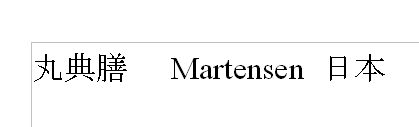
Can the japanese font reduced by one step? I.e. if you have selected arial 10, a japanese font of 9 or 8 would be the corresponding size. This would prevent the field from beeing black when the dialog box is opened.
Below is an image about the size of fonts in japanese and english. I used font size 12 for both.
Edited: Monday, August 21, 2006 by
maru-san
|
|
|
|
|
Administrators
Moderators
Customers
Gamma
FamilyTrees.GenoPro.com
Translator
GenoPro version: 3.1.0.1
Last Login: Tuesday, February 3, 2026
Posts: 4,886,
Visits: 22,803
|
The application has no control over the specific characters within the text. Internally, GenoPro uses the ExtTextOutW API from Windows. To output text, GenoPro uses some code like this:| ExtTextOutW(hdc, x, y, 0, NULL, "Kai Martensen (渡邊カイ)", 20, NULL) |
|