|
|
|
|
Customers
GenoPro version: 2.0.1.4
Last Login: Thursday, June 30, 2016
Posts: 141,
Visits: 294
|
HelloThe new Ancestor Pedigree Chart for V2b20 is great. A minor problem is that sometimes the written line breaks and looks awkward. 
When internet explored width is increased, other lines are longer without lines breaking. As the width is increased and sometimes even when decreased the "1982" pops back into the previous line looking like the other lines. Thanks Frank1
|
|
|
|
|
Administrators
Customers
Important Contributors
FamilyTrees.GenoPro.com
GenoPro version: 3.1.0.1
Last Login: 13 hours ago
Posts: 3,487,
Visits: 27,235
|
I have previously noticed and thought I had a fix in Beta 20, your style.css file should have a line | .nowrap { white-space: nowrap; text-overflow: scroll; } |
and the Pedigree Chart <div> tag should have this attribute class='nowrap'
If it is not there now it will be in Beta 20b.IE and Fx behave differently here. Fx will not wrap below a picture and text flows over the picture. 
IE does wrap below a picture but leaves a coloured box behind. 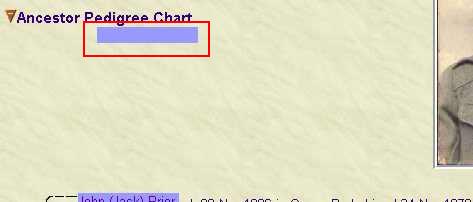
These appear to be browser bugs and I and still looking for a solution. Suggestions Please!
'lego audio video erro ergo disco' or "I read, I listen, I watch, I make mistakes, therefore I learn"
|
|
|
|
|
Important Contributors
Customers
GenoPro version: 3.1.0.1
Last Login: Saturday, December 28, 2024
Posts: 193,
Visits: 4,270
|
Hi, I have found a page, http://www.blooberry.com/indexdot/css/supportkey/position.htm where you can find, which CSS element supported by which browser.
I am not a web design guru, but for me it seems, that the scroll value is for the overflow property. Also, text_overflow is an MS extension and supported by IE6 only 
The doc is quite old (2003), do not know, if there was any change 
Another interesting info concerning compatibility is in http://en.wikipedia.org/wiki/Cascading_Style_Sheets#CSS_limitations
On wiki there are also lots of tips and trick (and links), like http://www.quirksmode.org/css/contents.html
Feri
Edited: Thursday, November 30, 2006 by
fbukolyi
|
|
|
|
|
Customers
GenoPro version: 2.0.1.4
Last Login: Thursday, June 30, 2016
Posts: 141,
Visits: 294
|
I found the nowrap line on line 92 in style.css.the Pedigree Chart <div> tag should have this attribute class='nowrap' I don't know where or how to find "the Pedigree Chart <div>". I am using IE 6. Frank1
|
|
|
|
|
Customers
GenoPro version: 2.0.1.4
Last Login: Thursday, June 30, 2016
Posts: 141,
Visits: 294
|
As a work around for the IE and Fx behaviours you have shown above I suggest that the Ancestor Pedigree Chart heading to be always placed below a picture.I know that it may leave a blank space, but the chart would look correct. Frank1
|
|
|
|
|
Customers
GenoPro version: 2.0.1.4
Last Login: Thursday, June 30, 2016
Posts: 141,
Visits: 294
|
RonThe line still wraps the same in V2b20b as in V2b20. Thanks Frank1
|
|
|
|
|
Important Contributors
Customers
GenoPro version: 3.1.0.1
Last Login: Saturday, December 28, 2024
Posts: 193,
Visits: 4,270
|
Ron, what if you put the pedigree chart into a new popup frame (similar to the svg)?
Feri
|
|
|
|
|
Administrators
Customers
Important Contributors
FamilyTrees.GenoPro.com
GenoPro version: 3.1.0.1
Last Login: 13 hours ago
Posts: 3,487,
Visits: 27,235
|
Thanks for the suggestions Frank1 & Feri. I had originally planned to put the Chart in its own frame and it would avoid the picture wrap issues but it was considered preferable to keep the information on the individual's page. I had also considered placing below the picture, a clear: right; style setting would achieve that, but again I was unhappy with the gap it left. My view was that the 'quirks' of IE6 and Fx were not that serious and so I chose the current implementation. I am also aware that the text-overflow style is IE specific, indeed Firefox reports a problem in the Javascript/Error Console. However in my tests it fixed the IE line wrap issue. I suppose I could try and hide this style from Firefox but didn't seem worth the effort.As yet I have not been able to reproduce the line wrap problem reported by Frank1. I simply get a horizontal scroll bar which is what was intended. So if anyone has sample .gno for which the report exhibits this problem perhaps they could send it to me. Either it attach to post or send in a Private Message on this forum.
'lego audio video erro ergo disco' or "I read, I listen, I watch, I make mistakes, therefore I learn"
|
|
|
|
|
Customers
GenoPro version: 2.0.1.4
Last Login: Thursday, June 30, 2016
Posts: 141,
Visits: 294
|
Hello RonI have attached a .gno fragment file that exhibits the word wrap problem. I have a screen size of 1024 X 768. I run IE V6. I do not run IE in full size so the sides may be moved and resized. After generating a report, IE launches. Select Agnes Hutterer, the first individual name in the list. Resize IE to show full width. Then slowly move the right hand border towards the left reducing the width. First the "1979" wraps, then unwraps. Then, the "1944" wraps and then unwraps as the border is moved further. I have much larger family trees and depending on the width of the pedigree chart (which is different for each person) the word wrap will show on some charts and not on others depending on the width of the IE window. Hope this will help find the problem. Frank1
 Hutt.gno
(261 views,
4.83 KB)
Hutt.gno
(261 views,
4.83 KB)
|
|
|
|
|
Customers
GenoPro version: 2.0.1.4
Last Login: Thursday, June 30, 2016
Posts: 141,
Visits: 294
|
Just noticed another minor problem on the pedigree chart. The background colour of some individuals will be white and others will have the reddish or bluish colour.Using the sample file attached above, please continue to move the right hand border towards to left. Around half screen width, the background colour of Agnes Hutterer changes to white and moving the border back will bring the reddish colour back. Thanks Frank1
|