|
|
|
|
Customers
Important Contributors
GenoPro version: 3.1.0.1
Last Login: 12 hours ago
Posts: 449,
Visits: 7,991
|
This has been around since the option was introduced to use approximate dates of birth and death in the Genogram, but I have only just noticed that the approximation indicator (~) is omitted in the index and the narrative parts of the report, whereas the SVG reflects the original Genogram - see highlighted points below: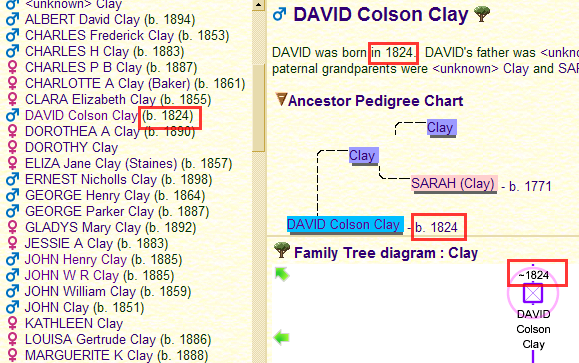
Would it be possible to include the ~ within the report?
|
|
|
|
|
Administrators
Moderators
Customers
Gamma
FamilyTrees.GenoPro.com
Translator
GenoPro version: 3.1.0.1
Last Login: Tuesday, February 3, 2026
Posts: 4,886,
Visits: 22,803
|
At this point of releasing GenoPro 2.0, it is very risky to make a modification which may cause a bug somewhere else. Ron is the expert regarding the report generator. If he feels comfortable making the change and the impacts are not too significant, then this improvement is a big welcome.
|
|
|
|
|
Administrators
Customers
Important Contributors
FamilyTrees.GenoPro.com
GenoPro version: 3.1.0.1
Last Login: 4 hours ago
Posts: 3,487,
Visits: 27,240
|
I have not shown approximate dates as yet because I am not aware of any Report Generator property or method for extracting such dates. I have just done a bit of experimenting and the only way I can find to extract an such approximate dates is to use Individual.TagValue("Birth.Date") as check the result. But I wonder if there any built-in methods available? The .ToString(<format> ) method only seems to work for a full date, i.e. with day, month and year present. I have found that the only viable method to check or format dates is ToStringNarrative that formats the date as per the control panel. If there are no built in methods then yes I can provide some code without too much effort or risk that will check for approximate dates and report accordingly.
'lego audio video erro ergo disco' or "I read, I listen, I watch, I make mistakes, therefore I learn"
Edited: Friday, December 1, 2006 by
Ron
|
|
|
|
|
Administrators
Moderators
Customers
Gamma
FamilyTrees.GenoPro.com
Translator
GenoPro version: 3.1.0.1
Last Login: Tuesday, February 3, 2026
Posts: 4,886,
Visits: 22,803
|
Future updates will include more properties and methods to format dates. At the moment, I don't think there is a way to output the approximation symbol.
|
|
|
|
|
Customers
Important Contributors
GenoPro version: 3.1.0.1
Last Login: 12 hours ago
Posts: 449,
Visits: 7,991
|
Well done : :: v2b20d has the solution for 3 out of the 4 highlighted: :: v2b20d has the solution for 3 out of the 4 highlighted: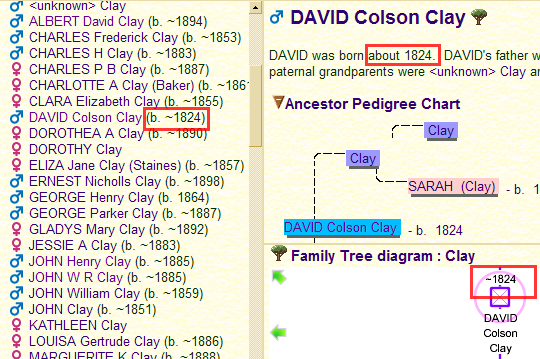
The only missing one is the Ancestor Pedigree Chart, but that is less important.
|
|
|
|
|
Forum Members
Last Login: Thursday, October 14, 2010
Posts: 7,
Visits: 170
|
Why did the report generator that?

In the program I use only one ~ !
|
|
|
|
|
Customers
FamilyTrees.GenoPro.com
GenoPro version: 3.1.0.1
Last Login: Saturday, May 23, 2026
Posts: 149,
Visits: 1,263
|
There is a problem with approximate dates where the exact birth date is known and the date of death is approximated. As an example:Date of Birth: 7 Mar 1779 Date of Death: >1826 The report prints "He died at the age of 47 after 1826." Obviously, there is no way of knowing how old he was when he died as the date of death is approximated. I would suggest that the age not be calculated/printed if any date is an apoproximation.
|
|
|
|
|
Administrators
Customers
Important Contributors
FamilyTrees.GenoPro.com
GenoPro version: 3.1.0.1
Last Login: 4 hours ago
Posts: 3,487,
Visits: 27,240
|
Why did the report generator that?
It does look a bit strange. Are you using a customised report skin? The standard skin only shows year of birth whereas your example has some full dates hence I assume a custom skin is being used. The repeated approximation symbol may be due to a problem with the Date.ToString method. However I cannot explain the doubling of dates. Can you give more details of your customisation? I would suggest that the age not be calculated/printed if any date is an apoproximation. I agree. I had missed this issue. I will tweak the report to exclude age at death if date of birth or death are approximated.
'lego audio video erro ergo disco' or "I read, I listen, I watch, I make mistakes, therefore I learn"
|
|
|
|
|
Forum Members
Last Login: Thursday, October 14, 2010
Posts: 7,
Visits: 170
|
Thanks Ron.
I used this symbol "~" before 20d too. When I make a new file whit 20d and use the ~ the report is good. But if I use my original file which cointains ~ symbols the report looks like in the picture.
I used the original skin.
There is one of my files:
http://palmai.uw.hu/test_1.gno
Edited: Sunday, January 28, 2007 by
GenoProSupport
|
|
|
|
|
Administrators
Customers
Important Contributors
FamilyTrees.GenoPro.com
GenoPro version: 3.1.0.1
Last Login: 4 hours ago
Posts: 3,487,
Visits: 27,240
|
Thanks for the sample. It had me foxed for a while. However the problem is a custom tag, birth.DATE.COMM, in your file. This seems to upset GenoPro's Report Generator methods for dates such that both Birth.Date.Approximation and Birth.Date.Year return ~~<date>. The work-around is to delete this custom tag. Use Table View / Individuals, then right click on column headed birth.DATE.COMM and select the 'X Delete custom tag birth.DATE.COMM' option. If you need to retain this information I suggest you rename the tag to say birth.DATE_COMM for example, using GenoPro's Tag Editor.
'lego audio video erro ergo disco' or "I read, I listen, I watch, I make mistakes, therefore I learn"
Edited: Friday, December 8, 2006 by
Ron
|