|
|
|
|
Customers
GenoPro version: 3.1.0.0
Last Login: Thursday, May 7, 2020
Posts: 57,
Visits: 610
|
HiI liked the software the moment I found it - google search. I am trying to enter the data in Telugu - An Indian Language but unable to. I have tried it on XP as well as 2K Prof and using Gautami font, TL-Rambabu Font etc. Could you please help? regards Sriram
|
|
|
|
|
Important Contributors
Customers
GenoPro version: 3.1.0.1
Last Login: Saturday, December 28, 2024
Posts: 193,
Visits: 4,270
|
Did you install a special keyboard (I mean virtual keyboard) as well for this language? Genopro support Unicode, some of the users are using it for Japanese and Hebrew - so it should not be a problem, if the font you are using really supports Telugu.
You can also try to set up the text in Character table (in English XP it is under Accessories). Compose the text you wish, copy and then paste to a field in Genopro.
Feri
|
|
|
|
|
Customers
Important Contributors
FamilyTrees.GenoPro.com
Translator
GenoPro version: 3.1.0.1
Last Login: Sunday, March 21, 2021
Posts: 716,
Visits: 12,927
|
Have entered Japanese fonts on Engl. Windows ME and Jap. Windows XP, with more complications on ME, due to the fact that the Global IME is not activated when starting GenoPro. However if you have used XP, there should be no problem if you have installed the proper fonts on your PC. Found the following page for fonts:
http://salrc.uchicago.edu/resources/fonts/available/telugu/
Hope this page will help.
To select the proper font when using Genopro, open Genopro and just click enter, it will open a dialog box with several tabs on top; select the font tab and scroll through the available fonts. However can`t help you with how to enter names, words and letters in your language. For Japanese I have to click a selection of 2 or 3 or even 4 alphabetic characters sometimes and click space for the selection of the correct Japanese character. If I want to enter 東京 I have to type toukyou, after activating the Japanese input method.
Good luck.
|
|
|
|
|
Customers
GenoPro version: 3.1.0.0
Last Login: Thursday, May 7, 2020
Posts: 57,
Visits: 610
|
HiFirst - Thank you for the responses and wish you all a HNY 2007. I have tried both methods - selection of "Telugu" font ( have tried atleast 5 fonts - which were working) and also tried copy paste the text. Somehow I get either squares or circles. Please let me know what is the virtual keyboard? I have tried the onscreen keyboard available in W2K Prof but of no use. regards Sriram
|
|
|
|
|
Customers
Important Contributors
FamilyTrees.GenoPro.com
Translator
GenoPro version: 3.1.0.1
Last Login: Sunday, March 21, 2021
Posts: 716,
Visits: 12,927
|
|
|
|
|
|
Important Contributors
Customers
GenoPro version: 3.1.0.1
Last Login: Saturday, December 28, 2024
Posts: 193,
Visits: 4,270
|
I have also tried on a Hungarian Windows with Arabic characters. Though all the selected chars are visible in the character map correctly, when copy/paste to genopro some of them have been replaced by squares... I will try to reproduce.
btw, I could not find help for the dialog (with tab Fonts) in the new help system. I would have liked to see, what 'Use the xxx font to display text for Default Font' tick stands for 
Feri
|
|
|
|
|
Customers
GenoPro version: 3.1.0.0
Last Login: Thursday, May 7, 2020
Posts: 57,
Visits: 610
|
Hi MARU-SAN,I really appreciate your research and help. I too can not read the words - letters are recognisable. Yesterday I was able to get some results but still can not really read as Telugu words. The letter changes its shapes based on the context of next letter(s). What is happening here is that the combined letter is not appearing - instead all the shapes used are serially displayed. I would try with different combinations. My fonts are recognised in Genepro but not functioning properly. My name - nadiminti - written in Telugu - నడిమింటి The first letter consists of - న్ and అ - entered together become న - n and a are used The second letter consists of - డ్ and ఇ taking the shape of డి - D and i are used You can see that here I am able to write with ease - directly. I can not do the same in the Genepro Fields, also when I do a copy & paste operation, the letters which are together will be seperated and shown. regards Sriram
|
|
|
|
|
Customers
Important Contributors
FamilyTrees.GenoPro.com
Translator
GenoPro version: 3.1.0.1
Last Login: Sunday, March 21, 2021
Posts: 716,
Visits: 12,927
|
I think you have to look into the input method more closely. I was able to copy your name into GenoPro and it shows properly in the genomap even without changing the font of that genomap. Did not try to input your name, since I am not familiar with the method and your language.
Good luck.
Niels
|
|
|
|
|
Important Contributors
Customers
GenoPro version: 3.1.0.1
Last Login: Saturday, December 28, 2024
Posts: 193,
Visits: 4,270
|
Maru-san, what is your setting under Tools|Display alphabets, Languages tab for Telugu? For me after installing the font that you have installed it is empty...
As a result when I make copy/paste of the telugu name I will get squares only.
Feri
|
|
|
|
|
Customers
Important Contributors
FamilyTrees.GenoPro.com
Translator
GenoPro version: 3.1.0.1
Last Login: Sunday, March 21, 2021
Posts: 716,
Visits: 12,927
|
Feri, here is what shows up on my PC:tools > display alphabet > Language > TE (telugu), no code page available under fonts in the font tab of the properties dialog box I have installed only the normal font such as TLW-TTHemalatha, which has the ok under the 1st column "Western/Us(Ansi)", which I did not select for this test and here is how it shows up after copy/paste of the name (on the right is maru=丸) 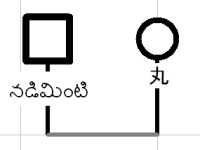
Please note that japanese Windows is using 2byte and 1byte system. a japanese character takes usually 2 bytes.
|