|
|
|
|
Customers
GenoPro version: 3.0.0.5
Last Login: Friday, July 1, 2016
Posts: 6,
Visits: 14
|
Does not matter if the whole Genepro input (5 seperate pages) or selected page is used to generate a report, certain (the same) individuals lose their pedigree, but selecting these individuals in Genepro (latest version) all seems correct and selecting their "Ancester "tree all of the boxes light up correctly.e.g. I pesonally lose my pedigree in a generated report. but my 3 brothers and 1 sister remain intact. Checking me, or them, or my parents in GenPro, I cannot see any input error or missing links or detail. It is the same with other select individuals in the report. Help or guidance please.
|
|
|
|
|
Customers
Important Contributors
GenoPro version: 3.1.0.1
Last Login: 2 hours ago
Posts: 449,
Visits: 7,991
|
In my experience this can happen when the pedigree link of the affected individual is incorrect, although I would not then expect the Ancestor Tree to show up correctly.Hover your mouse over the pedigree link and see that the link shows correctly - 'Link: Child Name'; also hover over the Union Line of the parents to check whether the correct numbers of children are shown. Lastly view the Table Layout of the affected individual and check the columns for Father, Mother and Siblings.
|
|
|
|
|
Customers
GenoPro version: 3.0.0.5
Last Login: Friday, July 1, 2016
Posts: 6,
Visits: 14
|
Thankyou Howard53,checked as you suggested to no avail, I am sure it is something simple as my brothers and sister are spot on. The tests as per your suggestions are all perfect. I will keep at it. Regards Ryszui.
|
|
|
|
|
Customers
Important Contributors
GenoPro version: 3.1.0.1
Last Login: 2 hours ago
Posts: 449,
Visits: 7,991
|
The other possibility is that you have options set within the Privacy Filter which are excluding yourself from the report. - You have not said whether your parents and siblings are still alive. If they are not, check the Privacy Tab on the Generate Report dialog. Is the box 'Remove All Living Individuals' ticked?
- If any are living, then check the Family tab under your own Properties page. Is the box 'Make Label / Exclude From Report' ticked?
|
|
|
|
|
Customers
GenoPro version: 3.0.0.5
Last Login: Friday, July 1, 2016
Posts: 6,
Visits: 14
|
Hello Howard35, again followed up you suggestions to no avail. I cannot find any differances from my brothers and sister, all links read correct and the same. Can I send you the file for you to open, maybe you will spot it Regards Ryszui
|
|
|
|
|
Important Contributors
Customers
GenoPro version: 3.1.0.1
Last Login: Saturday, December 28, 2024
Posts: 193,
Visits: 4,270
|
|
|
|
|
|
Customers
Important Contributors
GenoPro version: 3.1.0.1
Last Login: 2 hours ago
Posts: 449,
Visits: 7,991
|
Ryszui sent me his file with the problem and, as he said, all the checks I suggested showed no apparent faults. It was only on close examination of the graphics that I found the problem.I have made a new file to illustrate where the fault lay. This is how the layout appeared: 
But the report showed: 
which is not complete (the ancestors and Ancestor Pedigree Chart are missing). However, moving the graphics showed: 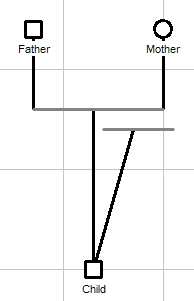
i.e. there was a second biological child link to an orphaned marriage (no parents). Since it is impossible for a child to have two sets of biological parents, the report was only reporting on the link which was made first (in this case the orphaned link). If the links are made the other way round (the orphan link last), the report is correct (even though the orphan link is still present): 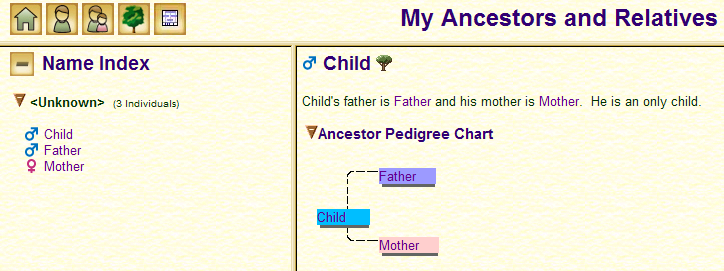
I don't regard this as a bug, but I wonder whether it would be possible to have some sort of error-trapping mechanism to detect such a situation.
|