|
|
|
|
Customers
FamilyTrees.GenoPro.com
GenoPro version: 2.0.1.6
Last Login: Monday, August 29, 2011
Posts: 6,
Visits: 17
|
I am using geno pro 2.01. I am trying to display chinese names.
Whenever I paste a chinese text into a field, it displays it sideways.
I have tried different fonts but seem to get the same problem.
The characters are all rotated 90 degrees counterclockwise.
Any help would be appreciated.
Thanks,
John
Edited: Wednesday, April 23, 2008 by
GenoProSupport
|
|
|
|
|
Administrators
Moderators
Customers
Gamma
FamilyTrees.GenoPro.com
Translator
GenoPro version: 3.1.0.1
Last Login: Tuesday, February 3, 2026
Posts: 4,886,
Visits: 22,803
|
In the Display tab, you will see a check box named Display Text Vertically. This option was designed to display Chinese and Japanese text.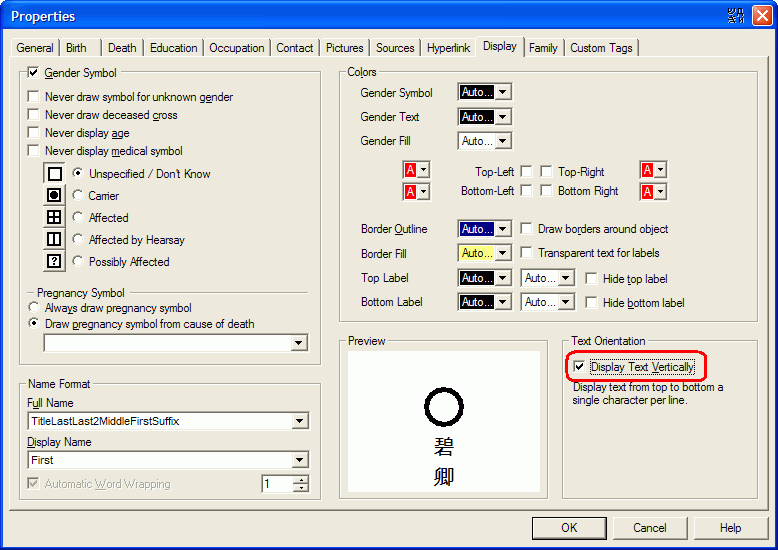
|
|
|
|
|
Customers
FamilyTrees.GenoPro.com
GenoPro version: 2.0.1.6
Last Login: Monday, August 29, 2011
Posts: 6,
Visits: 17
|
Thanks for the suggestion...
This still displays the characters rotated 90 degrees counterclockwise... but now the name is displayed top to bottom.
When I type any chinese text on any field in Geno Pro 2.0, the character is always rotated to the 90 degrees to the left.
I remember not having this problem when I was using the older version. Is there some other setting that I am missing.
Thanks again for your help
|
|
|
|
|
Customers
Important Contributors
FamilyTrees.GenoPro.com
Translator
GenoPro version: 3.1.0.1
Last Login: Sunday, March 21, 2021
Posts: 716,
Visits: 12,927
|
Please change the font. Some fonts are rotated by 90 degrees, others not. Just click "enter" when nothing is selected and you will find the font tab in a dialog box, from where you can select the proper font.
Edited: Wednesday, April 23, 2008 by
maru-san
|
|
|
|
|
Customers
FamilyTrees.GenoPro.com
GenoPro version: 2.0.1.6
Last Login: Monday, August 29, 2011
Posts: 6,
Visits: 17
|
I tried different fonts..
The fonts that were designed to display Chinese seemed to have the same problem.
However once I changed the font to Times Roman.. everything seemed to work fine.
Will this be a problem when I want to try to put my family tree on the website?
Thanks again
|
|
|
|
|
Customers
Important Contributors
FamilyTrees.GenoPro.com
Translator
GenoPro version: 3.1.0.1
Last Login: Sunday, March 21, 2021
Posts: 716,
Visits: 12,927
|
89268 (4/25/2008)
I tried different fonts..
The fonts that were designed to display Chinese seemed to have the same problem.
However once I changed the font to Times Roman.. everything seemed to work fine.
Will this be a problem when I want to try to put my family tree on the website?
Thanks again
I just tried your settings with my Japanese files. You can use that setting for the narrative report, however you won`t see the names in the SVG chart. In order to see those names you need a proper Chinese font. Which font are you using for Chinese? May be I can find a suitable one for you.
Tried following font, which works: SimHei, comes apparently with Windows P
Edited: Friday, April 25, 2008 by
maru-san
|