|
|
|
|
Administrators
Customers
Important Contributors
FamilyTrees.GenoPro.com
GenoPro version: 3.1.0.1
Last Login: 13 hours ago
Posts: 3,487,
Visits: 27,235
|
Well it's been over 2 weeks since my last update but we did sneak in a fantastic week in 'Lago di Como, Italia' so don't think I haven't been working !  So the updated skin in the first post of this thread fixes the problem with 'label/social entity pictures'. You will need to have IrfanView installed on your system now in order to display pictures on SVG & PDF GenoMaps, as the script now creates thumbnail images via Irfanview for these pictures. Also I have now implemented the following Custom Tags for Labels and Social Entities to supercede the use of picture="picID" etc. in the label text. The Tags are: - Picture.ID - the ID of the Picture to be displayed
- Picture.Style - any CSS styling required e.g. opacity: 0.5;
- Picture.FixRatio - keep aspect ratio - this the default - set to N to override.
- Picture.FitLabel - adjust label/social entity size to match aspect ratio of picture. means you don't have to draw the label too accurately.
Also highlighting of individuals and families on PDF is implemented by highlighting a hidden ID field (thanks JC for the suggesting the ID search rather than name). Other minor fixes, e.g. references to SVG replaced by GenoMap to cater for PDF.
'lego audio video erro ergo disco' or "I read, I listen, I watch, I make mistakes, therefore I learn"
|
|
|
|
|
Important Contributors
FamilyTrees.GenoPro.com
Customers
Translator
GenoPro version: 2.0.1.6
Last Login: Tuesday, December 16, 2008
Posts: 390,
Visits: 1,271
|
Ron,
Got this error straight away in trying an EN Rep:
JC
|
|
|
|
|
Administrators
Moderators
Customers
Gamma
FamilyTrees.GenoPro.com
Translator
GenoPro version: 3.1.0.1
Last Login: Tuesday, February 3, 2026
Posts: 4,886,
Visits: 22,803
|
|
|
|
|
|
Administrators
Customers
Important Contributors
FamilyTrees.GenoPro.com
GenoPro version: 3.1.0.1
Last Login: 13 hours ago
Posts: 3,487,
Visits: 27,235
|
Thanks Dan, that point must have slipped my mind over the holiday. I also forgot about tidying up temporary files used in generating pdfs & thumbnails. I should have a revised skin later today but until then you will find extra files left in your windows temporary directory (along with all the others that other applications leave lying around  ) )
'lego audio video erro ergo disco' or "I read, I listen, I watch, I make mistakes, therefore I learn"
|
|
|
|
|
Customers
Important Contributors
FamilyTrees.GenoPro.com
Translator
GenoPro version: 3.1.0.1
Last Login: Sunday, March 21, 2021
Posts: 716,
Visits: 12,927
|
Have tried this narrative report with this latest program download and ended up with mixed results.
Since all my pictures are entered into the SVG charts via "Text Label" with the previous text(picture="picnnnnn"), they are showing up although following error message appears:
Using label text 'picture="picnnnnn"' for pictures in labels is now superceded. Please Label/SocialEntity Custom Tags 'Picture.ID' and 'Picture.Style' instead of text in label/Social Entity
The picture entered into "social entity" shows up nicely. I think the description as used above label/social entity pictures is misleading making the user believe that the "Text Label" is used. Pictures are not showing in the Text Label if the picture ID is entered via custom tag.
|
|
|
|
|
Important Contributors
FamilyTrees.GenoPro.com
Customers
Translator
GenoPro version: 2.0.1.6
Last Login: Tuesday, December 16, 2008
Posts: 390,
Visits: 1,271
|
Hi guys,
I installed 2.0.1.6.
The error at line 334 disappeared. However:
1) with Ron's skin 2.0.1.5.5., none of my Picts show up in the Rep.
2) with 2.0.1.6. Custo EN skin and 2.0.1.5.5. skin, both show an error regarding the missing <PhER_CuttoffRepaired> Ph in Dic.
JCUpdate for point 1): With param <fUsePictureThumbnails> = "N", my Picts are showing up OK. However, should the Default be "Y" ? because many other Users will probably also report the matter.
Edited: Thursday, July 3, 2008 by
jcguasp
|
|
|
|
|
Administrators
Customers
Important Contributors
FamilyTrees.GenoPro.com
GenoPro version: 3.1.0.1
Last Login: 13 hours ago
Posts: 3,487,
Visits: 27,235
|
Sorry JC I should have said that at present thumbnails are only generated for pictures in Labels and Social Entities as this was needed to add images to PDFs. I just thought I'd release what I had now as it may be a few days before I have thumbnails for all pictures ready.At present I cannot tell whether or not a thumbnail, or PDF for that matter, needs updating or not and so they are produced each time a report is generated. I am in discussion with Daniel for a solution to this so that Inkscape and IrfanView calls can be optimized to avoid unecessary calls. Use of other picture thumbnails will remain optional, but will be created and used for pictures in Labels & S. E.s.
'lego audio video erro ergo disco' or "I read, I listen, I watch, I make mistakes, therefore I learn"
|
|
|
|
|
Administrators
Customers
Important Contributors
FamilyTrees.GenoPro.com
GenoPro version: 3.1.0.1
Last Login: 13 hours ago
Posts: 3,487,
Visits: 27,235
|
I never thought to test Labels as well as Social Entities because the same routine is used to generate both as SVG in the genomap.svg script. The only difference was that the code allowed S.E.s to have a border pattern when on checking I find Text Labels should have a border pattern too. So I tried with identical coding for both and still no picture appeared in the label. At the moment I can only conclude that this is a GenoPro Report Generator bug in that although custom tags can be created and set for Labels they are not accessible from the Report Generator. i.e. the method TagValue does not work correctly for Labels. My testing shows it just returns an empty string when a custom tag, e.g. Picture.ID is in fact present. Hopefully Dan will read this post and investigate further.
'lego audio video erro ergo disco' or "I read, I listen, I watch, I make mistakes, therefore I learn"
|
|
|
|
|
Administrators
Moderators
Customers
Gamma
FamilyTrees.GenoPro.com
Translator
GenoPro version: 3.1.0.1
Last Login: Tuesday, February 3, 2026
Posts: 4,886,
Visits: 22,803
|
I added the pictures and sources to labels and social entities. I am crossing my fingers this won't cause compatibility issues and nobody will loose data exchanging files with earlier versions of GenoPro.If you download and install http://www.genopro.com/download/InstallGenoPro.2.0.1.6.exe again, you will get the changes and it will work better. Version 2.0.1.6 is much orthogonal. By the way, the social entity and the label have the same tags, with the exception of the social entity having contacts. 
|
|
|
|
|
Customers
Important Contributors
FamilyTrees.GenoPro.com
Translator
GenoPro version: 3.1.0.1
Last Login: Sunday, March 21, 2021
Posts: 716,
Visits: 12,927
|
Just before the post of Dan I had tested with two different files, one with just one Text Label(picture) which came out ok and one with plenty of Text Labels(pictures) which came out as follows:
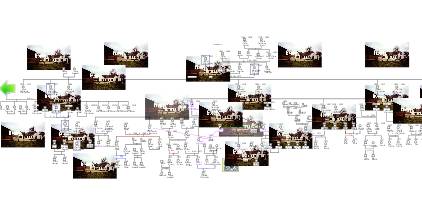
All Text Labels have the same picture, although picture.Id is different. On two pictures I work with opacity, which can be seen in the center. The picture which is shown is the utmost left Text Label.
update: I tested with the latest download and with 2 Text Labels(pictures) in above first file. Both pictures are the same.
Edited: Thursday, July 3, 2008 by
maru-san
|