|
|
|
|
Important Contributors
FamilyTrees.GenoPro.com
Customers
Translator
GenoPro version: 2.0.1.6
Last Login: Tuesday, December 16, 2008
Posts: 390,
Visits: 1,271
|
I only have basically 1 tree and 1 EN & 1 FR report. My drop down menus are as follows:1 - Language: <List All> (8); {FR} French (1); {EN} English (7)
2 - Skin name: \AllComments\* (Display All Comments) {EN}; \English Narrative Report\* {EN}; \English\* (English Narrative Report) {EN}; \SaveGenoMaps\* (Save All GenoMaps to Disk) {EN}; Display All Comments {EN}; English Narrative Report {EN}; Save All GenoMaps to Disk {EN} Questions: 1 - Having only 1 EN skin, how to reset (8) (1) (7) into (2) (1) (1) 2 - my skin name list is confusing (2 comments!; 3 narrative report!; 2 savegenomaps!). How to clean this list in order to keep only 1 of each?
|
|
|
|
|
Administrators
Moderators
Customers
Gamma
FamilyTrees.GenoPro.com
Translator
GenoPro version: 3.1.0.1
Last Login: Tuesday, February 3, 2026
Posts: 4,886,
Visits: 22,803
|
- In the Generate Report dialog, click on the button [Edit Skin...] to launch Windows Explorer. Then, make a backup of all the files in your "Skin" folder (either using WinRAR, Zip or a plain copy in another folder).
- Delete all the files in the Skin folder, except your French template.
- Next time you open the Generate Report dialog, you should see the 3 built-in skins (Display All Comments {EN}, English Narrative Report {EN} and Save All GenoMaps to Disk {EN}) plus your custom French skin.
|
|
|
|
|
Important Contributors
FamilyTrees.GenoPro.com
Customers
Translator
GenoPro version: 2.0.1.6
Last Login: Tuesday, December 16, 2008
Posts: 390,
Visits: 1,271
|
OK for the skin name menu (SNM) but I think there's still a problem with the report skin language (RSL) drop down menu. I unistalled 15h and only kept my "Genopro Beta\Skins\French" dir. Sequence of event and RSL reading:- 15h install -> RSL = all(4), FR(1), EN(3) ; SNM = 3items OK - cancel -> close 15h -> restart -> RSL = (4), (1), (3). - edit skin (EN nar rep dir created) -> close Explorer -> RSL = (5), (2), (7); SNM = 3 + 1 (\EN nar rep\*{EN} created) OK - close 15h -> restart -> RSL = (5), (1), (4); SNM = 4 items. It is what I've got now. Not a big deal but seems strange. Thanks
|
|
|
|
|
Administrators
Moderators
Customers
Gamma
FamilyTrees.GenoPro.com
Translator
GenoPro version: 3.1.0.1
Last Login: Tuesday, February 3, 2026
Posts: 4,886,
Visits: 22,803
|
I am having difficulty undrestanding. Can you post a screenshot?
|
|
|
|
|
Important Contributors
FamilyTrees.GenoPro.com
Customers
Translator
GenoPro version: 2.0.1.6
Last Login: Tuesday, December 16, 2008
Posts: 390,
Visits: 1,271
|
I only have 2 skins: your English Narrative Report and my French one but it shows as follows: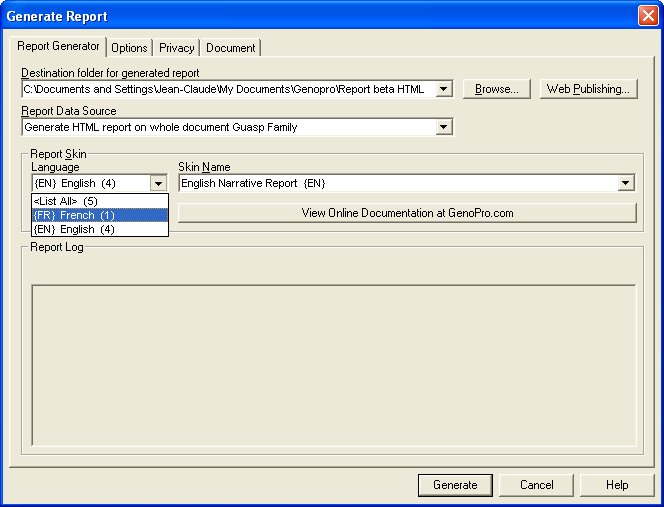
|
|
|
|
|
Administrators
Moderators
Customers
Gamma
FamilyTrees.GenoPro.com
Translator
GenoPro version: 3.1.0.1
Last Login: Tuesday, February 3, 2026
Posts: 4,886,
Visits: 22,803
|
Select <List All> which will display all the skins. You should see 4 skins in the other drop down (the 4 English + 1 French skin).
|
|
|
|
|
Customers
Important Contributors
FamilyTrees.GenoPro.com
Translator
GenoPro version: 3.1.0.1
Last Login: Sunday, March 21, 2021
Posts: 716,
Visits: 12,927
|
I only have 2 skins: your English Narrative Report and my French one but it shows as follows:
You have 4 skins for the English language and 1 skin for French. So if you select English, you will find those 4 skins in the right drop down list (skin names), the same goes for French. Each listed skin name in the right drop down list has a different purpose and gives you a different output. Just try them out and you will find out.
Edited: Friday, March 3, 2006 by
GenoProSupport
|