|
|
|
|
Customers
Important Contributors
FamilyTrees.GenoPro.com
Translator
GenoPro version: 3.1.0.1
Last Login: Sunday, March 21, 2021
Posts: 716,
Visits: 12,927
|
|
|
|
|
|
Administrators
Moderators
Customers
Gamma
FamilyTrees.GenoPro.com
Translator
GenoPro version: 3.1.0.1
Last Login: Tuesday, October 28, 2025
Posts: 4,886,
Visits: 22,799
|
maru-san (4/26/2006)
how can I avoid copying "all" pictures when only a limited number is actually being used?GenoPro should copy only the pictures being used by the report... maybe I am missing something...
|
|
|
|
|
Customers
Important Contributors
FamilyTrees.GenoPro.com
Translator
GenoPro version: 3.1.0.1
Last Login: Sunday, March 21, 2021
Posts: 716,
Visits: 12,927
|
GenoProSupport (4/26/2006)
maru-san (4/26/2006)
how can I avoid copying "all" pictures when only a limited number is actually being used?GenoPro should copy only the pictures being used by the report... maybe I am missing something...
That`s what I want, but I do not create any individual and family pages, so only pictures which are used for the SVG maps should be copied. Have no intention of copying 1200 pictures when only 150 or less are used.
Edited: Wednesday, April 26, 2006 by
GenoProSupport
|
|
|
|
|
Administrators
Moderators
Customers
Gamma
FamilyTrees.GenoPro.com
Translator
GenoPro version: 3.1.0.1
Last Login: Tuesday, October 28, 2025
Posts: 4,886,
Visits: 22,799
|
There is a little trick to trigger the report generator to copy a specific picture in the report: just query the dimension of the picture, and the report generator will mark that picture for copying.strDimension = picture.cache.dimension
|
|
|
|
|
Customers
Important Contributors
FamilyTrees.GenoPro.com
Translator
GenoPro version: 3.1.0.1
Last Login: Sunday, March 21, 2021
Posts: 716,
Visits: 12,927
|
Made a small report with 2 genomaps and a very limited number of pictures, however it copied all 88 pictures to familytrees.genopro.com. Stripped down almost all files to a minimum, but may be too much or still not enough.
|
|
|
|
|
Administrators
Moderators
Customers
Gamma
FamilyTrees.GenoPro.com
Translator
GenoPro version: 3.1.0.1
Last Login: Tuesday, October 28, 2025
Posts: 4,886,
Visits: 22,799
|
Is the option Remove Stray Objects checked? This option will delete any unused objects.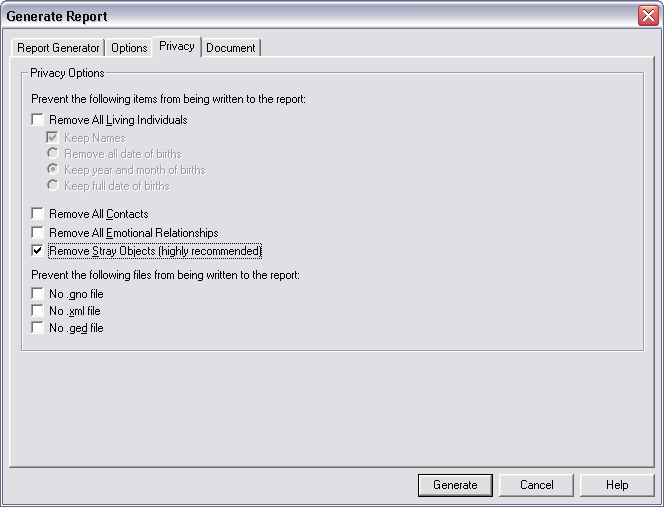
|
|
|
|
|
Customers
Important Contributors
FamilyTrees.GenoPro.com
Translator
GenoPro version: 3.1.0.1
Last Login: Sunday, March 21, 2021
Posts: 716,
Visits: 12,927
|
Have clicked this option always.
|
|
|
|
|
Administrators
Moderators
Customers
Gamma
FamilyTrees.GenoPro.com
Translator
GenoPro version: 3.1.0.1
Last Login: Tuesday, October 28, 2025
Posts: 4,886,
Visits: 22,799
|
You are welcome to send me your files + HTML templates to my email address. You don't have to send me all your 88 pictures; sending 3 or 4 pictures will be enough for understanding what's going on. I will personally take a look at this problem and find a solution.
|
|
|
|
|
Administrators
Moderators
Customers
Gamma
FamilyTrees.GenoPro.com
Translator
GenoPro version: 3.1.0.1
Last Login: Tuesday, October 28, 2025
Posts: 4,886,
Visits: 22,799
|
From my understanding, the file kay.gno is stored in the same folder as the HTML templates. This is not a problem, however all your pictures are stored in the images sub-folder, making them part of the skin. This is why all your pictures are always copied.Solution:
Move the file kay.gno to a different folder (eg: c:\genealogy\), and your pictures into a sub-folder named images (eg: c:\genealogy\images\). Next time you open GenoPro, locate the file (c:\genealogy\kay.gno) and generate your report from there. GenoPro will copy to the report only the images from the folder c:\genealogy\images\ if used within the report. On the other hand, any file (.htm, .gif, .jpg) part of the skin will be copied to the report. Let me know how it goes.
|
|
|
|
|
Customers
Important Contributors
FamilyTrees.GenoPro.com
Translator
GenoPro version: 3.1.0.1
Last Login: Sunday, March 21, 2021
Posts: 716,
Visits: 12,927
|
Thanks for looking into this, but the kai.gno is not located together with the html files. Its location is an entirely different location with a subfolder images in this folder.
However have renamed this subfolder now in order to avoid having a subfolder with the same name, even though it is in different locations, but in vain. Still copies all pictures.
Since I won`t be in for the next 3 weeks, please put this problem on hold and concentrate on Beta-updates, which has a higher priority than my small problem.
|