|
|
|
|
Gamma
Moderators
Administrators
FamilyTrees.GenoPro.com
Customers
GenoPro version: 3.1.0.1
Last Login: Monday, May 12, 2025
Posts: 952,
Visits: 10,077
|
1. Generate the report normally on FamilyTrees.GenoPro.com.
2. Go in your Account Page. (to access this page it's the same username and password as the forum) 3. Go in the Online Publications section. If the section doesn't exist, it's because you have not publish any report on that account. 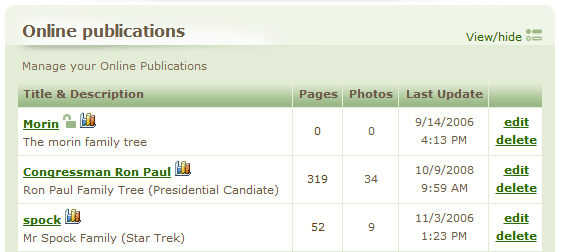 4. Find your publication and click the "Edit" link corresponding. 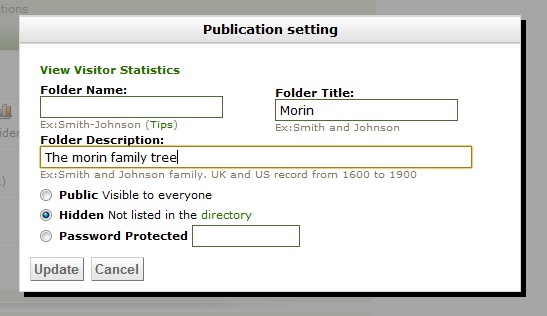 - Public (visible in your public profile, FamilyTrees.GenoPro.com home page, and the directory)
- Hidden (not listed anywhere but accessible for people who know your URL)
- Password protected (a password will be required each visit to the report, will not be indexed by search engine such as Google, Bing and Yahoo)
Select the protection mode, type your password press the edit button (again) to save your setting.
Edited: Monday, July 23, 2012 by
jcmorin
|
|
|
|
|
Customers
FamilyTrees.GenoPro.com
GenoPro version: 3.1.0.1
Last Login: Wednesday, August 13, 2025
Posts: 2,
Visits: 46
|
Thanks Jean-Claude, This has achieved some progress. The development control panel worked fine and I was able to set a password. It now shows a padlock sign against it, confirming that it is password protected. However, When I go to Familytrees, and search for a family member, I'm able to find them all, click on the link from one of them, and go into the family tree without having to provide a password. Is the system using a cookie on my machine to identify that I'm the owner of a Family Tree which my machine is trying to access? I also note that when I go into Familytrees and use the Newest Reports or Updated Reports, it appears to be Hidden. Presumably the Password Protected setting also excludes it from the visible directories (although this isn't explicitly stated). Regards Alan
|
|
|
|
|
Customers
GenoPro version: 2.0.1.5
Last Login: Thursday, June 30, 2011
Posts: 2,
Visits: 19
|
Password protection isn't working for me either. Unfortunately, it worked for one click and I tried it again and it hasn't worked again. It's still showing that the site is password protected, but when I go to the site, it let's me right into the tree. Please help!Eunice
|
|
|
|
|
Customers
Important Contributors
GenoPro version: 2.5.4.0
Last Login: Thursday, January 11, 2024
Posts: 386,
Visits: 4,475
|
Welcome 457108Please do not be allarmed. Your password is held for a period of time during the day, so you do not have to use it repeatedly. Others will still need it, but also can enter the site and return without the use of the password during a given time after they have entered it once. This is done by using Cookies stored on your computer, and is normal on modern software. I do not know the length of time this cookie lasts, but would be no more than 24 hours.
Poolzone a mere cog in a revolution
|
|
|
|
|
Customers
GenoPro version: 2.5.3.8
Last Login: Friday, February 11, 2011
Posts: 3,
Visits: 40
|
I have set up a new publication within my account under a new name, and have deleted the old publication. Having waited for nearly 24 hours I have then checked Google and the new publication seems to be invisible okay (so far).However, the old publication is still sitting within Google's cache and there is no guarantee that the cache will ever be purged, ever after 90 days. Having studied the Google Tools instructions for manual deleting cache pages from their database it seems that only the operater of the host site (Genopro) has enough access rights to insert the requisite command line(s) to cause these pages to be ignored during a Google search. So Genopro Support, if you're reading this, can you assist at all please? Cheers Caladh Beag.
|
|
|
|
|
Customers
Important Contributors
GenoPro version: 2.5.4.0
Last Login: Thursday, January 11, 2024
Posts: 386,
Visits: 4,475
|
|
|
|
|
|
Customers
GenoPro version: 2.5.3.8
Last Login: Friday, February 11, 2011
Posts: 3,
Visits: 40
|
Thanks Poolzone. I had been previously rummaging around on the Google Webmasters Tools page trying a few things out but can't get past the "Verify your site" stage (if that's what I need to do). This is where my state of complete ignorance in such matters lets me down! For example, I don't know whether I should be "uploading an HTML file" or "adding a metatag to my site's index file", neither of which I would know how to do anyway! Or am I way off the mark here? In your advice you give : “service=sitemaps&passive=true&nui=1&continue=https://www.google.com/webmasters/tools/removals&followup=https://www.google.com/webmasters/tools/removals<mpl=urlremoval&hl=en” What does this refer to please? It's all a bit of a red mist I'm afraid!
|
|
|
|
|
Customers
Important Contributors
GenoPro version: 2.5.4.0
Last Login: Thursday, January 11, 2024
Posts: 386,
Visits: 4,475
|
Sorry Calabeag
I apologise for not reading my suggestion after posting it.
I have edited my previous post. Simply 'click' on the URL provided.
I notice that they now require you to have a Google Account. If you do not use Gmail just sign up on the page supplied, and you will have the benefit of a Gmail account as well as removing your unwanted postings on the search engine.
They state that it will take weeks to remove, but mine was removed within 24 hours of my request. Good luck.
Poolzone a mere cog in a revolution
|
|
|
|
|
Customers
GenoPro version: 2.5.3.8
Last Login: Friday, February 11, 2011
Posts: 3,
Visits: 40
|
Hi Poolzone,I have now submitted the request in accordance with your helpful advice and await results. With the weekend coming up it will probably take a bit longer for Google to action. Many thanks and best wishes Caladh Beag
|
|
|
|
|
Administrators
Moderators
Customers
Gamma
FamilyTrees.GenoPro.com
Translator
GenoPro version: 3.1.0.1
Last Login: Monday, October 12, 2026
Posts: 4,885,
Visits: 22,809
|
'Caladh Beag' (1/23/2009)
Hi Poolzone, I have now submitted the request in accordance with your helpful advice and await results. With the weekend coming up it will probably take a bit longer for Google to action. Google may take up to 6 weeks to completely purge deleted pages from its index.
|