|
|
|
|
Customers
Important Contributors
FamilyTrees.GenoPro.com
GenoPro version: 3.1.0.1
Last Login: Yesterday @ 9:00 PM
Posts: 1,614,
Visits: 33,993
|
I have a a file with about 20 GenoMaps. As the first one is now redundant I have deleted it. I had created a new skin with slightly modified Dictionary.xml but this produced the following error and the output is missing the .svg file Amberley. (The records are of course in the report)
[0.61] Processing template 'genomap.svg'... No Drawing objects for Amberley [1.81] Processing template 'genomap.htm'...
I have tried modifying the appearance of Amberley, in case parameters such as width have got lost and also tried using the default Skin. Even saving the file and closing GenoPro has not restored this. I have not tried a reboot.
I have now repeated this with an earlier version of the file, which still has the first GenoMap, and get the same results
Edited: Monday, August 7, 2006 by
GenoProSupport
|
|
|
|
|
Administrators
Moderators
Customers
Gamma
FamilyTrees.GenoPro.com
Translator
GenoPro version: 3.1.0.1
Last Login: Monday, October 12, 2026
Posts: 4,885,
Visits: 22,809
|
You get this message if a GenoMap is empty. Have you tried to delete the GenoMap Amberley?
|
|
|
|
|
Customers
Important Contributors
FamilyTrees.GenoPro.com
GenoPro version: 3.1.0.1
Last Login: Yesterday @ 9:00 PM
Posts: 1,614,
Visits: 33,993
|
You get this message if a GenoMap is empty. Have you tried to delete the GenoMap Amberley?
Nope. The map still exists and contains individuals that do not exist on any other map.
I have just generated a version of this at
http://familytrees.genopro.com/appleshaw/SussexSteers/
The file familytree.gno contains the GenoMap Amberley but the Report does not. Interestingly it has started the process in that the letter 'A' appears in the list of Family Tree Diagrams but no detail.
If you want to see a .gno file before the removal of the first map, an ealier version is at
http://familytrees.genopro.com/appleshaw/SussexSteer/
Edited: Sunday, August 6, 2006 by
GenoProSupport
|
|
|
|
|
Customers
Important Contributors
FamilyTrees.GenoPro.com
GenoPro version: 3.1.0.1
Last Login: Yesterday @ 9:00 PM
Posts: 1,614,
Visits: 33,993
|
Have just downloaded 17g and still get Missing Drawing Object Error. In case some files were not updated I re-installed to a separate directory but same result
|
|
|
|
|
Administrators
Moderators
Customers
Gamma
FamilyTrees.GenoPro.com
Translator
GenoPro version: 3.1.0.1
Last Login: Monday, October 12, 2026
Posts: 4,885,
Visits: 22,809
|
appleshaw (8/7/2006)
Have just downloaded 17g and still get Missing Drawing Object Error. In case some files were not updated I re-installed to a separate directory but same resultI can reproduce the bug... and working on it.
Edited: Monday, August 7, 2006 by
GenoProSupport
|
|
|
|
|
Administrators
Moderators
Customers
Gamma
FamilyTrees.GenoPro.com
Translator
GenoPro version: 3.1.0.1
Last Login: Monday, October 12, 2026
Posts: 4,885,
Visits: 22,809
|
Can you please try Beta 17h and confirm the fix? Thanks!
|
|
|
|
|
Customers
Important Contributors
FamilyTrees.GenoPro.com
GenoPro version: 3.1.0.1
Last Login: Yesterday @ 9:00 PM
Posts: 1,614,
Visits: 33,993
|
Sorry for the delay in replying but I have been unable to update to 2.17h on this machine. I have tried a straight install; uninstall and install; restart after uninstall; turn off and restart. I always end up with 2.17g. It looks as though I may have removed some key when I used Regedit but not all of them.
However I have installed 2.17h on another machine and now do not get the error message. Slight problem still in that the Report does not list the svg for Amberley although the letter A is there, so no effective change in the final Report
|
|
|
|
|
Administrators
Moderators
Customers
Gamma
FamilyTrees.GenoPro.com
Translator
GenoPro version: 3.1.0.1
Last Login: Monday, October 12, 2026
Posts: 4,885,
Visits: 22,809
|
You can download Beta 17h directly from this link: http://www.genopro.com/beta/InstallGenoProBeta17h.exe.I generated a report using Beta 17h and got the following. Notice the Amberly GenoMap is listed, but not the Thakeham/Warminh GenoMap. Somehow the Thakeham/Warminh GenoMap has not been validated. All you have to do is visit the Thakeham/Warminh GenoMap and re-generate the report. You should get all the GenoMaps listed in your report. 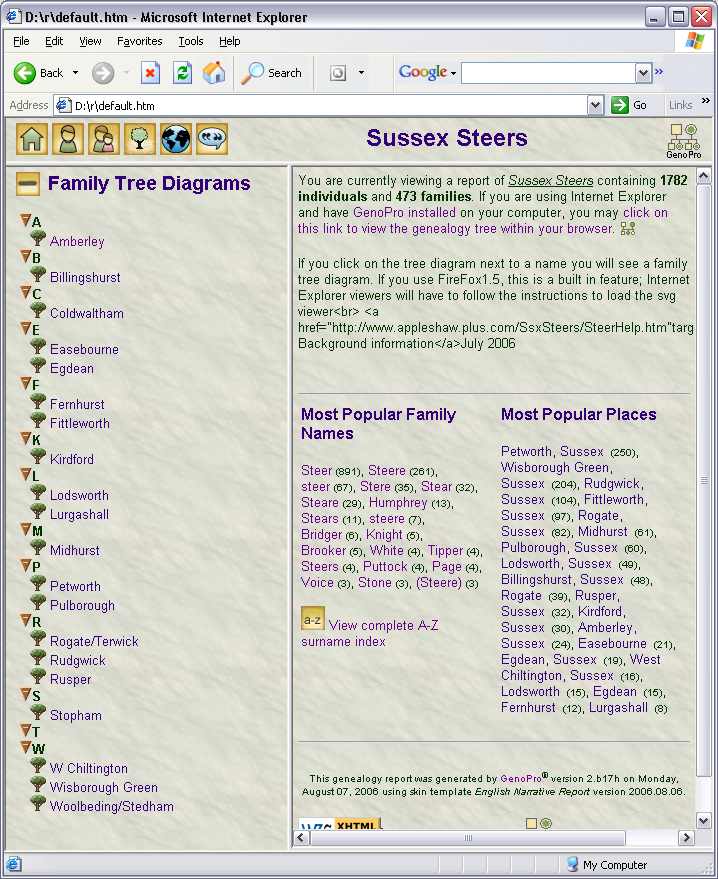
|
|
|
|
|
Customers
Important Contributors
FamilyTrees.GenoPro.com
GenoPro version: 3.1.0.1
Last Login: Yesterday @ 9:00 PM
Posts: 1,614,
Visits: 33,993
|
All sorted now. My original file still did not know about Amberley but moving an individual made it active. The link to 17h worked; wish I knew why the normal process did not work on this PC but did on my laptop.
One further improvement I noticed has crept in; If you click on the 'click on this link to view the genealogy tree within your browser. ' link, it now works in FireFox (although you are asked to download the familytrees.gno.)
Should the text be amended as it reads as though you have to Internet Explorer for this to happen?
|