|
|
|
|
Customers
FamilyTrees.GenoPro.com
GenoPro version: 3.0.1.0
Last Login: Friday, December 18, 2020
Posts: 8,
Visits: 11
|
A few months ago I bought the beta version and used it successfully to post to my own web site via FTP. Now I'm revisiting the software and I'm totally lost. For example, I can't get the software to recognize any skins (nor do I know how to use the skins, or I've forgotten). So in the report generator, the form says that it can't find any skins. I can't believe I'm so lost! Help!Thanks, Mary Beth
|
|
|
|
|
Customers
Important Contributors
Translator
GenoPro version: 3.1.0.1
Last Login: Friday, November 25, 2022
Posts: 334,
Visits: 7,574
|
77618 (11/24/2006)
A few months ago I bought the beta version and used it successfully to post to my own web site via FTP. Now I'm revisiting the software and I'm totally lost. For example, I can't get the software to recognize any skins (nor do I know how to use the skins, or I've forgotten). So in the report generator, the form says that it can't find any skins. I can't believe I'm so lost! Help! Thanks, Mary Beth Which Beta version you are using?? The report generator and skins had some major changes in the last several Beta version.
Edited: Friday, November 24, 2006 by
GenoProSupport
|
|
|
|
|
Customers
FamilyTrees.GenoPro.com
GenoPro version: 3.0.1.0
Last Login: Friday, December 18, 2020
Posts: 8,
Visits: 11
|
I just downloaded the most recent beta. I'm stuck when I get to the second window that asks for the server info...I put in the ftp server info there? And "OK" is not highlighted as an option.
|
|
|
|
|
Administrators
Moderators
Customers
Gamma
FamilyTrees.GenoPro.com
Translator
GenoPro version: 3.1.0.1
Last Login: Tuesday, October 28, 2025
Posts: 4,886,
Visits: 22,799
|
Search for a file named Config.xml. Any GenoPro skin must have this file. Once you have found this file, type the folder into the field named Skin Folder.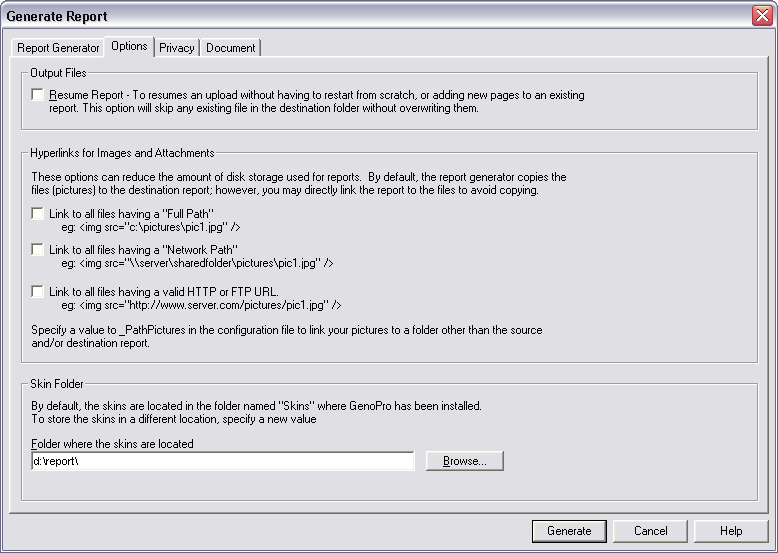
|
|
|
|
|
Customers
FamilyTrees.GenoPro.com
GenoPro version: 3.0.1.0
Last Login: Friday, December 18, 2020
Posts: 8,
Visits: 11
|
Great, thanks! That worked. Now to get this to the ftp server, am I to go to the "web publishing" option? Or do I manually go into the ftp window and transfer that way (and which file am I transferring)? thanks, I really appreciate your help!Mary Beth
|
|
|
|
|
Administrators
Moderators
Customers
Gamma
FamilyTrees.GenoPro.com
Translator
GenoPro version: 3.1.0.1
Last Login: Tuesday, October 28, 2025
Posts: 4,886,
Visits: 22,799
|
You can transfer by FTP using the built-in Web Publishing option, or generate the report on your local disk and use an FTP client to transfer your files. It is up to you. Pick what is more convenient and/or faster. The upload speed should be the same, however GenoPro tend to have problems uploading large reports by FTP. When a report has more than 10,000 files, sometimes the FTP session gets lost.
|
|
|
|
|
Customers
FamilyTrees.GenoPro.com
GenoPro version: 3.0.1.0
Last Login: Friday, December 18, 2020
Posts: 8,
Visits: 11
|
If I use my own ftp server, are you talking about all of the html files that were generated from the skins function I just used? So i would just take all of those and transfer them over manually? This is what was generated under so-called "Family Tree.v2x", not anything generated within subfolders genomaps, genomapsz, and images. You have the patience of a saint.
|
|
|
|
|
Administrators
Moderators
Customers
Gamma
FamilyTrees.GenoPro.com
Translator
GenoPro version: 3.1.0.1
Last Login: Tuesday, October 28, 2025
Posts: 4,886,
Visits: 22,799
|
If you are not sure, I would recommend using the built-in FTP feature of GenoPro. GenoPro will take care of uploading everything for you.By the way, you should consider publishing to http://familytrees.genopro.com/. Publishing to our server is probably 10 times faster than by FTP. We have designed a custom publishing protocol to include data compression and advanced caching. Our protocol is also firewall firendly and our server is configured to host all the files necessary for an interactive report. It is possible your FTP server does not allow certain types of files, such as .gno, .svg or .svgz.
Edited: Friday, November 24, 2006 by
GenoProSupport
|
|
|
|
|
Customers
FamilyTrees.GenoPro.com
GenoPro version: 3.0.1.0
Last Login: Friday, December 18, 2020
Posts: 8,
Visits: 11
|
Also, I just capitulated and used the genopro server. It's just that I'm wanting a backup to my own web site. I think I remember now that I manually move all the files over myself in the FTP app window? Anyway, thanks for your help (and your reply!). Mary Beth (under "dudley" as most recent report on the site)
|
|
|
|
|
Administrators
Moderators
Customers
Gamma
FamilyTrees.GenoPro.com
Translator
GenoPro version: 3.1.0.1
Last Login: Tuesday, October 28, 2025
Posts: 4,886,
Visits: 22,799
|
77618 (11/24/2006)
Mary Beth (under "dudley" as most recent report on the site)I would suggest changing your username from 77618 to something more personalized. Visit the ControlPanel and pick a username that will be easy for you (and others) to find your posts.
Edited: Friday, November 24, 2006 by
GenoProSupport
|