|
|
|
|
Customers
FamilyTrees.GenoPro.com
GenoPro version: 3.1.0.0
Last Login: Thursday, September 5, 2024
Posts: 67,
Visits: 221
|
Hi Folks,I'm back to torture you. I want to be able to add the wee programme "Statcounter" to my GP website so that I can see who is visiting my site. It actually gives the IP addresses and a world map of where they live. I have opened the index.html file in my Customised English Narrative Skin using Nopepad and inserted the code, as instructed from the Statcounter site, after <body>. Seemed easy enough even for a dweeb like me. But, no sign of my wee counter on my website, or the Statcounter icon. And nothing on the webcounter site either. In a much simpler genealogy hosting site, I was able to embed it just by copying the code onto the equivelant of "Document" on Generate Report. I tried that too but with no success. Please keep instuctions veeeeeeeeeeeeeery simple. Thanks, Boyd
|
|
|
|
|
Customers
FamilyTrees.GenoPro.com
GenoPro version: 3.1.0.0
Last Login: Thursday, September 5, 2024
Posts: 67,
Visits: 221
|
Sorry - I intended adding this to my previous thread on this topic but wrote in the wrong window. Can they be amalgamated?
|
|
|
|
|
Customers
Important Contributors
FamilyTrees.GenoPro.com
Translator
GenoPro version: 3.1.0.1
Last Login: Sunday, March 21, 2021
Posts: 716,
Visits: 12,927
|
A) Just one idea, others may have others:
1) change line 36 in home.htm from
2) put your counter code into the Description field (under Generate Report > Document tab)
B) If you have the present introduction already there, I suggest you use an iframe and a separate htm file (like intro.htm or mycomments.htm) and show this content within the iframe (codes for this can be found on the internet). By doing so you do not have to scroll down the home.htm page to see most popular names and places. The counter code was pasted into toc_individual.htm after line 29.A sample of idea B) is shown here: 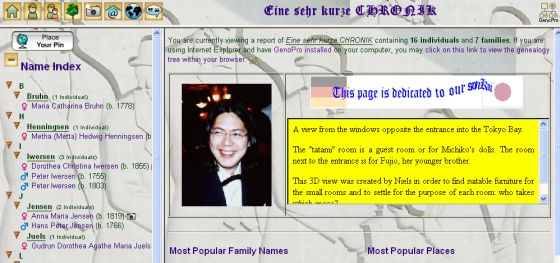
Edited: Friday, February 23, 2007 by
maru-san
|
|
|
|
|
Customers
Important Contributors
GenoPro version: 2.5.4.0
Last Login: Thursday, January 11, 2024
Posts: 386,
Visits: 4,475
|
|
|
|
|
|
Customers
FamilyTrees.GenoPro.com
GenoPro version: 3.1.0.0
Last Login: Thursday, September 5, 2024
Posts: 67,
Visits: 221
|
|
|
|
|
|
Customers
FamilyTrees.GenoPro.com
GenoPro version: 3.1.0.0
Last Login: Thursday, September 5, 2024
Posts: 67,
Visits: 221
|
Still not working.Becuase of the doubt about the code which I mentioned last time, I asked Statcounter to redo the code and this time it DID end at <!-- End of StatCounter Code -->: <!-- Start of StatCounter Code -->
<script type="text/javascript" language="javascript">
var sc_project=2094805;
var sc_invisible=0;
var sc_partition=19;
var sc_security="ac80c3cd";
</script> <script type="text/javascript" language="javascript" src="http://www.statcounter.com/counter/frames.js"></script><noscript><a href="http://www.statcounter.com/" target="_blank"><img src="http://c20.statcounter.com/counter.php?sc_project=2094805&java=0&security=ac80c3cd&invisible=0" alt="free web page hit counter" border="0"></a> </noscript>
<!-- End of StatCounter Code --> I notice that Stacounter suggests placing it in the Index page: "Using windows notepad, macintosh simpletext or any other simple text editor, open the file for the web page on which you want to install the counter (most likely, index.htm or index.html)" but I have already tried this and it didn't work. In fact the old code is still in there. I have just replaced it with the new one and tried again - still no go. One other thing Stacounter says is: "If you are using frames: When inserting the code, do not insert it on the page that contains the frameset tags. The code must go in the main content pages of your site." Is that of any relevance?
|
|
|
|
|
Customers
Important Contributors
GenoPro version: 2.5.4.0
Last Login: Thursday, January 11, 2024
Posts: 386,
Visits: 4,475
|
Hi Boyd,My code will not 'show' the counter as I have chosen not to. It is possible that you also have selected the option of making the label invisible. Check your setup and installation criteria in Statcounter. It will work fine without the counter being visible. Genopro uses the Index file differently than Statcounter expects. We ususally access the 'Default' page rather than the 'index' page, and so the statcounter would not get loaded. You will need to remove the entry from the 'Index' file for the entry on the 'home' page to be sure it will work. I find using the 'home' page to be successful, and provides most information on hits. If you install it on the 'home' page as I suggest, it WILL work. Mine does.
Poolzone a mere cog in a revolution
|
|
|
|
|
Customers
FamilyTrees.GenoPro.com
GenoPro version: 3.1.0.0
Last Login: Thursday, September 5, 2024
Posts: 67,
Visits: 221
|
Fraid not - I have done exactly as you said (well, I THINK I have done it exactly as you said) and still no luck. Could (and would) you check my website and make sure it's not there?Below is the entire code from my home.htm file - you can see where I have inserted the code as you suggested. <%[@ IncludeFile "Code/Util.vbs" ]%>
<%[
Set doc = ReportGenerator.Document
Set oStringDictionaryNames = Session("oStringDictionaryNames")
strTitle = Session("Title") InitGlobalVariables ]%><?xml version="1.0" encoding="utf-8"?>
<!DOCTYPE html
PUBLIC "-//W3C//DTD XHTML 1.0 Transitional//EN"
"http://www.w3.org/TR/xhtml1/DTD/xhtml1-transitional.dtd">
<html>
<head>
<meta http-equiv="Content-Language" content="en"/>
<meta http-equiv="Content-Type" content="text/html; charset=utf-8"/>
<title>@[ Report.WriteText strTitle ]@ - Report Summary</title>
<meta name="description" content="@[WriteMetaDescriptionReport]@" />
<meta name="keywords" content="@[WriteMetaKeywordsReport]@" />
<link rel="stylesheet" href="style.css" type="text/css"/>
<script src="script.js" type="text/javascript"></script>
</head>
<body
onload="document.getElementById('divEnableScripting').style.display='none'; top.document.title='@[Report.Write Util.JavaScriptEncode(strTitle)]@'; if (self == parent) document.getElementById('divFrameset').style.display='block';">
<p>@[ Report.WriteFormattedLn Dic("FmtHtmlHomeIntro"), strTitle, Individuals.Count, Families.Count ]@
<%[
strFamilyTreeGno = ReportGenerator.ExtraFiles("FamilyTree.gno")
If (strFamilyTreeGno <> "") Then
Report.WriteFormattedBr Dic("FmtHtmlHomeBrowser"), strFamilyTreeGno, Dic.FormatString("FmtAltViewGnoFile", Util.HtmlEncode(strTitle))
End If
]%>
</p><p>@[ Report.WriteText doc.Description ]@</p>
<br/>
<%[
iNameLast = oStringDictionaryNames.Count - 1
If (iNameLast > 19) Then
iNameLast = 19 ' Keep only the first 20 families
End If
strFmtTemplate = "<a href='toc_individuals.htm#{0&t}' target='toc'>{0&t}</a> <small>({})</small>"
If g_fUseTreeIndexes Then strFmtTemplate = "<a href='toc_individuals.htm#{0&t}' onclick='explorerTreeOpenTo(parent.parent.toc, ""names"",""{0&j}"", 0, 1, ""2"");' target='toc'>{0&t}</a> <small>({})</small>"
cPlaces = Places.Count
]%>
<a name='MostPopular'></a>
<hr/>
<table class='table1'><tr><td@[Report.Write Util.IfElse(cPlaces > 0," width='49%'","")]@>
<h2>@[ Report.WriteTextDic "HomeMostPopularFamilyNames" ]@</h2>
<%[
strSep=""
For iName = 0 To iNameLast
Report.WriteFormatted strSep & strFmtTemplate, oStringDictionaryNames.Key(iName), oStringDictionaryNames.KeyCounter(iName)
strSep = ", "
Next If g_fUseTreeIndexes Then
Report.WriteBr Report.TagBr
Report.WriteFormattedLn "<a href='toc_names.htm' target='popup' onclick='showPopUpFrame(""40%"");'><img src='images/toc_names.jpg' align='bottom' alt=''/> {}</a>", Dic("TocAZSurnameIndex")
End If If cPLaces > 0 Then
Report.WriteFormattedLn "</td><td width='2%'></td><td><h2>{}</h2>", Dic("TocIndexPlacesPopular")
Places.SortBy("-Dependents.Count") ' Sort by most popular place
iLast = Places.Count - 1
If iLast > 19 Then iLast = 19 strSep=""
For i = 0 to iLast
Set p = Places(i)
Report.WriteFormatted strSep & "<a href='place-{0}.htm' onclick='showPopUpFrame("""");' title='{1&t}' target='popup'>{2&t}</a> <small> ({3})</small>", p.id, p.Category, p, p.Dependents.Count
strSep = ", "
Next
End If
]%> </td></tr></table>
<br/>
<div id="divEnableScripting"><hr/>
<table width="80%" cellpadding="10">
<tr>
<td bgcolor="#FFFF00">@[Report.Write Dic("FmtHtmlHomeScripts")]@</td>
</tr>
</table><br/></div><hr/>
<p align="center"><small>@[Report.WriteFormatted Dic("FmtHtmlHomeSkin"), ReportGenerator.SoftwareVersion, FormatDateTime(Date(),1),
Util.IfElse(ReportGenerator.PathSkin, "", "custom "), ReportGenerator.SkinName, ReportGenerator.SkinVersion ]@.<br/><br/> </small></p><div class="floatleft">
<a href="http://validator.w3.org/about.html "target="_blank"><img
src="images/valid-xhtml10.png"
alt="Valid XHTML 1.0 Transitional" title="Valid XHTML 1.0 Transitional" height="31" width="88" /></a>
</div>
<p align="center"><a target="_blank" href="http://www.genopro.com/"><img src="images/genopro.logo.gif" alt="@[Report.Write Dic("AltGenoProLogo")]@" title="@[Report.Write Dic("AltGenoProLogo")]@" border="0" width="36" height="36"/></a></p>
<%[WriteHtmlFramesetSafeguard(oStringDictionaryNames.Count)]%> <!-- Start of StatCounter Code -->
<script type="text/javascript" language="javascript">
var sc_project=2094805;
var sc_invisible=0;
var sc_partition=19;
var sc_security="ac80c3cd";
</script> <script type="text/javascript" language="javascript" src="http://www.statcounter.com/counter/frames.js"></script><noscript><a href="http://www.statcounter.com/" target="_blank"><img src="http://c20.statcounter.com/counter.php?sc_project=2094805&java=0&security=ac80c3cd&invisible=0" alt="free web page hit counter" border="0"></a> </noscript>
<!-- End of StatCounter Code --> </body>
</html> Thanks for your help anyway. I guess I will just have to give up. Boyd
|
|
|
|
|
Customers
FamilyTrees.GenoPro.com
GenoPro version: 3.1.0.0
Last Login: Thursday, September 5, 2024
Posts: 67,
Visits: 221
|
Sheepish grin..............It IS working. There are stats at Stacounter. I have had five visitors. But honestly - I definitely did NOT clcik invisible and have checked - I chose the counter rather than the Statcounter icon - and it is just not there on any of my pages. Anyway, that's down to me and Statcounter. Thank you once again for all your help....................... Nowwwwwwwwww - how do I make my email addy into a hyperlink like everyone else?
|
|
|
|
|
Customers
Important Contributors
GenoPro version: 2.5.4.0
Last Login: Thursday, January 11, 2024
Posts: 386,
Visits: 4,475
|
|