|
|
|
|
Customers
FamilyTrees.GenoPro.com
GenoPro version: 2.5.4.1
Last Login: Wednesday, June 2, 2021
Posts: 220,
Visits: 14,736
|
Hello,
I want to know, how to edit red marked field in Place Properties window. There is a different form of the place name in text in Czech language.
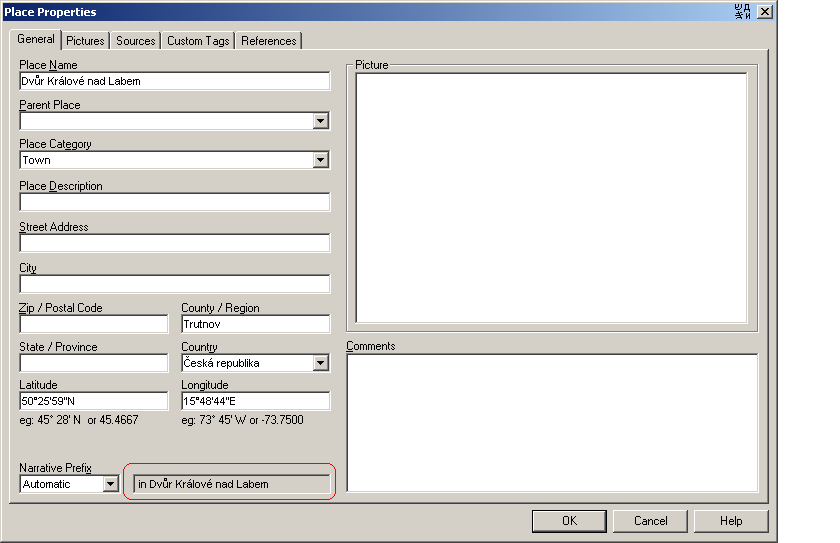
Thanks for help
|
|
|
|
|
Administrators
Customers
Important Contributors
FamilyTrees.GenoPro.com
GenoPro version: 3.1.0.1
Last Login: 2 days ago @ 9:23 PM
Posts: 3,464,
Visits: 26,854
|
The process is quite complex but I will do my best to explain it.
The prefix in the text you have highlighted is taken from the GenoPro PlacePrefix Enumerations. The can and have been translated to Czech using GenoPro's inbuilt translation tools (Ctrl+Shift+E). Normally these enumerations would be copied into Dictionary.xml under the PlacePrefix tag in thre Enumerations section. However te current narrativ Report does not use these entries because of its limitations i.e. no gender or plural alternatives can be defined. Instead the Narative Report uses values in the ReportGenerator section e,g <!-- the Place Prefix elements below are used in the Narrative Report and override the PlacePrefix values in the Enumerations sections earlier in this Dictionary. each of the elements below can have feminine & masculine forms as well as the default neuter form. They can also have 'P' attributes to define prefix for plural nouns. --> <PlacePrefix_In T="in" P="aux"/> <PlacePrefix_In_F T="in" P="in"/> <PlacePrefix_InThe T="in the"/> <PlacePrefix_InA T="in a"/> <PlacePrefix_At T="at"/> <PlacePrefix_AtThe T="at the"/> <PlacePrefix_AtA T="at a"/> <PlacePrefix_On T="on"/> <PlacePrefix_OnThe T="on the"/> <PlacePrefix_OnA T="on a"/> <PlacePrefix_To T="to"/> <PlacePrefix_ToThe T="to the"/> <PlacePrefix_ToA T="to a"/>
|
The process is further complicated because many languages, including Czech I beleive, have locative cases for nouns.
e.g. in Prague (Praha) becomes v Praze
Therefore it is necessary to change the noun endings. The rules for this can be defined in the Dictionary tag LocativeProperNoun <!-- Locative Proper Nouns or Place preposition exceptions.
In some languages such as French the preposition for a place may need special rules for example 'in Le Mans' in French is 'au Mans' and not 'à Le Mans' and 'in Les Lilas' is 'aux Lilas' The syntax is as per PossessiveProperNoun above, but usage is more complex because the place name is sometimes in a html hyperlink preceded by the preposition. e.g. à <a href='place-place00001.htm' onclick='javascript:showPopUpFrame("");' target='popup'>Le Mans</a> For this reason the place expression to be converted by the regular expression will be presented in the form ' prefix[noun]suffix' or ' preposition[noun]postposition' - note leading space so that the noun can be identified. The prefix/suffix etc include any punctuation such as spaces or '. The resulting expression must be in a similar format. The example below handles exceptions similar to the above two examples. The careat symbol ^ means 'startswith' and \[ matches the [ in the expression. '[' is also used for other purposes in regular expressions therefore an actual [ must be escaped as \[ N.B. < & > must be specified as < & > in XML <LocativeProperNoun T="^ à \[le = au [:^ à \[les = aux [:" /> Other languages such as Finnish & Hungarian use a 'locative' case to express location, similar to in, at, by etc. in Engish. It may be possible to define rules here to convert nominative case of place names to locative/inessive case --> <LocativeProperNoun T="" />
|
so to change Praha to Praze we write<LocativeProperNoun T="ha\]=ze\]:" />You will need to add more rules for the other conversions of nouns to locative form, I have included some more here <LocativeProperNoun T="ha\]=ze]:a\]=e]:e\]=i]:o\]=ě]:" /> I cannot guarantee this is correct as I do not know the Czech language. You will probably need to extend this to cover all cases. Non standard forms can be handled using the NameDictionary. xml file
'lego audio video erro ergo disco' or "I read, I listen, I watch, I make mistakes, therefore I learn"
|
|
|
|
|
Customers
FamilyTrees.GenoPro.com
Translator
GenoPro version: 3.1.0.1
Last Login: 2 hours ago
Posts: 282,
Visits: 12,923
|
I agree with Powery.
Some time ago (and now) Ron has offered way for removal of this problem.
But I think this is a difficult algorithm for many users - hundreds of the names, else more completions...
We can not create the report with the correct phrase construction where the geographical names are used.
Meanwhile in all dialogues New Place and Edit Place of the program we may choose the Narrative Prefix to be automatically used afterwards in the Narrative report. In the field to the right from the Narrative Prefix field there is a field where we may see how this word combination looks like. But we can not made change in this field.
Here is a proposal: Would this field be active, changes in the word inflections will be made by the users and automatically inserted afterwards to the Name Dictionary. Then the report will be created in the correct way and with due regard for these changes.
This will improve considerably the genealogical narration on our languages.
But probably I do not know all difficulties... 
|
|
|
|
|
Important Contributors
Customers
GenoPro version: 3.1.0.1
Last Login: Saturday, December 28, 2024
Posts: 193,
Visits: 4,270
|
Yes, this would solve the reporting issue if you generate reports only on one language
Feri
|
|
|
|
|
Administrators
Customers
Important Contributors
FamilyTrees.GenoPro.com
GenoPro version: 3.1.0.1
Last Login: 2 days ago @ 9:23 PM
Posts: 3,464,
Visits: 26,854
|
I have moved discussion on multiple languages in the skin to a new thread leaving this one for the original topic
As regards locative forms for place names, then perhaps where possible the rules for forming these should be built into GenoPro, e.g. as part of the translation facility. The user should also be allowed to edit this generated locative phrase as suggested by Alex. But as Feri as suggested, this will only work when a user generates reports in a single language. What is really needed is a way to store different language versions of each text field within GenoPro and also gender and singular/plural indication for nouns such as place names. There have been similar requests in the past but its seems that major changes to the structure of .gno files are unlikely to be implemented. 
'lego audio video erro ergo disco' or "I read, I listen, I watch, I make mistakes, therefore I learn"
|
|
|
|
|
Customers
FamilyTrees.GenoPro.com
GenoPro version: 2.5.4.1
Last Login: Wednesday, June 2, 2021
Posts: 220,
Visits: 14,736
|
The definition in Place preposition exceptions with LocativeProperNoun is not easy. There is o lot of forms. This is not usable. To define all places in NameDictionary.xml is also not usable. But I found usable a solution in Polish thread http://support.genopro.com/Topic23830.aspx. In short to define the custom tag Name.Locative in Place tab.
|
|
|
|
|
Customers
FamilyTrees.GenoPro.com
Translator
GenoPro version: 3.1.0.1
Last Login: 2 hours ago
Posts: 282,
Visits: 12,923
|
|
|
|
|
|
Customers
FamilyTrees.GenoPro.com
GenoPro version: 2.5.4.1
Last Login: Wednesday, June 2, 2021
Posts: 220,
Visits: 14,736
|
Is it possible to translate it to English and add attachments again?
|
|
|
|
|
Customers
FamilyTrees.GenoPro.com
Translator
GenoPro version: 3.1.0.1
Last Login: 2 hours ago
Posts: 282,
Visits: 12,923
|
For GenoPro v. 2.5.3.9
1. Open .gno file.
2. Select Tools\Tag Editor\Place
3. Change 'custom_tag1' on 'Name.Locative' in 'Tag Permanent Name' and OK.
4. Open Table Layout\Places_and_Location and see new column 'Name.Locative'.
5. Write place name in narrative form in this new column.
6. Repeat 5 for other hundreds of the places.
7. Save and exit.
8. Generate Report.
|
|
|
|
|
Customers
FamilyTrees.GenoPro.com
GenoPro version: 2.5.4.1
Last Login: Wednesday, June 2, 2021
Posts: 220,
Visits: 14,736
|
Many thanks, particularly point 6 is very nice 
|