|
|
|
|
Customers
GenoPro version: 2.5.4.1
Last Login: Friday, April 13, 2012
Posts: 2,
Visits: 3
|
Genogram - cannot find any simple instructions for how to begin. Tutorials seem to reveal only advanced and not VERY basic 'how to.'
Edited: Friday, April 13, 2012 by
GenoProSupport
|
|
|
|
|
Administrators
Moderators
Customers
Gamma
FamilyTrees.GenoPro.com
Translator
GenoPro version: 3.1.0.1
Last Login: Tuesday, October 28, 2025
Posts: 4,886,
Visits: 22,799
|
|
|
|
|
|
Customers
Important Contributors
FamilyTrees.GenoPro.com
GenoPro version: 3.1.0.0
Last Login: 6 hours ago
Posts: 1,595,
Visits: 32,483
|
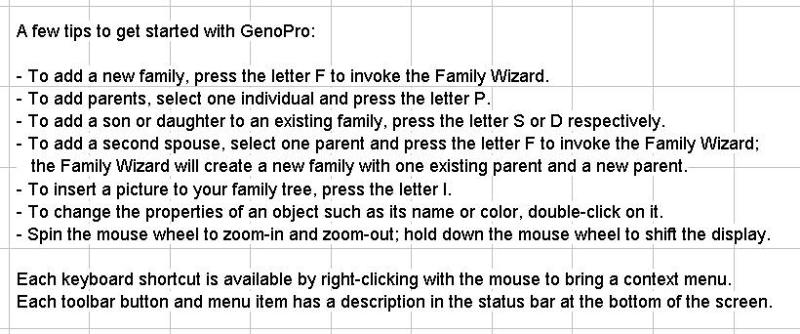
The very basic instructions appear on screen when you start GenoPro. They disappear as soon as you start entering data, so I have pasted them here. Basic tip is to use a right click to open a menu and choose action from here. I normally start by adding a person and then open the properties menu to add details. The open is by double click, or select an individual and either press Enter or right click and select Properties. The notes here show how to add other members of the family. You can also add individuals and (with a right click) add them to a family either as parent or child. As with other complex programs there are many approaches and you just have to sort out the best way for you
|
|
|
|
|
Customers
GenoPro version: 2.5.4.1
Last Login: Friday, April 13, 2012
Posts: 2,
Visits: 3
|
So, there's no tutorial or overview to see how the whole thing works?
|
|
|
|
|
Customers
Important Contributors
FamilyTrees.GenoPro.com
GenoPro version: 3.1.0.0
Last Login: 6 hours ago
Posts: 1,595,
Visits: 32,483
|
If you press the Help icon on the main menu you get a lot of information. If you want a description of the program try
http://www.genopro.com/family-tree-software/
Everyone needs different levels of information to get started. Hopefully one of these will get you going. I am not sure if you are asking for basic help in getting going, or for background information on the concepts behind this project.
|