|
|
|
|
GenoPro version: 2.5.3.8
Last Login: Friday, October 31, 2014
Posts: 1,
Visits: 17
|
I have recently spent some time trying to achieve a satisfactory print-out from Geno Pro, thus far without success. I am using an A3 printer - Epson Stylus Photo 2100. Ideally my print-out would have been Landscape format, as there's no point in using A3 paper and thereafter cutting and pasting to have a tolerable result. However, the problems I've encountered are numerous and variable. So much so, that I was taken back in my thoughts to the earliest DOS days, when the unpractised relationship between PCs and printers was the source of probably more stress than any other aspect of business computerisation. - Despite setting page margins in the page layout view these were not only not reflected in the print preview, they were also mainly ignored in the print-outs.
- While I can set individually the paper dimensions, adjusting the printable area is greyed out. This would be understandable if Geno Pro was reading the printable area from the printer driver but it's not doing that either. It seems that Geno Pro simply takes the paper dimension as the printable area. A recipe for frustration.
- Despite setting the page to landscape format, print preview would show a blank first page in portrait format before a second page in landscape format which contained data.
- Having somehow solved the preceding problem I printed out what should have been 2 landscape pages showing the full tree. The result was two landscape pages with unmatched joints. Having compared the print-out to the tree on screen it was clear that data was "concealed" under the page margin settings. I also realised from this print-out that the 2nd page had been printed to the edge (again ignoring the margin settings) and in fact there should have been a third page as the last two entries on the tree had not been printed.
There followed a frustrating period when I tried adjusting all possible settings, both in Geno Pro and in the printer driver. Having had a lot of experience with such problems in the past I was simply looking for an effective work-around, being preferable to whining about the problem here. Probably for the first time ever, such a work-around eluded me, so I decided to play the joker, a card that has never failed me in the past. I'd print out in PDF format and if necessary use the "fit to page" facility when printing the resultant PDF file to get a tolerable result. Unfortunately this caused PDF Expert 8 Pro to get into a dither, and Geno Pro to crash. A message to Microsoft and more adjustments and I finally had a PDF file without dither or crashing; but unfortunately it still did not show the final two entries on the tree, and is therefore an unsatisfactory result. Clearly there is much work needed on the printing facilities in Geno Pro, which is a little sad, as this is one of the fundamental needs with a program of this kind; and let's be honest, most of these PC/application/printer inconsistencies were ironed out of the PC world LONG AGO. This is a serious let down for a program which seems otherwise to fulfil its promise. Tom Graham
|
|
|
|
|
Customers
Gamma
GenoPro version: 3.0.1.0
Last Login: Sunday, October 28, 2018
Posts: 8,
Visits: 29
|
I agree completely. Trying to print on 4, 8 1/2 x 14" sheets, all setup seems OK but the images don't reach the paper edges by inches and also some data are left out. GenoPro proprietor(s), please look into this.
Ken Herrick
|
|
|
|
|
Customers
Gamma
GenoPro version: 3.0.1.0
Last Login: Sunday, October 28, 2018
Posts: 8,
Visits: 29
|
I'd like to add...a jpeg or other standard export-output could be very useful. Such could then be directly used for printing on large-format paper. Will the proprietor(s) reply to this?
Ken Herrick
|
|
|
|
|
Customers
Gamma
GenoPro version: 3.0.1.0
Last Login: Sunday, October 28, 2018
Posts: 8,
Visits: 29
|
Well, I might have checked this out further before posting: If one exports to .emf format, one can then convert that to many other image formats, including jpeg. I've just used IrfanView for that (a jpeg) and it works just fine. Haven't printed it yet on any large format but on-screen it looks great.
Ken Herrick
|
|
|
|
|
Administrators
Customers
Important Contributors
FamilyTrees.GenoPro.com
GenoPro version: 3.1.0.1
Last Login: 43 minutes ago
Posts: 3,487,
Visits: 27,237
|
GenoPro's printing facilities are widely misunderstood. To describe them as the OP did as 'very basic' is IMHO quite unfair. The area in which perhaps 'improvement' is required is in the instructions and help on how to use it.
One of the things the OP complains about is that the 'printable area' cannot be set as it is greyed out. Yes the 'printable area' column is read only BUT it is derived by subtracting the margins from the page size, both of which can be adjusted and the results observed in the 'printable area' column. There is also a column headed 'Printer Hardware Margins (inches)' (you will need to change column width to see it). I think we can be certain this data is coming from the printer driver and not plucked out of thin air by GenoPro 
I have found that the easiest way to set up printing is to first choose your printer AND paper size to be used using the File / Printer Setup dialogue. Only then move to the File/Page Layout dialogue. Set margins required and then in the table ONLY change Single Page?, Landscape, Horizontal Pages and Vertical pages to scale your GenoMap to the required size. DO NOT change Page Size or Scale in this table! This allows GenoPro to make the best fit. Use 'easy page clipping' if you want some overlap of one page tile over its adjacent page to make it easier to trim the page and match. Ticking the 'Print Margin Lines' option is useful when guillotining the edges. The View/ Display Page Layout mode should accurately show how the GenoMap will be laid out on the paper. Small adjustments can be made to avoid individuals straddling page edges. Also DO NOT change any of the printer settings in the File/Print dialogue after setting up in the File/Page Layout
'lego audio video erro ergo disco' or "I read, I listen, I watch, I make mistakes, therefore I learn"
Edited: Thursday, February 12, 2015 by
genome
|
|
|
|
|
Customers
Gamma
GenoPro version: 3.0.1.0
Last Login: Sunday, October 28, 2018
Posts: 8,
Visits: 29
|
After several months' hiatus I'm at it again, this time with v. 3.0.0.2 of 2016 (yes?...didn't know we'd gotten to that year yet. Oh well...). Printing is just as miserable as it has always been. With respect, "genome", "widely misunderstood" might lead one to think that improvement is in order, no? GenoPro folks...do you hear?... hear?...
For the life of me I cannot get all of my .gno file to print properly, on just 1 page, on 8 1/2 x 14 paper, with margins all set to 0.5, and etc. and etc. Followed your suggestions to the letter, "genome", to no avail: something always gets lopped off or else the whole thing prints within about 5" x 7". I use an Epson WP-4020 printer which otherwise is easy to set up and works like a champ under all other apps.
Other than the printing, this is a fine app and I'm sure all users thank you for it. But please make it easier to print...and give the proper results (in case I'm stating the situation correctly).
Ken Herrick
Edited: Friday, September 11, 2015 by
GenoProSupport
|
|
|
|
|
Administrators
Moderators
Customers
Gamma
FamilyTrees.GenoPro.com
Translator
GenoPro version: 3.1.0.1
Last Login: Tuesday, February 3, 2026
Posts: 4,886,
Visits: 22,803
|
Feel free to send your .gno file to support at genopro dot com and I will investigate. I am curious why the family tree does not zoom to fit the whole page.
|
|
|
|
|
Administrators
Moderators
Customers
Gamma
FamilyTrees.GenoPro.com
Translator
GenoPro version: 3.1.0.1
Last Login: Tuesday, February 3, 2026
Posts: 4,886,
Visits: 22,803
|
Hi Key,Thank you for reporting the issue. You have found a bug in the printing module. This bug has been lurking for many years, as the code of the print module has not been modified for many years. Here is a temporary solution to print your family tree into a single page on Legal paper (8.5 x 14): 1. From the File menu, select the menu item Printer Setup and pick the Paper Size to Legal. 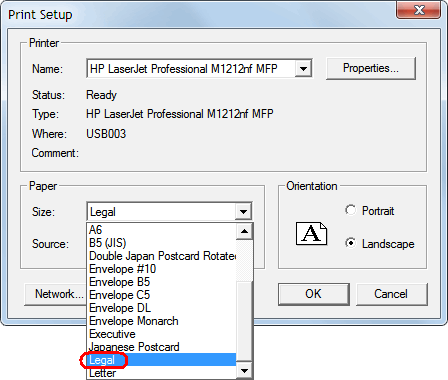 2. From the File menu, select the menu item Page Layout and delete the Paper Dimension so it no longer appears in bold. A bold value means a custom Paper Dimension which is where the code is buggy. If the Paper Dimension is not specified, then GenoPro will use the page size of the printer. Also, make sure you have checked the option Single Page. 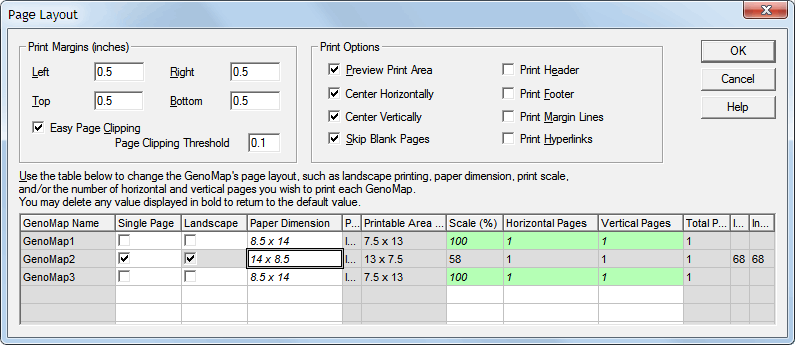 PS: I added to your account the package SponsorExpert for GenoProX as a gift for reporting this bug.
|
|
|
|
|
Customers
Gamma
GenoPro version: 3.0.1.0
Last Login: Sunday, October 28, 2018
Posts: 8,
Visits: 29
|
Whew!...Thanks for reassuring me I'm not totally incompetent. And thanks for the gift; I'm today in the middle of some other, different, cogitation--sorry...codgertation as I prefer to say--so will try out the temporary fix tomorrow or soonest. But I'm amazed that others have not been pounding on GenoPro's door about it long before this. Glad I could help & thanks also for the temporary fix info.
BTW I notice below that the default is "Do not subscribe" whereas I'd think the most convenient one for most of us would be "Immediate notification...". Not so?
Ken Herrick
Edited: Wednesday, September 23, 2015 by
GenoProSupport
|
|
|
|
|
Administrators
Moderators
Customers
Gamma
FamilyTrees.GenoPro.com
Translator
GenoPro version: 3.1.0.1
Last Login: Tuesday, February 3, 2026
Posts: 4,886,
Visits: 22,803
|
The titles, such as "Legendary Master" are assigned according to the number of posts on the forum, and I feel we need to change all titles to something more relevant 
I am sure many people ran into a similar problem as yours, however very few report it. On the other hand, I wonder how many specified a custom paper size larger than 8.5 x 11". The custom paper size was designed for those wishing to print their family tree on post cards. We will be moving away from this forum. There are many bugs in this forum, including the private messaging which is no longer working.
|