|
|
|
|
Administrators
Customers
Important Contributors
FamilyTrees.GenoPro.com
GenoPro version: 3.1.0.1
Last Login: 2 days ago @ 6:12 AM
Posts: 3,503,
Visits: 27,499
|
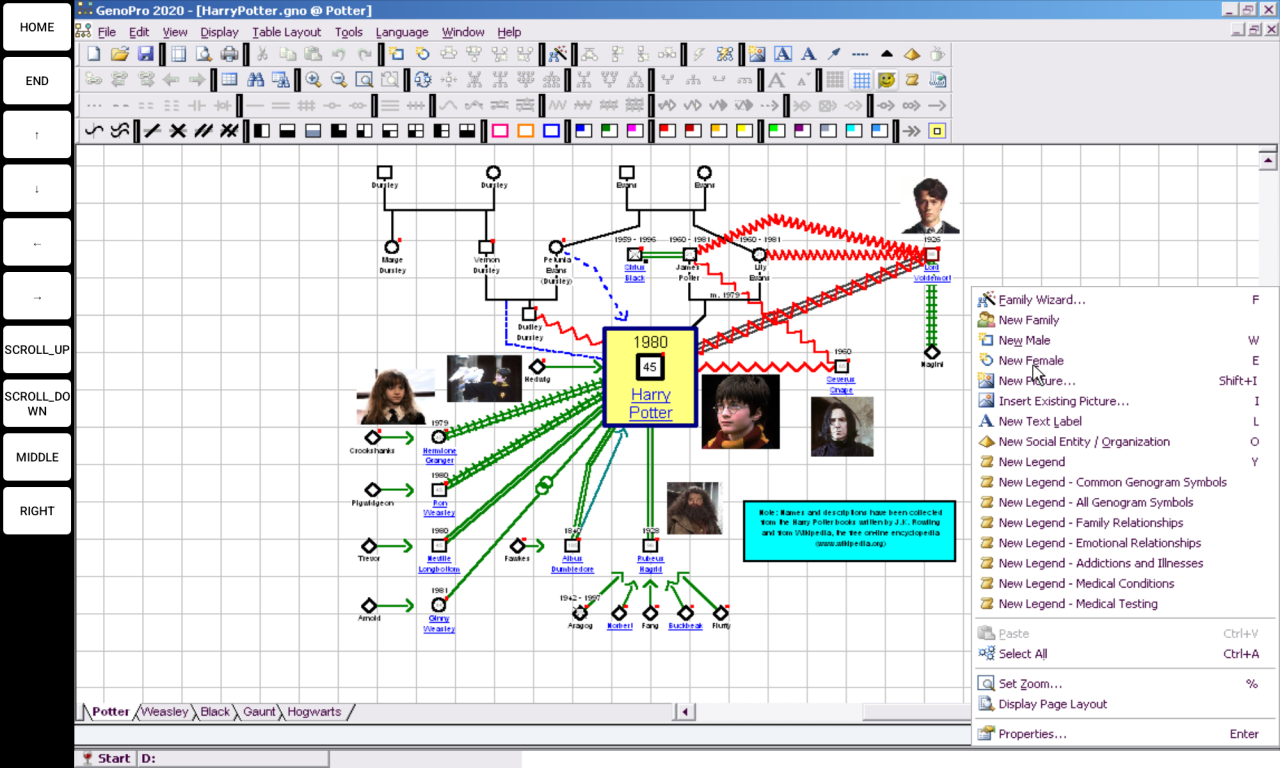 This is a screenshot of GenoPro running very well on my cheap 10.8" EagleSoar Android tablet under Wine  A little tricky to get it running, I first tried Winlator as the emulator app without success. GenoPro installed but I couldn't get it to run. So then I tried a discontinued app called ExaGear which is aimed more towards 32bit app and eventually had success. I will try and retrace my steps so that I can document the process. Watch this space 
'lego audio video erro ergo disco' or "I read, I listen, I watch, I make mistakes, therefore I learn"
Tags:
|
|
|
|
|
Administrators
Customers
Important Contributors
FamilyTrees.GenoPro.com
GenoPro version: 3.1.0.1
Last Login: 2 days ago @ 6:12 AM
Posts: 3,503,
Visits: 27,499
|
Update
My initial partial success was with ExaGear SU 3.02 but it installed with a dark theme which did not work with GenoPro and so I spent some considerable time trying to change the theme with winecfg. After locating several .msstyles files and loading them via winecfg I still had issues e.g. the menu bar separator in the screenshot in my original post. So I started to look for more recent ExaGear distributions. I hit a complete rabbit warren of links and versions with many dead ends so I tried Winlator again. I managed to get GenoPro running by employing the 'system32 fixes' patch that came with ExaGear SU 3.02. This seems to be the magic key to get GenoPro to run under Wine on Android. But Winlator seemed sluggish so I returned to ExaGear searches. I found some promising versions but many where only in Chinese/Korean. I eventually his upon ExaGear builds by TechBravo. I tracked down a link to their ExaGear Pro 6.02 version here: https://www.mediafire.com/file/jshgkw8urkopr8z/ExaGear_Pro_6.0.2.xapk/fileSo on your Android tablet start your browser and download this file to your Android Download folder and unpack the resulting .zip file. Install the app via the ExaGear Pro 6.02.apk file but do not open/run it just yet. You will need to give permissions to install aom www.genopro.com applications from the source (i.e. your browser (Chrome?) on Android if not already set. The extracted zip will have a file Android/obb/com.eltechs.ed/main.30.com.eltechs.ed.obb. Copy this file to your Android internal storage Android/obb/com.eltechs.ed/ folder, creating the subfolder(s) if required. Also download InstallGenoPro.exe from www.genopro.com and fixes.zip file from https://www.mediafire.com/file/hy3njk4oz6zu0ju/fixes.zip/file and unzip the latter into your Download folder providing three files 7z1900.exe, 7z.exe, setup.7z & setup.bat Now run the installed ExaGear Pro 6.02 app. This will show an empty desktop. Make a mental note of the Tap gestures displayed Tap the ≡ icon top left and choose Manage Containers. Tap + top right to create one then tap three 3 dots to its right and tap Run Explorer. A 'Windows' desktop should open. Wait for Wine update to complete and then tap 'install' for wine-gecko installation. The TFM (Tiny File Manager) window should open. Navigate to D: and find 7z1900.exe as added above. Double tap it to install 7zip, following prompts. Then find setup.bat and double tap it to install system32 fixes. Now find InstallGenoPro.exe and double tap to install it. Tap Start Programs GenoPro to launch it. 😁
'lego audio video erro ergo disco' or "I read, I listen, I watch, I make mistakes, therefore I learn"
Edited: Wednesday, September 3, 2025 by
genome
|
|
|
|
|
Administrators
Customers
Important Contributors
FamilyTrees.GenoPro.com
GenoPro version: 3.1.0.1
Last Login: 2 days ago @ 6:12 AM
Posts: 3,503,
Visits: 27,499
|
fixes.zip file was missing from previous post as it was too big for an attachment in this forum. I have moved it to https://www.mediafire.com/file/hy3njk4oz6zu0ju/fixes.zip/file and updated the previous post to reflect this.
'lego audio video erro ergo disco' or "I read, I listen, I watch, I make mistakes, therefore I learn"
|
|
|
|
|
Administrators
Customers
FamilyTrees.GenoPro.com
Important Contributors
GenoPro version: 3.1.0.1
Last Login: 12 hours ago
Posts: 529,
Visits: 4,463
|
I tried this on an old Lenovo tablet running Android 11. It has a separate keyboard (via blue tooth) and a touch screen stylus.
The installation of Wine went OK and so did the installation of GenoPro, although I was never asked to provide a GenoPro key.
When I open the GenoPro container, I get following error message: There is no windows program configured to open this type of file.
When I open the file explorer and click on the Start (Wine) button, I notice a "GenoPro.lnk" file in the list of programs. Is that normal?  I was able to find the GenoPro.exe in the C:\ProgramFiles\GenoPro folder but was unable to run it. There is simply no reaction nor error message at all. Clicking on the desktop icon has no effect neither. Any ideas?
|
|
|
|
|
Administrators
Customers
FamilyTrees.GenoPro.com
Important Contributors
GenoPro version: 3.1.0.1
Last Login: 12 hours ago
Posts: 529,
Visits: 4,463
|
I cleaned up all files, uninstalled what I had done so far, restarted the system, redownloaded everything needed and repeated the whole process.
This time Wine asked to install Mono as well as Gecko, which was done.
Start / Programs now lists GenoPro (iso GenoPro.lnk) but does not start GenoPro when requested. And as before, no error message is displayed.
How can this be debugged? Any log files around? What puzzles me is the absence of GenoPro the key request when installing. What could be the reason?
|
|
|
|
|
Administrators
Customers
Important Contributors
FamilyTrees.GenoPro.com
GenoPro version: 3.1.0.1
Last Login: 2 days ago @ 6:12 AM
Posts: 3,503,
Visits: 27,499
|
GenoPro requests a key when you run genopro.exe, but not when you run the installer. 
BTW with no key you can still save to .xml > 25 objects
You need to have run setup.bat successfully in order to get genopro.exe to run. GenoPro seems to take a second or two to start up.
After my last post I tried Winlator 10.1 again and applied the same system32 fixes via setup,bat from fixes.zip. It runs OK, better than ExaGear. I had problems using it with the limited touch screen gestures available, but after connecting a bluetooth mouse I found it quite useable.
I have added a few buttons to the margins by editing Input Controls.
I didn't post updates as there seemed to be little interest in this topic. 
'lego audio video erro ergo disco' or "I read, I listen, I watch, I make mistakes, therefore I learn"
Edited: Monday, September 22, 2025 by
genome
|
|
|
|
|
Administrators
Customers
FamilyTrees.GenoPro.com
Important Contributors
GenoPro version: 3.1.0.1
Last Login: 12 hours ago
Posts: 529,
Visits: 4,463
|
I ran setup.bat again and realized I missed an error message  I also found following log files at the top of the Android Internal Shared Storage folder  The x86-stderr.txt file contains a bunch of error messages but don't make me any wiser (note that I removed the duplicate lines) argv = ['libubt'; '--vfs-kind'; 'guest-first'; '--path-prefix'; '/data/user/0/com.eltechs.ed/files/image'; '--vpaths-list'; '/data/user/0/com.eltechs.ed/files/image/.exagear/vpaths-list'; '-f'; '/opt/recipe/run/simple.sh'; '--fork-controller'; 'ua:.exagear-tracker-app12'; '--ipc-emul-server'; 'ua:com.eltechs.ed'; '--tmp-dir'; '/data/user/0/com.eltechs.ed/files/image/.exagear/tmp'; '--vfs-hacks=tlsasws,tsi,spd,'; '--socket-path-suffix'; 'ed'; '--ubt-executable'; '/data/app/~~fhZ54XR6NkMP2QE2JUuS9A==/com.eltechs.ed-795M_WeVfiUrKybEOFeYnA==/lib/arm/libubt.so'; '--ubt-loader'; '/data/app/~~fhZ54XR6NkMP2QE2JUuS9A==/com.eltechs.ed-795M_WeVfiUrKybEOFeYnA==/lib/arm/libelfloader.so'; '--'; '/opt/recipe/run/simple.sh'; 'eval "wine explorer /desktop=shell,1280x752 /opt/exec_wrapper.exe /opt/TFM.exe D:/"'; ]
envp = ['HOME=/home/TechBravo/'; 'WINEPREFIX=/home/TechBravo/.wine'; 'LC_ALL=en_US.utf8'; 'DISPLAY=:12'; 'AXS_SOUND_SERVER_PORT=/tmp/.sound/AS12'; 'AXS_DSOUND_SERVER_PORT=/tmp/.sound/DS12'; ]
cwd = '/storage/emulated/0/Download'
005c:fixme:ndis:add_device failed to create device error c0000035
Xlib: extension "SHAPE" missing on display ":12".
00b0:err:plugplay:deviceloop_thread Can't init SDL: Could not initialize UDEV
009c:err:wineusb riverEntry Failed to initialize libusb: Other error riverEntry Failed to initialize libusb: Other error
009c:err:ntoskrnl:ZwLoadDriver failed to create driver L"\\Registry\\Machine\\System\\CurrentControlSet\\Services\\wineusb": c0000001
003c:fixme:service:scmdatabase_autostart_services Auto-start service L"wineusb" failed to start: 31Xlib: extension "SHAPE" missing on display ":12".
0024:fixme:shell:ISF_ControlPanel_fnGetDisplayNameOf retrieve display name from control panel app
Xlib: extension "SHAPE" missing on display ":12".
0110:fixme:keyboard:X11DRV_ActivateKeyboardLayout 0x4090409, 0000: semi-stub!
0130:err:module:import_dll Library MFC42.DLL (which is needed by L"C:\\Program Files\\GenoPro\\GenoPro.exe") not found
0130:err:module:LdrInitializeThunk Importing dlls for L"C:\\Program Files\\GenoPro\\GenoPro.exe" failed, status c0000135
|
I would like to try the Winlator 10.1 emulator but cannot find an app in the Google play store with a name that comes close to this.Could you post a screen shot of yours?(Not urgent, I've got a zillion other things to do)
|
|
|
|
|
Administrators
Customers
Important Contributors
FamilyTrees.GenoPro.com
GenoPro version: 3.1.0.1
Last Login: 2 days ago @ 6:12 AM
Posts: 3,503,
Visits: 27,499
|
From the window title in your screenshot I see you unzipped fixes.zip into a fixes folder but the batch file is expecting to find 7z.exe in the root of D;
You can either edit setup.bat or move the files into D:\
|
|
|
|
|
Administrators
Customers
FamilyTrees.GenoPro.com
Important Contributors
GenoPro version: 3.1.0.1
Last Login: 12 hours ago
Posts: 529,
Visits: 4,463
|
OK. Got it working. Thanks. This allows me to carry all my stuff with me so I can look it up when needed. I'll have a look at Winlator as well, but will have wait a few days.
|
|
|
|
|
Administrators
Customers
FamilyTrees.GenoPro.com
Important Contributors
GenoPro version: 3.1.0.1
Last Login: 12 hours ago
Posts: 529,
Visits: 4,463
|
I also prefer the look and feel of Winlator. Unfortunately, I got an error when trying to run setup.bat in order to apply the fixes.  As far as I can see, there is no 7z.dll file in the kit. And I did not get this error message with ExaGear.
|