|
|
|
|
Customers
GenoPro version: 2.5.4.1
Last Login: Friday, October 18, 2013
Posts: 142,
Visits: 3,822
|
Ron, Is there any way to display custom fields on a report (should allow view of specific fields only)? For example, I want to add Hebrew FName and LName on a report, but not to add Private Comments to the report (assuming I add these as three new and separate custom fields). Danny
Danny
|
|
|
|
|
Administrators
Moderators
Customers
Gamma
FamilyTrees.GenoPro.com
Translator
GenoPro version: 3.1.0.1
Last Login: Tuesday, October 28, 2025
Posts: 4,886,
Visits: 22,799
|
At the moment, GenoPro has little support for user-defined fields. The report generator is worse, because it displays an error if the custom tag is missing. For instanceGenoPro will display an error if CustomField1 does not exist. Now, you can see how difficult it is to write a report for those non-existent fields. I have a solution in mind for this, where the report could "register" some custom fields. Once a tag is registered, the report generator would no longer report an error if this tag is not found in the .gno document. As for the names in different languages, my solution is very similar to the multi-lingual comment. I think it is possible to have any field in any language, so you can have the first name in English, French, Hebrew and so on. The graphical user interface would display a little icon of which languages are available under a given field. GenoPro would select the proper language when generating a report, so this process would be transparent to the report generator.
Edited: Tuesday, June 20, 2006 by
GenoProSupport
|
|
|
|
|
Customers
GenoPro version: 2.5.4.1
Last Login: Friday, October 18, 2013
Posts: 142,
Visits: 3,822
|
As for the names in different languages, my solution is very similar to the multi-lingual comment. I think it is possible to have any field in any language, so you can have the first name in English, French, Hebrew and so on. The graphical user interface would display a little icon of which languages are available under a given field. GenoPro would select the proper language when generating a report, so this process would be transparent to the report generator. The point is to have both Hebrew and English names. The Hebrew name will be used in a Hebrew Report, while the English names in the English Report. I can't expect GenoPro to provide another set of names for Hebrew (unless you have another idea of how to provide multi-lingual for a single field), so I opt for custom fields for the Hebrew. However, I do want to be able to use these fields in a report.
Danny
|
|
|
|
|
Administrators
Customers
Important Contributors
FamilyTrees.GenoPro.com
GenoPro version: 3.1.0.1
Last Login: 2 days ago @ 9:23 PM
Posts: 3,464,
Visits: 26,854
|
GenoProSupport (6/20/2006)
At the moment, GenoPro has little support for user-defined fields. The report generator is worse, because it displays an error if the custom tag is missing. I have discovered a simple way to supress the error when a Custom Tag is referenced in the report but is not defined in the GenoPro file. Just add the following function to Util.vbs Function CustomTag(obj,tag)
on error resume next
CustomTag = obj.TagValue(tag)
End Function
|
Now you can get the value of any Custom Tag anywhere in any report template file (provided that Util.vbs has been included) by using this function and no error will be generated if the tag has not been defined. For example suppose you have Custom Tags for an Individual of HairColour & EyeColour but not SkinColour you can now write for example Report.WritePhrase "{0}'s[ hair is {1}][[{?0}{?3},][{?0}{?!3} and] eyes are {2}][[{?1|2} and] skin is {?3}]", i.name, CustomTag(i, "HairColour"), CustomTag(i, "Eyecolour"), CustomTag(i, "SkinColour")
|
The code will still be valid and error free even if none of the Custom Tags are defined. I will add this function to Util.vbs in the next release of the Report templates.
'lego audio video erro ergo disco' or "I read, I listen, I watch, I make mistakes, therefore I learn"
|
|
|
|
|
Administrators
Customers
Important Contributors
FamilyTrees.GenoPro.com
GenoPro version: 3.1.0.1
Last Login: 2 days ago @ 9:23 PM
Posts: 3,464,
Visits: 26,854
|
I have almost completed testing of a Report feature that will hopefully satisfy most users using Custom Tags. This will add automatic reporting of all Custom Tags as 'Additional Information' for all objects that have them, e.g. Individual, Family, Education, Occupation, Source, Place. Here is an example showing just Individual custom tags, shown here under 'Individual Additional Information'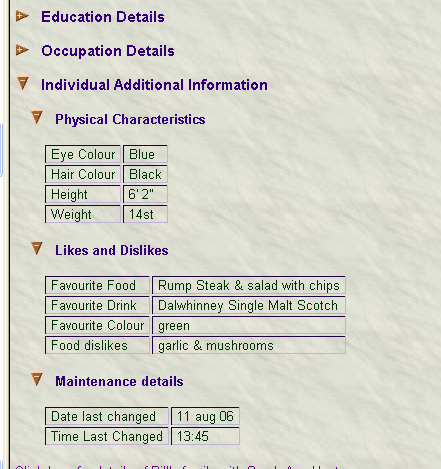
Only entered tags will be displayed and they are grouped into the 'Dialog Layout' groups used for Custom Tags. The Dialog Layout descriptions are used for the subgroup headings, e.g. 'Physical Characteristics', 'Like & Dislikes' are the examples used above, but of course you are free to choose your own subgroup headings and Custom Tag descriptions and have as many of them as you want. I need to add something so that certain Custom Tags can be hidden on the report if required. I'm thinking of ignoring Custom Tags whose description startswith say §, and whole subgroups (e.g. Custom Tag Diaglog Layouts) whose description startswith §. Or perhaps some other character/string defined in Dictionary.xml. This feature should be ready for Beta 18, which Dan will complete when he & Jean-Claude return from their well-earned break. So we are probably looking at the last week in August.
'lego audio video erro ergo disco' or "I read, I listen, I watch, I make mistakes, therefore I learn"
|
|
|
|
|
Important Contributors
FamilyTrees.GenoPro.com
Customers
Translator
GenoPro version: 2.0.1.6
Last Login: Tuesday, December 16, 2008
Posts: 390,
Visits: 1,271
|
That's a very good approach for displaying custom tags. However I'm not too sure about the "Section Sign" symbol (Alt+0167) or any other. I think there is plenty place in the panel to afford the addition of a proper "Shown in report" tick box: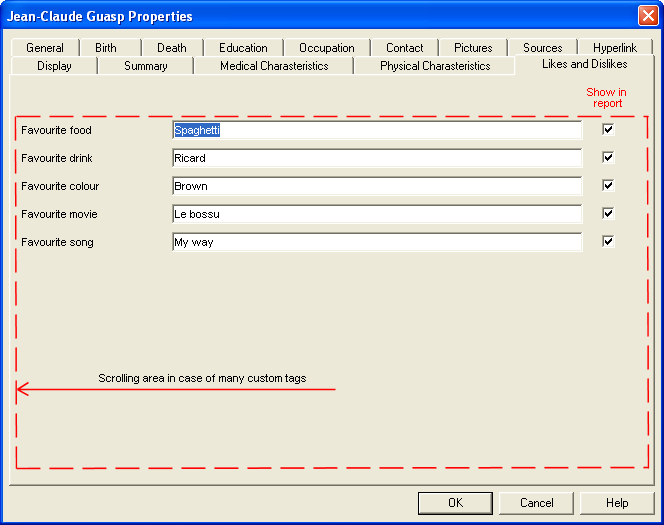
These boxes could be set, on or off, by default in config.xml. Just another thought.
|
|
|
|
|
Administrators
Customers
Important Contributors
FamilyTrees.GenoPro.com
GenoPro version: 3.1.0.1
Last Login: 2 days ago @ 9:23 PM
Posts: 3,464,
Visits: 26,854
|
Yes I agree with you Jean-Claude except I would prefer 'exclude from report' rather than 'show in report' tick box(es) as the general approach is to show everything in the report unless indicated otherwise. However I can only work with what is currently provided in the GenoPro program. Using the § symbol or other character as a privacy indicator can be regarded as an interim measure until Dan implements a built-in mechanism. We know he is anxious not to delay version 2.0 more than necessary so if he decides to implement such a feature I guess it will be after 2.0. This 'privacy' feature will be switched on & off by specifying a privacy prefix in the Dictionary. Initially it will be commented out and so will be relatively invisible.By the way, I have now modified the reporting of Custom Tags to optionally use a phrase specified in the Dictionary to format a narrative phrase for the custom tags in each 'Dialog Layout'. If not present it will default to the table view as previously shown in my earlier reply to this post. Therefore users familiar with the phrase generator format will be able to produce quite complex narrative without need to understand/change the script files.
'lego audio video erro ergo disco' or "I read, I listen, I watch, I make mistakes, therefore I learn"
|
|
|
|
|
Administrators
Moderators
Customers
Gamma
FamilyTrees.GenoPro.com
Translator
GenoPro version: 3.1.0.1
Last Login: Tuesday, October 28, 2025
Posts: 4,886,
Visits: 22,799
|
We have scheduled several weeks to improve the custom fields in GenoPro, including a better tag editor and more tag options. Since GenoPro 2.0 is well overdue, those improvements will be in GenoPro 3.0.
|
|
|
|
|
Customers
GenoPro version: 2.5.4.1
Last Login: Friday, October 18, 2013
Posts: 142,
Visits: 3,822
|
Meanwhile, can the selection of the custom tags (as part of the display) choose multiple lines of data to display? In other words, not just "birth date - death date" OR <custom field> but allowing a choice of multiple lines, so that both birth & death AS WELL AS custom fields will appear. This should be part of the report as well (in the SVG).
Danny
|