|
|
|
|
Customers
GenoPro version: 3.0.1.5
Last Login: Tuesday, January 31, 2023
Posts: 8,
Visits: 17
|
Hola a todos-as,
He intentado cambiar el código generado por Google maps para mi sitio en el fichero places.htm, concretamente en la línea <SCRIPT src="http://maps.google.com/maps?file=api&v=2&key=ABQIAAAASJ0G4SOiaQ8eyk3nzNi7YhS8Sug1lBz5d9mEGdwPgwjMebPy9xQoQLPIM-CcpjAnaGoBwGuJrnArCQ" type=text/javascript></SCRIPT>
|
Sin resultados hasta el momento. ¿Podrían ayudarme?
Gracias
Edited: Wednesday, July 16, 2008 by
Ron
|
|
|
|
|
Administrators
Customers
Important Contributors
FamilyTrees.GenoPro.com
GenoPro version: 3.1.0.1
Last Login: 14 hours ago
Posts: 3,504,
Visits: 27,522
|
You do not need to edit places.htm. Simply obtain a Google Maps API key for your website from the Google Maps API site. Then use the Configuration Paramters dialogue when you generate a Report (clear the checkbox under 'Configuration Parameter Settings' under the 'Options' Tab of te Generate Report dialog. Then paste your own key in place of the default familytrees.genopro.com key in the input field under 'Google Map Settings'Using Google Translate: Usted no necesita editar places.htm. Basta con obtener un índice API de Google Maps clave para su sitio web de la API de Google Maps sitio. A continuación, utilice la configuración Paramters diálogo al generar un Informe (claro en la casilla que bajo el título "Configuración de parámetros de configuración 'en la' Opciones' de Tab te Generar Informe de diálogo. A continuación, pega su propia llave en lugar de la clave por defecto en familytrees.genopro.com el campo de entrada en 'Google Map Configuración'
'lego audio video erro ergo disco' or "I read, I listen, I watch, I make mistakes, therefore I learn"
|
|
|
|
|
Customers
GenoPro version: 3.0.1.5
Last Login: Tuesday, January 31, 2023
Posts: 8,
Visits: 17
|
It seems to be easy the way you're explaining away the issue, but I cannot see it. I'm not able to find the place things must be put. Could you insert some pics in the post? My genopro release is the newest.Thanks in advance.
|
|
|
|
|
Important Contributors
FamilyTrees.GenoPro.com
Customers
Translator
GenoPro version: 2.0.1.6
Last Login: Tuesday, December 16, 2008
Posts: 390,
Visits: 1,271
|
Another way to change your Google API key code is:
1) open config.xml (the one associated with your Report Skin) with notepad (or with another text editor).
2) find the tag named <GoogleMapsApiKey> in the list.
3) insert your new key within Default="...". This will replace the existing Genopro server key.
4) save config.xml and close.
5) run your report.
It should then be OK.
Changing directly into config.xml will make the change PERMANENT.
JCUsing Google Translate: Una otra manera de cambiar su clave de la API de Google es:
1) abrir config.xml (el uno asociado a su informe de la piel) con el notepad (o con otro editor de texto).
2) encontrar la etiqueta el nombre <GoogleMapsApiKey> en la lista.
3) introduzca su nueva clave por Default ="...". Este sustituirá al actual Genopro clave de servidor.
4) guardar y cerrar config.xml.
5) ejecutar el informe.
A partir de entonces debe ser OK.
Cambiar directamente en config.xml hará el cambio PERMANENTE.
JC
Edited: Thursday, July 17, 2008 by
jcguasp
|
|
|
|
|
Administrators
Customers
Important Contributors
FamilyTrees.GenoPro.com
GenoPro version: 3.1.0.1
Last Login: 14 hours ago
Posts: 3,504,
Visits: 27,522
|
For most users it is probably better to avoid custom skins, because they often lead to confusion when a new version is released. However at present a custom skin is unavoidable if you are using a non-English report skin. Also some users do not like editing configuration files for fear of corrupting something.There is a third alternative - create a Document Custom Tag called GoogleMapsApiKey and put your API key there. This will be saved with your .gno and used by default for your Reports from that .gno file. There are other posts on this forum that deal with how to create Document Custom Tags. For completeness I also include some screen grabs for the first method, i.e. using Config Params dialog, as requested by palentino Make sure Config Params dialog will be displayed: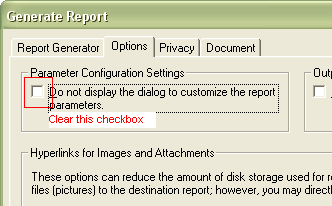 Then click the Generate button to run the Report scripts and display the Configuration Settings dialog. 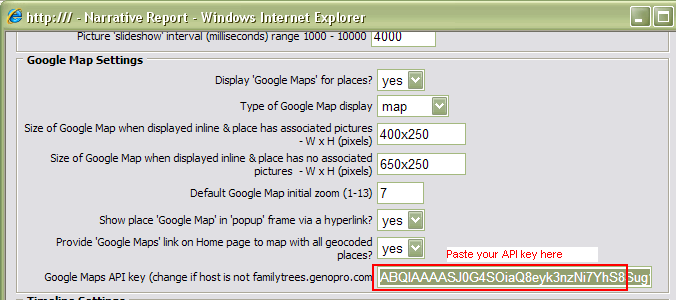
scroll down to the Google Maps Settings area and paste your key over the default one. Scroll to the bottom of the dialog and click the OK button.
'lego audio video erro ergo disco' or "I read, I listen, I watch, I make mistakes, therefore I learn"
|
|
|
|
|
Customers
GenoPro version: 3.0.1.5
Last Login: Tuesday, January 31, 2023
Posts: 8,
Visits: 17
|
Thank to you all, everything is ok at that very moment. Ron, your explanation has been excellent.
|
|
|
|
|
Forum Members
Last Login: Friday, September 24, 2010
Posts: 2,
Visits: 4
|
|
|
|
|
|
Forum Members
Last Login: Friday, September 24, 2010
Posts: 2,
Visits: 4
|
|