|
|
|
|
Forum Members
Last Login: Monday, December 16, 2013
Posts: 4,
Visits: 22
|
Hello everyone,
I need to do my genogram for my university, and I am enjoying it after overcoming many obstacles, including that I am a MAC user and had to borrow a Windows computer, which is almost alien to me. I can't figure how to right click on the laptop to get the extra set of options. I have tried both buttons on the mouse pad, but they seem not to be working, and I don't have an external mouse. I s there an alternative way to the right click through the menu? I'd like to make a household, and print the legend. Thank you ever so much for any help, Paula
|
|
|
|
|
Administrators
Customers
Important Contributors
FamilyTrees.GenoPro.com
GenoPro version: 3.1.0.1
Last Login: 5 hours ago
Posts: 3,504,
Visits: 27,492
|
Hi Paula,
Most laptops have a dedicated 'context menu' key, normally between the right hand Alt (gr) and Ctrl keys.
'lego audio video erro ergo disco' or "I read, I listen, I watch, I make mistakes, therefore I learn"
|
|
|
|
|
Customers
Important Contributors
FamilyTrees.GenoPro.com
GenoPro version: 3.1.0.1
Last Login: 10 hours ago
Posts: 1,614,
Visits: 33,866
|
Paula
Have not used a Mac but if you can not get the mouse to work there are two alternatives.
Keyboard shortcuts are introduced when you open a new file, but disappear as soon as you add any thing. So:-
F for family wizard
P to add parents to an individual
S or D for children of selected parent, or C for child
You can add a second mate with M, or use the family wizard
W inserts a new male
E inserts new female (not sure why these letters, probably lack of option)
X marks an individual as dead
Press Enter when an individual is selected to open the Properties menu
Most of these options are also available from icons in the menu bar
|
|
|
|
|
Forum Members
Last Login: Monday, December 16, 2013
Posts: 4,
Visits: 22
|
Thank you, genome! I will try this next time I turn the Windows on!
appleshaw, I have managed those basic features already (I am using Windows for this project by the way, but I don't know very well how to operate the computer). I was asking about the special choices available when you right click on an individual, such as in the image below: 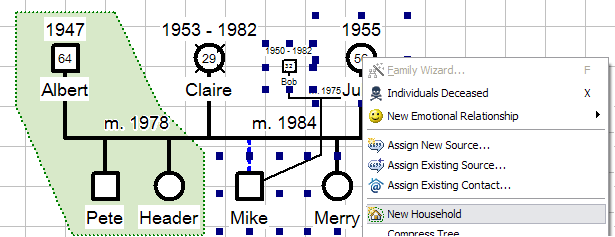 I would think they would also be available through a menu or shortcut. Thank you again, both!
Tags:
Edited: Thursday, July 25, 2013 by
paulagoes
|