|
|
|
|
FamilyTrees.GenoPro.com
Customers
GenoPro version: 3.1.0.1
Last Login: Thursday, June 2, 2022
Posts: 108,
Visits: 1,280
|
Hi Ron,
I ' ve been working my way through the latest narrative report, getting ready to publish my new family tree based on the latest skin . I ' ve been hacking the skin a little ( cough ) to suit my own requirements and having lots of fun . ( https://familytrees.genopro.com/HarryCaper/TheFamilyTree/)I have a little feedback on the family maps ( the family_map - famXXXXX . htm ). I think this needs a tweak as the map doesn ' t load . I assumed I ' d broken it with my code changes , but I ' ve checked using a vanilla ( unaltered ) version of the skin , with the same result . I ' ve just done a quick compare between a individual_map - indxxxxxx . htm and a family_map - famXXXXX . htm - they ' re calling different . js scripts , and have slight code differences , perhaps a left over from the switch from google maps . See below . I ' m going update the initiating & nbsp ; family_map . htm file in my custom skin , but thought I ' d better let you know so it can be fixed for general release . I have one or two other tweaks I ' ve made to my custom skin which I ' ll post about on this thread , as they might be useful for the next release . From the individual_map - indxxxxxx . htm : <script src="scripts/gmap_data.js" type="text/javascript"></script>
$(function () { PageInit(true); var loaded=true; showPopUpFrame(); initLocationMap(); window.addEventListener('resize',initLocationMap, false); setTimeout(function(){makeLocationMap(gMapData);},11); }); From the family_map - famXXXXX . htm : <script src="scripts/gmap_places.js" type="text/javascript"></script>
$(function () { PageInit(true); var loaded=true; showPopUpFrame(); initLocationMap(); makeLocationMap(gMapData); window.onresize=initLocationMap; |
|
|
|
|
FamilyTrees.GenoPro.com
Customers
GenoPro version: 3.1.0.1
Last Login: Thursday, June 2, 2022
Posts: 108,
Visits: 1,280
|
Another bit of feedback relates to the Source/ Citation section . I use the " Put Source / Citation references in collapse / expand section " option, and I noticed that from an individual and from a family page - when you click on a citation it doesn ' t target the popup frame ( the popup is the targeted frame when clicking on citations elsewhere in the report ). I believe a tweak is needed to the sub & nbsp ; WriteHtmlAllFootnotes in Utils . vbs In my testing to resolve this I changed this line ( line 1891 ): Report.WriteFormattedBr "<sup><a name='{0}'></a>{0} </sup> <a href='source-{&t}.htm' {}><i>{}</i></a>", iFootnote, oFootnote.ID, strTitle, JoinSourceCitationNames(oFootnote, StrFormatText(oFootnote, StrParseText(oFootnote.title, True),False), True)
To this : Report.WriteFormattedBr "<sup><a name='{0}'></a>{0} </sup> <a href='source-{&t}.htm?popup' onclick='showPopUpFrame("""");' target='popup' {}><i>{}</i></a>", iFootnote, oFootnote.ID, strTitle, JoinSourceCitationNames(oFootnote, StrFormatText(oFootnote, StrParseText(oFootnote.title, True),False), True)
I also changed this line ( line 1903 ) : Report.WriteFormatted strSep & " <a href='source-{&t}.htm' {}><i>{}</i></a>", oFootnote.ID, strTitle, JoinSourceCitationNames(oFootnote, StrFormatText(oFootnote, StrParseText(oFootnote.title, True), False), true)
To this : Report.WriteFormatted strSep & " <a href='source-{&t}.htm?popup' onclick='showPopUpFrame("""");' target='popup' {}><i>{}</i></a>", oFootnote.ID, strTitle, JoinSourceCitationNames(oFootnote, StrFormatText(oFootnote, StrParseText(oFootnote.title, True), False), true)
|
|
|
|
|
FamilyTrees.GenoPro.com
Customers
GenoPro version: 3.1.0.1
Last Login: Thursday, June 2, 2022
Posts: 108,
Visits: 1,280
|
I also noticed that the HTML code I'd used in my Document description, which is used on the home.htm, wasn't being interpreted as HTML on report generation.
I resolved this by changing the generating home . htm on line 64 from : @[ Report.Write StrFormatText(Null, doc.Description, False) ]@
To : @[ Report.Write StrFormatText(Null, doc.Description, True) ]@
|
|
|
|
|
FamilyTrees.GenoPro.com
Customers
GenoPro version: 3.1.0.1
Last Login: Thursday, June 2, 2022
Posts: 108,
Visits: 1,280
|
This one is a suggestion for the fancybox gallery, which is to display the title of the picture as a caption when the picture is viewed through the fancybox.
Util . vbs line 2419 changes from : Report.WriteFormattedLn "<a class='gallery' data-fancybox='{5}' href='{2}' title='{4&t}'><img src='{0}'{1} alt='{3&t}' title='{3&t}'/></a>", strThumbnail, strAttributesHTML, strPath, Util.FormatPhrase(Dic("PhPictureTooltip"), "", p.Date.ToStringNarrative, p.Place.Session("Locative"), StrParseText(p.Source, True)), p, obj.id
to Report.WriteFormattedLn "<a class='gallery' data-fancybox='{5}' href='{2}' title='{4&t}' data-caption='{4&t}'><img src='{0}'{1} alt='{3&t}' title='{4&t}'/></a>", strThumbnail, strAttributesHTML, strPath, Util.FormatPhrase(Dic("PhPictureTooltip"), "", p.Date.ToStringNarrative, p.Place.Session("Locative"), StrParseText(p.Source, True)), p, obj.id
When I was googling around , I found there is a newer version of fancybox which has a carousel feature , which looks very exciting . Well beyond my coding abilities to implement however .& nbsp ; |
|
|
|
|
FamilyTrees.GenoPro.com
Customers
GenoPro version: 3.1.0.1
Last Login: Thursday, June 2, 2022
Posts: 108,
Visits: 1,280
|
I've just noticed that in place-placeNNNNNN.htm, for places with a picture (and I think this is true also of source-sourceNNNNN.htm files too)- clicking the picture doesn't start the fancybox. See screenshots
Not sure if this is by design .& nbsp ; 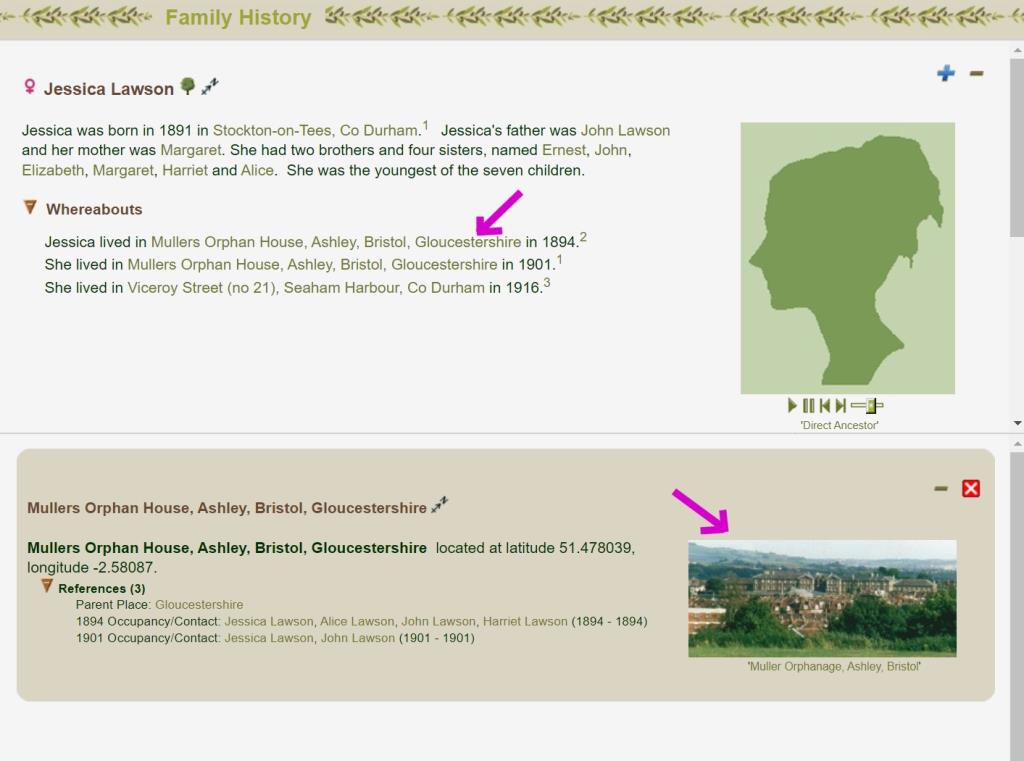 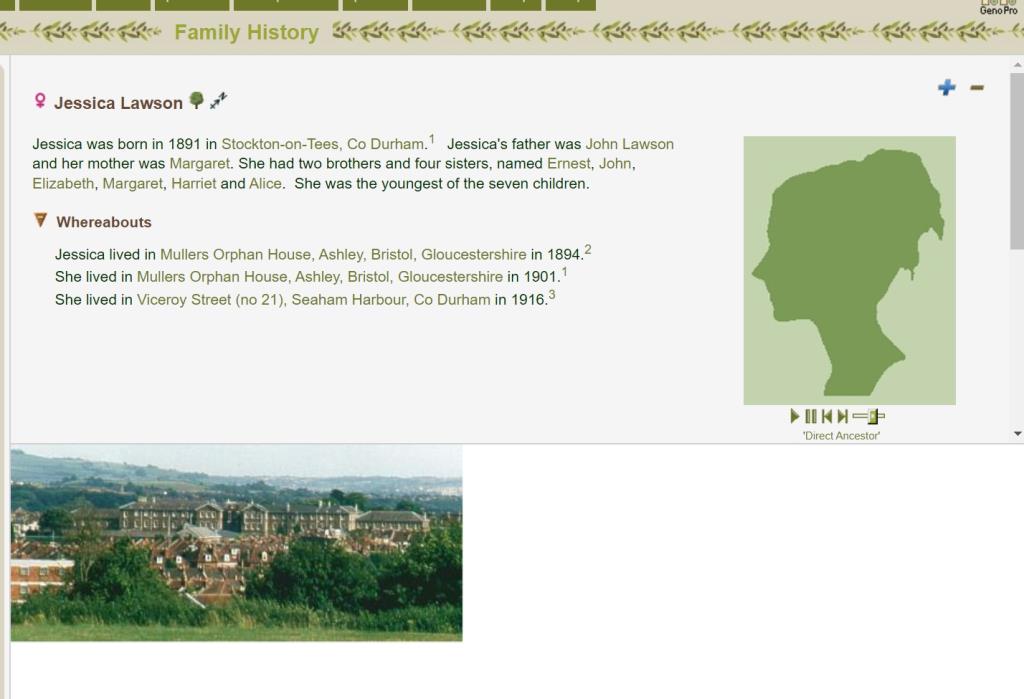 I haven ' t looked into fixes for this - just spotted it . |
|
|
|
|
FamilyTrees.GenoPro.com
Customers
GenoPro version: 3.1.0.1
Last Login: Thursday, June 2, 2022
Posts: 108,
Visits: 1,280
|
On a related note, on my customised version of the narrative skin, I borrowed your code to put a picture icon next to places that have picture(s).
If you ' d like to review those mods for possible inclusion into the base skin - let me know and I ' ll post them up . I ' ve done this for the Place TOC ( the other TOCs look to already have this feature ) and in the individual . htm With my trees I ' ve never added pictures to occupancies - I ' ve always added them to places , which is why I made this mod . I ' ve only just found out during testing today that small photos are displayed in the report for occupancies , but from a layout perspective I prefer the picture icon rather than a small picture , so it turned out to be happy error on my part that I associated the pictures with the places . 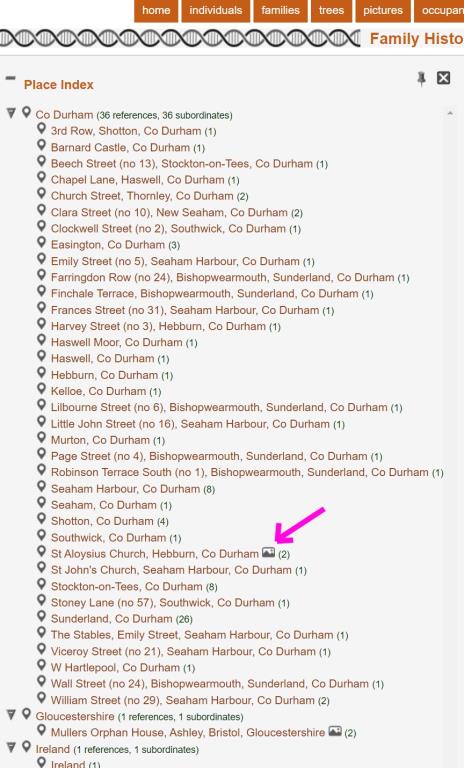 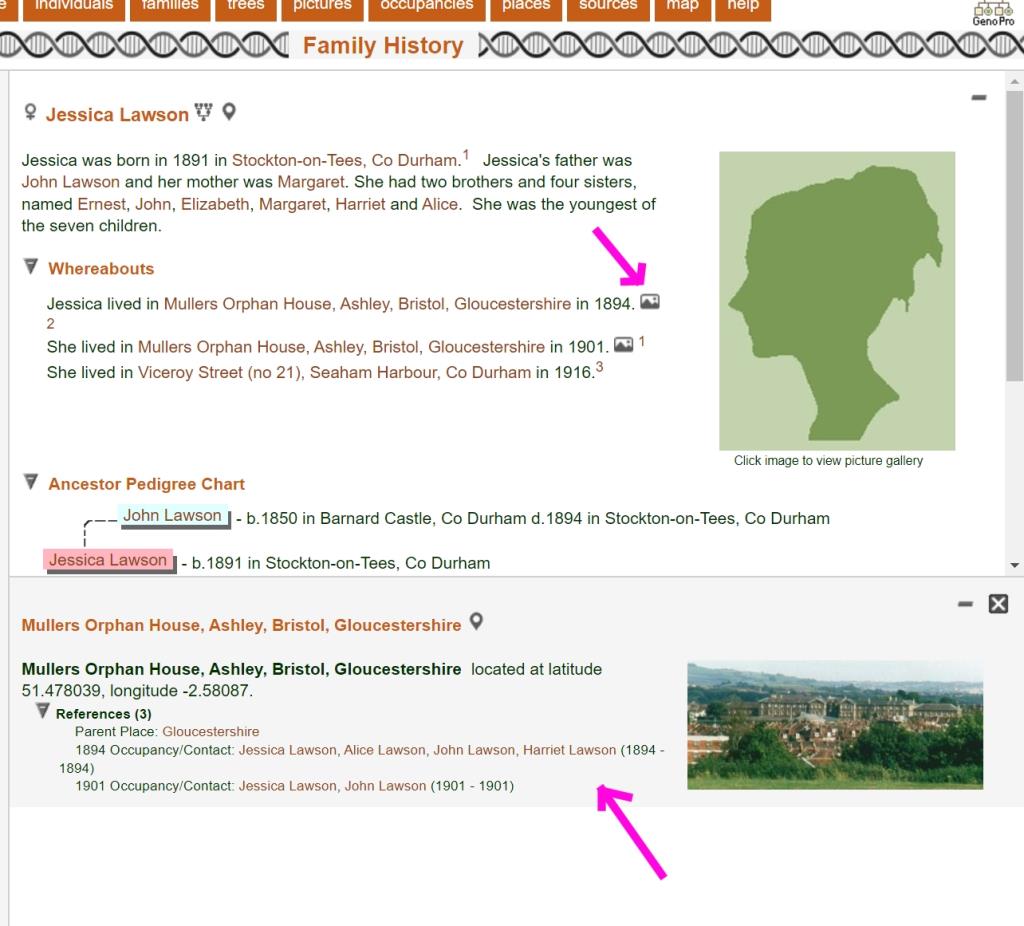 that ' s all from me , finally , H.
|
|
|
|
|
FamilyTrees.GenoPro.com
Customers
GenoPro version: 3.1.0.1
Last Login: Thursday, June 2, 2022
Posts: 108,
Visits: 1,280
|
Sorry one more glitch... I've no idea what is causing this, but it seems repeatable.
This is to do with maps for individual places generated by gmap_place . htm If I start from one of my individuals , and click on a place link in the Whereabouts section it pops up the place - placeNNNNN . htm - if I use the map icon from the pop up for that place - the map only loads about the top third of the tiles , the rest are grey . 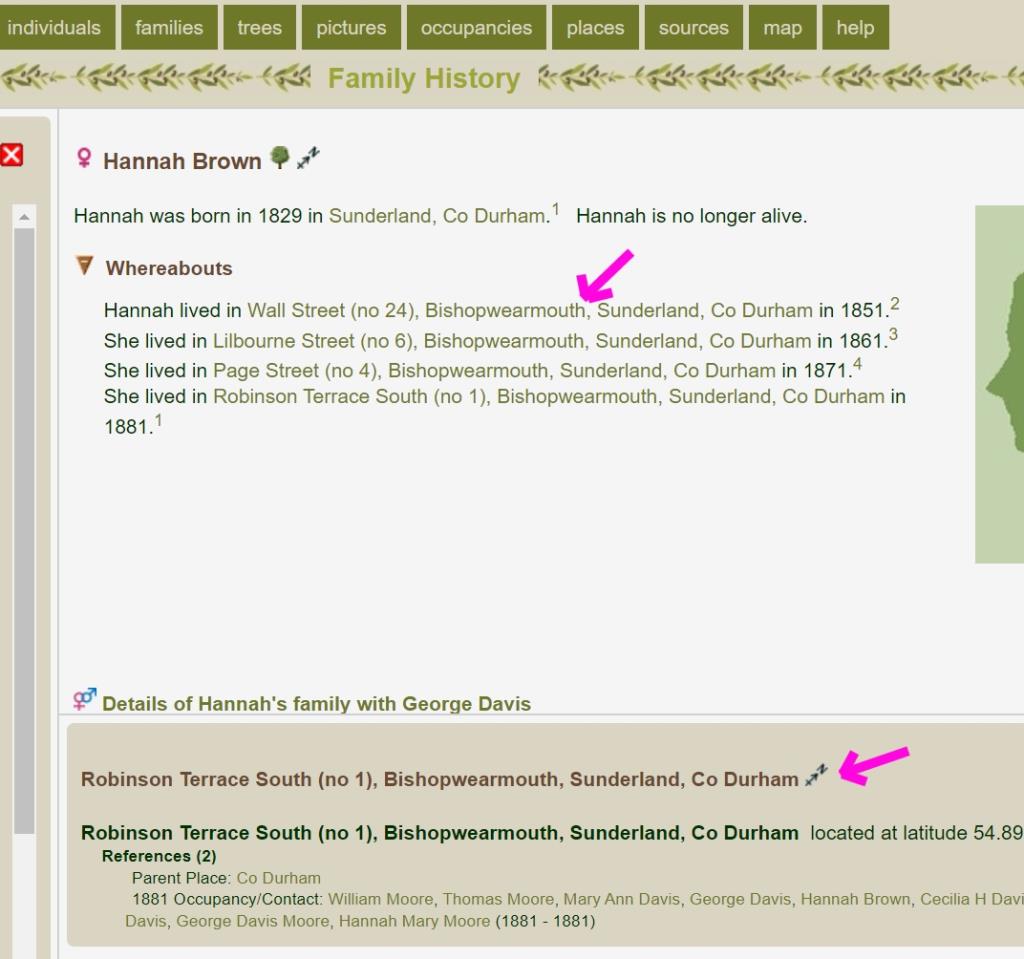 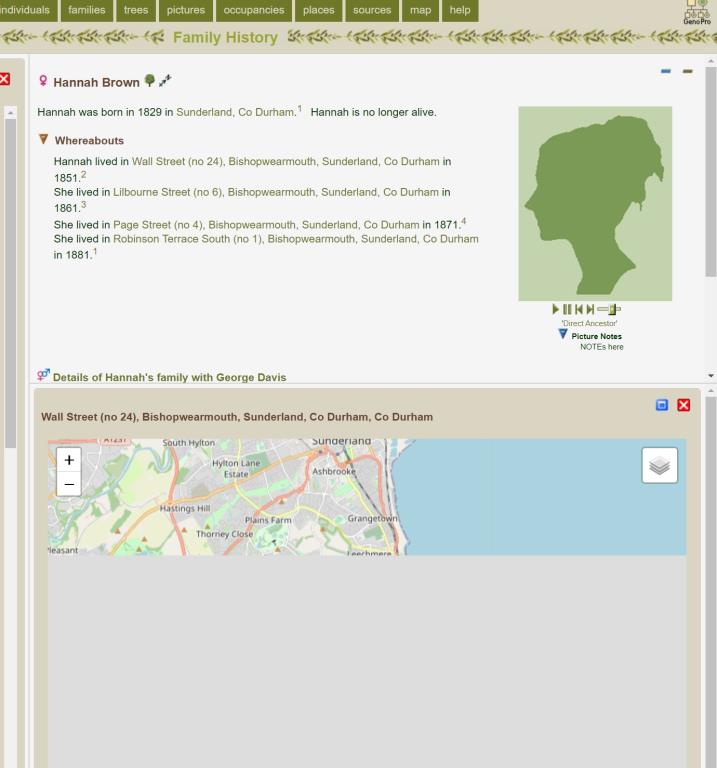 Strangely , if I start from the Places TOC , and choose the same place , and then click on the map icon for that place from & nbsp ; places . htm - the map loads fine |
|
|
|
|
FamilyTrees.GenoPro.com
Customers
GenoPro version: 3.1.0.1
Last Login: Thursday, June 2, 2022
Posts: 108,
Visits: 1,280
|
In penance for posting so much today , I hope this will be useful ... I ' ve taken another look at the curvycorner solution - since we introduced this the functionality is built into css , and with the death of IE , I think we can use the css solution now .& nbsp ; I ronically , since 2012 when we introduced this , curvy corners have gone out of fashion thanks to Windows 10 . This new css solution makes it possible for folks to remove the curvy corners using the theme . css , and since the new solution doesn ' t use images - it makes customising the colour scheme easier too , as it doesn ' t use the corner images so these no longer need editing . I ' ve attached a zip of the amended skin . Every change I ' ve made is notated with HarryCaper and the original code is still there commented out for easy comparison, although you probably have something like winmerge for doing comparisons . The image below shows the files that have been amended . The changes made to the OliveBranch theme . css would need to be replicated in the other themes . When you look at the changes , you ' ll notice I ' ve also made some changes to things like padding and margins , and heights & amp ; widths for TOCs and Maps , and I ' ve made use of the class cage on more pages ( for padding to bring the text in from the edges ). This is to address a couple of layout idiosyncrasies .& nbsp ; |
|
|
|
|
FamilyTrees.GenoPro.com
Customers
GenoPro version: 3.1.0.1
Last Login: Thursday, June 2, 2022
Posts: 108,
Visits: 1,280
|
... the attachment seems to be missing from my last post, trying again...
edit ... I ' m getting slightly different results publishing to my local drive than to the web with respect to the height of the TOCs and the maps . Looks perfect when running from my local drive , but the bottom of the TOC box & amp ; map box is off the screen when looking at the version published on the internet .& nbsp ; No idea why that is - I ran the generator for the two locations back to back without making any changes .& nbsp ; May need to shave another few px off the height of these which is set from script . js ( line 1254 ) and tocstart . js ( line 17 ). I have to confess I don ' t really understand the intricacies ...
 Skins2022.03.07.hc_corners.zip
(186 views,
6.71 MB)
Edited: Tuesday, May 31, 2022 by
HarryCaper
Skins2022.03.07.hc_corners.zip
(186 views,
6.71 MB)
Edited: Tuesday, May 31, 2022 by
HarryCaper
|
|
|
|
|
Administrators
Customers
Important Contributors
FamilyTrees.GenoPro.com
GenoPro version: 3.1.0.1
Last Login: Yesterday @ 9:17 AM
Posts: 3,466,
Visits: 26,890
|
Wow! you have certainly been busy  It's gonna take me a while to digest all of your posts, but many thanks for all your work on this. It's gonna take me a while to digest all of your posts, but many thanks for all your work on this.
One I can answer immediately is the question of HTML in the Document Description . You just need to prefix your text with the ' Custom Markup '& nbsp ; & lt ;? html ?& gt ;. This can be used on anytext field .& nbsp ; & nbsp ; See also ' How to customise your report'& nbsp ;
I'll look into the rest as soon as I can 
'lego audio video erro ergo disco' or "I read, I listen, I watch, I make mistakes, therefore I learn"
|