|
|
|
|
Customers
Last Login: Thursday, July 6, 2006
Posts: 1,
Visits: 3
|
Hi guys,
How do i generate or setup an Icon or picture in the report instead of the square, circle or diamond.
Thanks in advance.
Liliana
Edited: Friday, May 4, 2007 by
GenoProSupport
|
|
|
|
|
Administrators
Moderators
Customers
Gamma
FamilyTrees.GenoPro.com
Translator
GenoPro version: 3.1.0.1
Last Login: Monday, June 2, 2025
Posts: 4,886,
Visits: 22,796
|
This feature is not yet implemented. Some day GenoPro will be able to display pictures directly in the family tree (in the square or circle).
|
|
|
|
|
Administrators
Customers
Important Contributors
FamilyTrees.GenoPro.com
GenoPro version: 3.1.0.1
Last Login: 2 days ago @ 9:30 PM
Posts: 3,443,
Visits: 26,659
|
It is possible to add jpg images/photos to the SVG genograms in the report by use of a special GenoPro text label. The following example show a couple of ways how it mightbe used to add a picture to an individual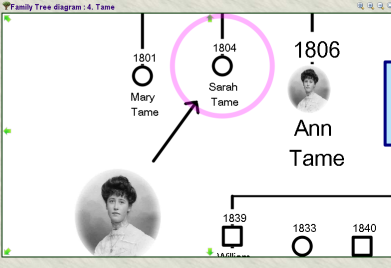
It is achieved by first creating a standard GenoPro text label with the size and position required for the photo and then setting the text of the label to picture="pic99999" where pic99999 is the GenoPro id of the picture to be used. No other text must appear in the label. The picture ids can be found using the Menu option View, Table Layout - Pictures.. and then adding the 'id' column to the table by clicking the  button and checking the 'id' check box. Set the text label border color and background color to transparent and the text padding to 0 the remove all borders. In the example above with the arrow I have placed one of the labels over a Social Entity object and drawn the arrow using a Social Entity Relationship. With the second image I have set the size of the individidual to 'extra large' to provide more space for the small image and set the display options not show a gender symbol. Alternatively I could have set the text label's postion 'to the front' to hide the gender symbol. button and checking the 'id' check box. Set the text label border color and background color to transparent and the text padding to 0 the remove all borders. In the example above with the arrow I have placed one of the labels over a Social Entity object and drawn the arrow using a Social Entity Relationship. With the second image I have set the size of the individidual to 'extra large' to provide more space for the small image and set the display options not show a gender symbol. Alternatively I could have set the text label's postion 'to the front' to hide the gender symbol. This is obviously a temporary work-around until GenoPro provides a built-in feature to place images on the genograms. Note the that pictures are only shown in the generated SVG page, GenoPro itself will only show the text label. The pictures are automatically sized to the label size. The pictures used must of course already be available within your GenoPro file in order to use their ids. Too many pictures will slow the display, panning and zooming of the SVG image. And of course large or high resolution pictures/images will also have performance implications, as even though they may scaled down to fit the label, they are downloaded in their original size.
'lego audio video erro ergo disco' or "I read, I listen, I watch, I make mistakes, therefore I learn"
Edited: Saturday, July 8, 2006 by
Ron
|
|
|
|
|
Administrators
Moderators
Customers
Gamma
FamilyTrees.GenoPro.com
Translator
GenoPro version: 3.1.0.1
Last Login: Monday, June 2, 2025
Posts: 4,886,
Visits: 22,796
|
Wow, this is a great idea.
|
|
|
|
|
Gamma
Customers
Important Contributors
FamilyTrees.GenoPro.com
Translator
GenoPro version: 3.1.0.1
Last Login: Monday, June 16, 2025
Posts: 257,
Visits: 2,862
|
Ron (7/8/2006)
This is obviously a temporary work-around until GenoPro provides a built-in feature to place images on the genograms. Note the that pictures are only shown in the generated SVG page, GenoPro itself will only show the text label. The pictures are automatically sized to the label size. The pictures used must of course already be available within your GenoPro file in order to use their ids. Too many pictures will slow the display, panning and zooming of the SVG image. And of course large or high resolution pictures/images will also have performance implications, as even though they may scaled down to fit the label, they are downloaded in their original size.It's great! But, is it possible to print out that *.svg?
- "εν οιδα οτι ουδεν οιδα" (Σωκρατησ) - "The only thing that I know is that I don't know anything" (Socrates)
|
|
|
|
|
Customers
Important Contributors
FamilyTrees.GenoPro.com
Translator
GenoPro version: 3.1.0.1
Last Login: Sunday, March 21, 2021
Posts: 716,
Visits: 12,927
|
But, is it possible to print out that *.svg?
Well, I had the same questions in the beginning, but problem is solved.
Download "Inkscape" (suggestion from Ron), open the corresponding SVG map, remove one red circle and the green spot inside (there is only one) and export in png format.
Did so with many of my maps and carried them to Germany in May. Everybody was impressed. Try to keep the height of maps readable on A4 (portrait), but stretched over several pages(depending on size of the map).
Have several pictures in my tree under genopro.
Edited: Saturday, July 8, 2006 by
GenoProSupport
|
|
|
|
|
Gamma
Customers
Important Contributors
FamilyTrees.GenoPro.com
Translator
GenoPro version: 3.1.0.1
Last Login: Monday, June 16, 2025
Posts: 257,
Visits: 2,862
|
maru-san (7/8/2006)
But, is it possible to print out that *.svg? Well, I had the same questions in the beginning, but problem is solved. Download "Inkscape" (suggestion from Ron), open the corresponding SVG map, remove one red circle and the green spot inside (there is only one) and export in png format. Did so with many of my maps and carried them to Germany in May. Everybody was impressed. Try to keep the height of maps readable on A4 (portrait), but stretched over several pages(depending on size of the map). Have several pictures in my tree under genopro. Thanks for suggestion! Now I only have to find out how to manage my huge family tree to find print it out...
- "εν οιδα οτι ουδεν οιδα" (Σωκρατησ) - "The only thing that I know is that I don't know anything" (Socrates)
|
|
|
|
|
Customers
GenoPro version: 2.5.4.1
Last Login: Friday, October 18, 2013
Posts: 142,
Visits: 3,822
|
My only wish is to have fast scrolling with a very large SVG (and yes, adding this wonderful option of having pictures displayed too). Unfortunately, I will need a different solution than the one that exists now in order to display the entire tree, due to slow scrolling.
Danny
|
|
|
|
|
Customers
GenoPro version: 3.0.1.5
Last Login: Monday, February 24, 2020
Posts: 8,
Visits: 37
|
Hi,I seem to have problems with SVG files saving in some "normal" format. What I did: I have used Ron's suggestion with picture in the text box and produced a report where I could see the pictures; then I saved the SVG picture as *.svg; then I downloaded Inkscape and tried to open the *.svg file in it. It opened but said that "Linked image not found". Also when I tried to view the *.svg by simply double-clicking on it I (sometimes) did not see the picture and (always) I saw a Microsoft JScipt runtime error message saying "Object expected: line: 0, column: 35". I guess these problems are somehow connected. Please advise how to resolve. Thanks,
Yuri Ilyin
|
|
|
|
|
Customers
Translator
GenoPro version: 3.1.0.1
Last Login: Wednesday, June 25, 2025
Posts: 103,
Visits: 2,092
|
then I saved the SVG picture as *.svg; then I downloaded Inkscape and tried to open the *.svg file in it. It opened but said that "Linked image not found". Hi, Try opening the original .svg file, located in genomaps sub folder, or try coping the pictures folder to a previous folder where you save your *.svg. Keep in mind that your pic path is relative to the location of the *.svg.. you must keep the relative path to the pics in order to inkscape can open it. Hugo
|