|
|
|
|
Customers
Important Contributors
GenoPro version: 3.1.0.1
Last Login: Wednesday, May 6, 2026
Posts: 213,
Visits: 4,465
|
I was trying to publish a report on my own server, but when I was trying to access "google map" (Click on one of the "places" under the "most popular places"), I got this massage. 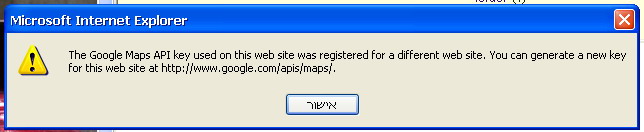
Here is an example http://beraha3.50webs.com/test4/default.htm My question is: How can I get an API key and configure the skin, so it will be possible to watch "Google maps" from my server.
Edited: Tuesday, December 19, 2006 by
beraha
|
|
|
|
|
Important Contributors
Customers
GenoPro version: 3.1.0.1
Last Login: Saturday, December 28, 2024
Posts: 193,
Visits: 4,270
|
See GeoMapping Places .
Ron wrote:
If you have the address you may not need the latitude & longitude. The geocoder will find most - its just the UK where it seems at bit weak. My code will try and find the place coordinates for the map using the street, city, county etc. info in the Place object. If these are not present it will try the place name. If you add the postcode and set country to UK for UK places the postcode will be displayed as link to streetmap.co.uk.
Nearly ready to send a skin to Dan. Mapping will be turned off by default in Config.xml so if you want to try it you'll need a custom skin. Each use of Google Maps API needs an API key. The default one in the skin will work on http://familiytrees.genopro.com and on your local PC only. If you publish to another site you will need to get an API key for it from http://www.google.com/apis/maps and store it in Config.xml. This file will also hold default zoom level and map size. You will be able to tailor these values for selected Places using custom tags.
Feri
Edited: Thursday, December 28, 2006 by
GenoProSupport
|
|
|
|
|
Forum Members
GenoPro version: 2.5.4.1
Last Login: Friday, February 6, 2015
Posts: 5,
Visits: 13
|
Hello, I too am trying to make this change, adding google maps API for my web site, but cannot find "config.xml" anywhere on my computer?Where is the default key "ABQIAAAASJ0G4SOiaQ8eyk3 . . . " stored? I am using genpro 2007 version 2.00 just downloaded to-day, Dec. 27-2006 Liam
|
|
|
|
|
Customers
Important Contributors
GenoPro version: 2.5.4.0
Last Login: Thursday, January 11, 2024
Posts: 386,
Visits: 4,475
|
|
|
|
|
|
Forum Members
GenoPro version: 2.5.4.1
Last Login: Friday, February 6, 2015
Posts: 5,
Visits: 13
|
Got it, thank you... works great.Liam
|
|
|
|
|
FamilyTrees.GenoPro.com
Customers
GenoPro version: 2.5.3.8
Last Login: Sunday, March 8, 2026
Posts: 19,
Visits: 53
|
I have no need for this feature at all, at this point.
How can I shut off the Google Maps part completely?
How can I stop the API Popup with out getting my own key?
I really like the new look and don't want to go back to 1.99 if I don't have to.
Panther
|
|
|
|
|
Administrators
Customers
Important Contributors
FamilyTrees.GenoPro.com
GenoPro version: 3.1.0.1
Last Login: Today @ 6:06 AM
Posts: 3,487,
Visits: 27,235
|
panther (1/13/2007)How can I shut off the Google Maps part completely?
There two methods. Firstly if you are using your own customised skin, just edit Config.xml and set parameters GoogleMaps and fGoogleMapsOverview to N. Otherwise from version 2.0.0.1 you can use an undocumented feature from by setting Report parameters using GenoPro Document Custom tags as follows: First use the GenoPro menu Tools/Tag Editor... then click the Document tab and change values to the following: 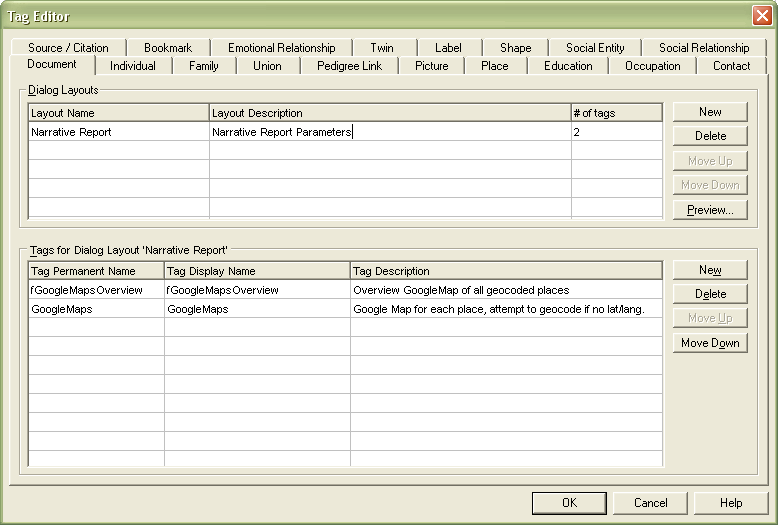
Notice that I have also set the Layout Name to Narrative Report. Next close this dialog, and select File/Properties.. from the menu bar. You can then click on your newly created Narrative Report tab and set the required values i.e. 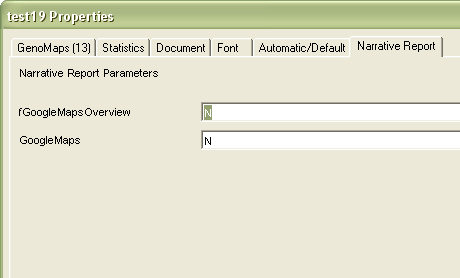 Other Report parameters can be set in this way, removing the need to create a custom skin just to change parameter values.
'lego audio video erro ergo disco' or "I read, I listen, I watch, I make mistakes, therefore I learn"
Edited: Monday, January 15, 2007 by
Ron
|
|
|
|
|
FamilyTrees.GenoPro.com
Customers
GenoPro version: 2.5.3.8
Last Login: Sunday, March 8, 2026
Posts: 19,
Visits: 53
|
Thanks for the quick reply Ron.
I shall try these fixes and report back if one or both of them work.
Thanks again,
Panther
|
|
|
|
|
FamilyTrees.GenoPro.com
Customers
GenoPro version: 2.5.3.8
Last Login: Sunday, March 8, 2026
Posts: 19,
Visits: 53
|
I'm back and with no good news to report. I implemented both of the fixes, and as far as I can tell, correctly. I even removed the default API key. Emptied my cache and history. Emptied my remote folder, also, before uploading. (It still pops up.)
One thing I did, was, I generated it to a local folder and then uploaded everything rather than upload right from GenoPro. I don't think that that would make a difference, however. Am I correct?
Do you have any other work-arounds to try or think of something I may have done wrong?
Thank you,
Panther
|
|
|
|
|
Administrators
Customers
Important Contributors
FamilyTrees.GenoPro.com
GenoPro version: 3.1.0.1
Last Login: Today @ 6:06 AM
Posts: 3,487,
Visits: 27,235
|
Looks like I'm gonna have to make some script changes. The actions outlined in this thread should prevent actual Google Maps from appearing in the Report but don't stop Google Maps from initialising its script and validating the API key, hence the prompt.Should have something later today.
'lego audio video erro ergo disco' or "I read, I listen, I watch, I make mistakes, therefore I learn"
|