|
|
|
|
FamilyTrees.GenoPro.com
Customers
GenoPro version: 3.1.0.1
Last Login: Thursday, June 2, 2022
Posts: 108,
Visits: 1,280
|
I haven't checked in for a while, so it was a lovely surprise to see some new reports 
I've been applying my usual customisations to the latest narrative report, and it occurred to me that there is an alternative to having a box around the report title if you want to make it stand out from the background image - you could use padding instead :
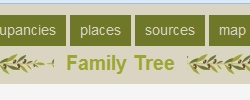
I hacked this into my customized version of the latest report, by removing the padding statement from the style.css. It originally had these lines:
.themed { background-color:#F6E7A1; color:#495557; border: #495557 1px solid;}
.title span {font-size: 1.4em; font-weight:bold; padding:1px;margin:1px;} |
And now it looks like this:
.themed { background-color:#F6E7A1; color:#495557;}
.title span {font-size: 1.4em; font-weight:bold; margin:1px;} |
Then changing the theme.css to something like this (example from olivebranch| .themed {background-color:#DAD5C2;color:#9CA731; padding: 0px 12px 0px 12px;} |
Anyway, just a thought (and of course it would probably make more sense to move the "padding: 0px 12px 0px 12px" into the style.css)
Meanwhile I'll look into "theming" (if that's a word) the events - it got overlooked when I last looked at themes because I usually untick the event calendar.
All the best, Harry
|
|
|
|
|
FamilyTrees.GenoPro.com
Customers
GenoPro version: 3.1.0.1
Last Login: Thursday, June 2, 2022
Posts: 108,
Visits: 1,280
|
So I think I've managed to re-theme the calendar, but it did involve some minor modifications to both the themes and the layercalendar.js script.
I modified the js script to use TH instead of TD for all the cells that need to be a different colour, then defined TR TD TH and Table in the css files.
Additionally for RoseTint and Default I've removed the textured background images, modified the background colour, and updated the curvycorner png files. The textured backgrounds caused problems for the other tables in the report (like the popular names & places table) because table now has a background colour defined making it stand out against the texture which didn't look so good.
The end result looks like this (also implementing the idea for padding out the title so a box isn't required):
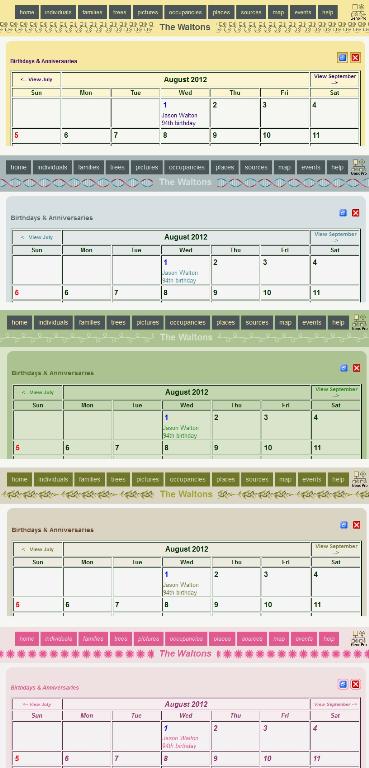
I've attached the files required for the default theme to this post, and I'll post the other attachments in subsequent posts.
Hope this helps,
Harry
 layercalendar.js
(126 views,
25.85 KB)
layercalendar.js
(126 views,
25.85 KB)
 style.css
(128 views,
12.54 KB)
style.css
(128 views,
12.54 KB)
 curvycorner_bl.png
(158 views,
165 bytes)
curvycorner_bl.png
(158 views,
165 bytes)
curvycorner_br.png
(152 views,
151 bytes)
curvycorner_tl.png
(148 views,
170 bytes)
curvycorner_tr.png
(153 views,
187 bytes)
|
|
|
|
|
FamilyTrees.GenoPro.com
Customers
GenoPro version: 3.1.0.1
Last Login: Thursday, June 2, 2022
Posts: 108,
Visits: 1,280
|
|
|
|
|
|
FamilyTrees.GenoPro.com
Customers
GenoPro version: 3.1.0.1
Last Login: Thursday, June 2, 2022
Posts: 108,
Visits: 1,280
|
|
|
|
|
|
FamilyTrees.GenoPro.com
Customers
GenoPro version: 3.1.0.1
Last Login: Thursday, June 2, 2022
Posts: 108,
Visits: 1,280
|
GreenLeaf files
theme.css
(121 views,
3.20 KB)
|
|
|
|
|
FamilyTrees.GenoPro.com
Customers
GenoPro version: 3.1.0.1
Last Login: Thursday, June 2, 2022
Posts: 108,
Visits: 1,280
|
OliveBranch files
theme.css
(115 views,
4.52 KB)
|
|
|
|
|
FamilyTrees.GenoPro.com
Customers
GenoPro version: 3.1.0.1
Last Login: Thursday, June 2, 2022
Posts: 108,
Visits: 1,280
|
One more for the Default theme - the pane_top.jpg.
 pane_top.jpg
(154 views,
3.26 KB)
pane_top.jpg
(154 views,
3.26 KB)
|
|
|
|
|
Administrators
Customers
Important Contributors
FamilyTrees.GenoPro.com
GenoPro version: 3.1.0.1
Last Login: 2 days ago @ 9:23 PM
Posts: 3,464,
Visits: 26,854
|
Hi Harry,
Glad to hear you are still 'alive and kicking' and looking in the forum again. I was busy elsewhere myself earlier in the year and have only recently found time to attend to a few report issues. Thanks for these updates, the event calendar page looks good now it is themed and the title is definitely better without the box. I'll add them to a skin revision and post it very soon, maybe later today. I think Dan should be back from his hols now so maybe we can get it in a GenoPro update too as the majority of users never use the forum updates judging from the download figures. regards, Ron
'lego audio video erro ergo disco' or "I read, I listen, I watch, I make mistakes, therefore I learn"
|
|
|
|
|
FamilyTrees.GenoPro.com
Customers
GenoPro version: 3.1.0.1
Last Login: Thursday, June 2, 2022
Posts: 108,
Visits: 1,280
|
Real life - can't be ignored 
Every now and again I check the directory and look at the recently updated & created family tree reports - surprising to see how many use the default theme options.
I wonder whether it is worth providing a preview function in the IE window - a sort of one click facility that sets the colour schemes / frames vs curvy boxes / icons vs text options appropriately. Perhaps by providing a pick-by-preview facility those people who just go with the defaults might be tempted to personalise their report a little. The way I imagine it, it would need 4 screenshots for each colour theme:
1. Icon Menu & Frames
2. Text Menu & Frames
3. Icon Menu & Curvy boxes
4. Text Menu & Curvy boxes
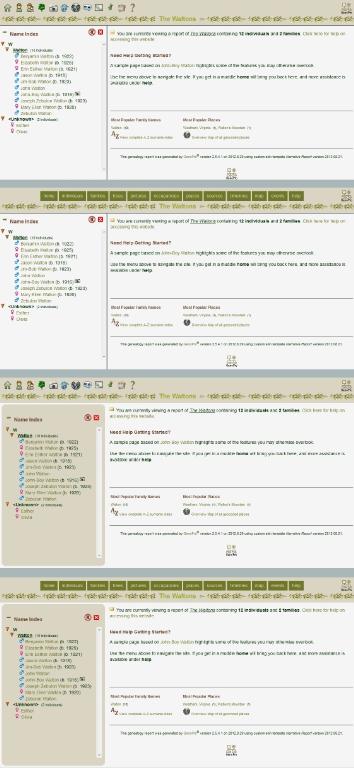
So that would be 20 screenshots for the 5 colour themes.
Obviously some amount of work by you required to implement, since I never fully figured out how the IE screen was generated. Happy to do all the screenshots - just say the word
|
|
|
|
|
Administrators
Customers
Important Contributors
FamilyTrees.GenoPro.com
GenoPro version: 3.1.0.1
Last Login: 2 days ago @ 9:23 PM
Posts: 3,464,
Visits: 26,854
|
I'll look into this. I'm thinking of a picture gallery allowing the user to click through the possibilities before selecting the desired theme.
I'll probably need to hand craft this as it is difficult to include javascript frameworks such as jQuery in the Configuration Parameters dialogue since for non-custom skins it gets embedded in the GenoPro exe. I'll also have to cater for user-defined themes as at present. FYI, the Configuration Parameters dialogue is created from the script by loading an Internet Explorer window as a COM automation object (a.k.a. ActiveX control). Documentation on this feature of IE is quite scarce. This IE object is then controlled by the skin script, first loading a skeleton template and then fleshing it out with parameter details extracted from Config.xml and any previously set non-default values from the registry. The window is then made visible and the script waits for one of the buttons to be pressed and then analyses the input fields.
'lego audio video erro ergo disco' or "I read, I listen, I watch, I make mistakes, therefore I learn"
|