|
|
|
|
Administrators
Customers
Important Contributors
FamilyTrees.GenoPro.com
GenoPro version: 3.1.0.1
Last Login: 2 days ago @ 9:23 PM
Posts: 3,464,
Visits: 26,854
|
OliveBranch is now back in.
For new themes you can just add the theme folder without sample images and edit ConfigXXMsg.xml. A dummy image will be substituted. You can then run the report and capture screen shots for the sample images and save to the samples folder.
'lego audio video erro ergo disco' or "I read, I listen, I watch, I make mistakes, therefore I learn"
|
|
|
|
|
FamilyTrees.GenoPro.com
Customers
GenoPro version: 3.1.0.1
Last Login: Thursday, June 2, 2022
Posts: 108,
Visits: 1,280
|
Thanks Ron. I was hoping it was a simple case of editing a file and providing images. Marvelous!!
|
|
|
|
|
Administrators
Customers
Important Contributors
FamilyTrees.GenoPro.com
GenoPro version: 3.1.0.1
Last Login: 2 days ago @ 9:23 PM
Posts: 3,464,
Visits: 26,854
|
Whoops, seems I overlooked OliveBranch which is a shame 'cos I quite like it! I'll add it soon.
Sample images are in a folder 'samples' in each theme's folder. the images are named according to additional options for the theme. So 0.jpg no extra options, add 1 for text label menu, add 2 for rounded corners so 3.jpg has both these options. Obviously more options can be added (4,8,16,32 etc). Images are 512 x 300 pixels and 36 d.p.i. to keep size low but just about viewable. The ConfigXXMsg. xml file has something similar to the old scheme O9="Blood_0:Blood theme with icon buttons for top menu" O10="Blood_1:Blood theme with text buttons for top menu" O11="Blood_2:Blood theme with icon buttons for top menu and rounded corners on index and pop-up frames" O12="Blood_3:Blood theme with text buttons for top menu and rounded corners on index and pop-up frames" O13="BlueDNA_0:BlueDNA theme with icon buttons for top menu" O14="BlueDNA_1:BlueDNA theme with text buttons for top menu" O15="BlueDNA_2:BlueDNA theme with icon buttons for top menu and rounded corners on index and pop-up frames" O16="BlueDNA_3:BlueDNA theme with text buttons for top menu and rounded corners on index and pop-up frames" O17="GreenLeaf_0:GreenLeaf theme with icon buttons for top menu"
|
But with extra options number appended to theme name after an underscore. The form still has the drop down list but it is hidden and selection is driven from the theme picker gallery. As yet I have not implemented the previous facility whereby new theme folders could be added without editing the ConfigXXMsg.xml file but just by adding new theme folders (if I had then it would have found OliveBranch!). I don't think I'll bother as it is simple enough to copy, paste and edit from other themes in that file.
'lego audio video erro ergo disco' or "I read, I listen, I watch, I make mistakes, therefore I learn"
Edited: Thursday, September 6, 2012 by
genome
|
|
|
|
|
FamilyTrees.GenoPro.com
Customers
GenoPro version: 3.1.0.1
Last Login: Thursday, June 2, 2022
Posts: 108,
Visits: 1,280
|
I'm stumped  I was figuring I might want to hack the theme picker at some point if I were to be testing any new themes. I was figuring I might want to hack the theme picker at some point if I were to be testing any new themes.
btw - OliveBranch is awol...
I like the generic image for individuals with no pictures. I had hacked something similar into an older version of the report, but had dropped it in order to reduce the number of "hacks" I need to re-integrate into each new official version of the narrative report.
Edited: Thursday, September 6, 2012 by
HarryCaper
|
|
|
|
|
FamilyTrees.GenoPro.com
Customers
GenoPro version: 3.1.0.1
Last Login: Thursday, June 2, 2022
Posts: 108,
Visits: 1,280
|
Looking good  Just trying to figure out how the theme picker works (where the images come from, how the list is generated)... Just trying to figure out how the theme picker works (where the images come from, how the list is generated)...
|
|
|
|
|
Administrators
Customers
Important Contributors
FamilyTrees.GenoPro.com
GenoPro version: 3.1.0.1
Last Login: 2 days ago @ 9:23 PM
Posts: 3,464,
Visits: 26,854
|
Well after jumping through many hoops and almost running out of midnight oil I have managed to get the theme gallery working in Narrative Report 2012.09.06
I've also included your new themes Harry and also a suggestion from Stuart and others in the past for an option to have generic images when an individual has no picture.
'lego audio video erro ergo disco' or "I read, I listen, I watch, I make mistakes, therefore I learn"
|
|
|
|
|
FamilyTrees.GenoPro.com
Customers
GenoPro version: 3.1.0.1
Last Login: Thursday, June 2, 2022
Posts: 108,
Visits: 1,280
|
|
|
|
|
|
Administrators
Customers
Important Contributors
FamilyTrees.GenoPro.com
GenoPro version: 3.1.0.1
Last Login: 2 days ago @ 9:23 PM
Posts: 3,464,
Visits: 26,854
|
I'll look into this. I'm thinking of a picture gallery allowing the user to click through the possibilities before selecting the desired theme.
I'll probably need to hand craft this as it is difficult to include javascript frameworks such as jQuery in the Configuration Parameters dialogue since for non-custom skins it gets embedded in the GenoPro exe. I'll also have to cater for user-defined themes as at present. FYI, the Configuration Parameters dialogue is created from the script by loading an Internet Explorer window as a COM automation object (a.k.a. ActiveX control). Documentation on this feature of IE is quite scarce. This IE object is then controlled by the skin script, first loading a skeleton template and then fleshing it out with parameter details extracted from Config.xml and any previously set non-default values from the registry. The window is then made visible and the script waits for one of the buttons to be pressed and then analyses the input fields.
'lego audio video erro ergo disco' or "I read, I listen, I watch, I make mistakes, therefore I learn"
|
|
|
|
|
FamilyTrees.GenoPro.com
Customers
GenoPro version: 3.1.0.1
Last Login: Thursday, June 2, 2022
Posts: 108,
Visits: 1,280
|
Real life - can't be ignored 
Every now and again I check the directory and look at the recently updated & created family tree reports - surprising to see how many use the default theme options.
I wonder whether it is worth providing a preview function in the IE window - a sort of one click facility that sets the colour schemes / frames vs curvy boxes / icons vs text options appropriately. Perhaps by providing a pick-by-preview facility those people who just go with the defaults might be tempted to personalise their report a little. The way I imagine it, it would need 4 screenshots for each colour theme:
1. Icon Menu & Frames
2. Text Menu & Frames
3. Icon Menu & Curvy boxes
4. Text Menu & Curvy boxes
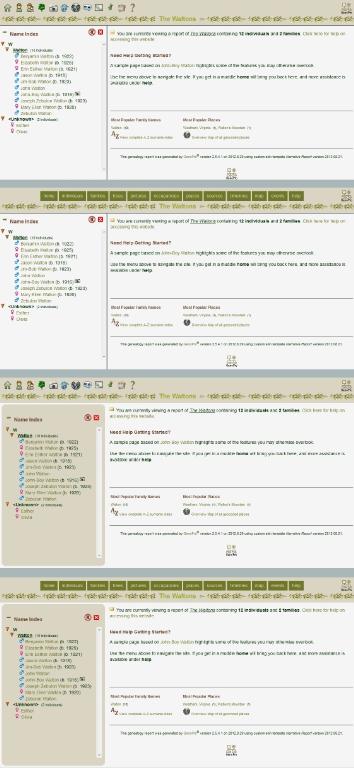
So that would be 20 screenshots for the 5 colour themes.
Obviously some amount of work by you required to implement, since I never fully figured out how the IE screen was generated. Happy to do all the screenshots - just say the word
|
|
|
|
|
Administrators
Customers
Important Contributors
FamilyTrees.GenoPro.com
GenoPro version: 3.1.0.1
Last Login: 2 days ago @ 9:23 PM
Posts: 3,464,
Visits: 26,854
|
Hi Harry,
Glad to hear you are still 'alive and kicking' and looking in the forum again. I was busy elsewhere myself earlier in the year and have only recently found time to attend to a few report issues. Thanks for these updates, the event calendar page looks good now it is themed and the title is definitely better without the box. I'll add them to a skin revision and post it very soon, maybe later today. I think Dan should be back from his hols now so maybe we can get it in a GenoPro update too as the majority of users never use the forum updates judging from the download figures. regards, Ron
'lego audio video erro ergo disco' or "I read, I listen, I watch, I make mistakes, therefore I learn"
|