|
|
|
|
Important Contributors
FamilyTrees.GenoPro.com
Customers
Translator
GenoPro version: 2.0.1.6
Last Login: Tuesday, December 16, 2008
Posts: 390,
Visits: 1,271
|
To Ron: I tried to change the Background and the Fill colour in genomap.svg but to no avail. Still showing White. Question: is it possible to change the background colour from white to, say, a lighter shade of another colour?
Thank you Ron.
Edited: Saturday, August 19, 2006 by
jcguasp
|
|
|
|
|
Important Contributors
FamilyTrees.GenoPro.com
Customers
Translator
GenoPro version: 2.0.1.6
Last Login: Tuesday, December 16, 2008
Posts: 390,
Visits: 1,271
|
Update on the topic:I managed to change the BG colour with Firefox (I choosed beige): 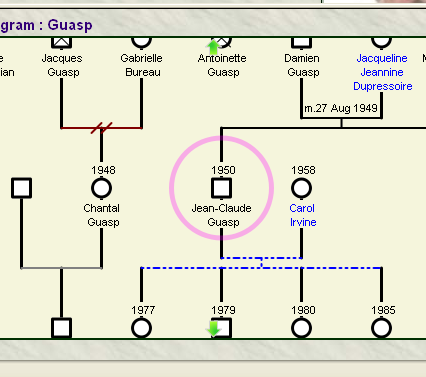
But with MSIE, only the rect of the dates and names changed. Still the white main BG: 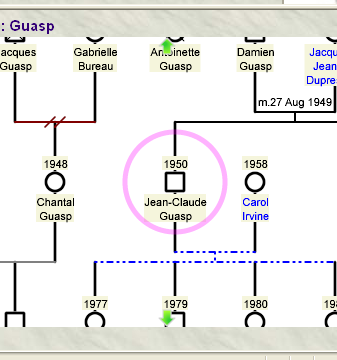
|
|
|
|
|
Administrators
Customers
Important Contributors
FamilyTrees.GenoPro.com
GenoPro version: 3.1.0.1
Last Login: Yesterday @ 9:20 PM
Posts: 3,478,
Visits: 27,084
|
I wasn't aware that it was possible to change the 'canvas' colour of an SVG image, but after your post I see that changing the 'blackground-color' style attribute in the <svg> element does indeed change the canvas with Mozilla Firefox as you say. But it has no effect with IE/ASV3. Adobe does however support a 'transparent' mode allowing the HTML page content to show through, so a combination of the two techniques may resolve this point. To use Adobe transparent mode add wmode="transparent" to the attribute list of the emitSVG call in genomap.htm.
'lego audio video erro ergo disco' or "I read, I listen, I watch, I make mistakes, therefore I learn"
|
|
|
|
|
Important Contributors
FamilyTrees.GenoPro.com
Customers
Translator
GenoPro version: 2.0.1.6
Last Login: Tuesday, December 16, 2008
Posts: 390,
Visits: 1,271
|
Thanks for your answer. I tried the "Transparent" mode and still doesn't work with MSIE: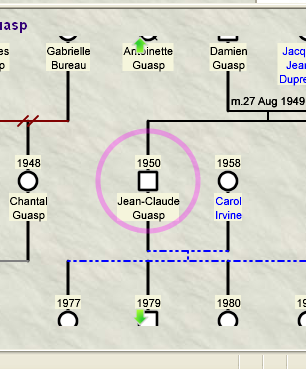
The style sheet "background.jpg" image takes over. For your info, I temporarily disabled Style.css and noticed that my beige color is present alright, but unfortunately, with the jpg image back on, under the said BG jpg image.
|
|
|
|
|
Customers
Important Contributors
FamilyTrees.GenoPro.com
GenoPro version: 3.0.1.5
Last Login: Saturday, March 14, 2020
Posts: 365,
Visits: 3,680
|
I use color coding for the various generations which means that I don't have a problem with the color behind the text as the boxes are already colored, but I found the effect of making the SVG transparent and thus showing my background very pleasing, so thanks for the tip. I will use this for my next update.
|
|
|
|
|
Administrators
Customers
Important Contributors
FamilyTrees.GenoPro.com
GenoPro version: 3.1.0.1
Last Login: Yesterday @ 9:20 PM
Posts: 3,478,
Visits: 27,084
|
jcguasp (8/20/2006)
Thanks for your answer. I tried the "Transparent" mode and still doesn't work with MSIEYou will of course need to change the HTML background to match. Add a line to style.css | .genomap {background-color:beige;background-image:none;} |
And then change the <body> tag in genomap.htm to Keep the wmode attribute. I've not tested this but I think it should work.
'lego audio video erro ergo disco' or "I read, I listen, I watch, I make mistakes, therefore I learn"
|
|
|
|
|
Important Contributors
FamilyTrees.GenoPro.com
Customers
Translator
GenoPro version: 2.0.1.6
Last Login: Tuesday, December 16, 2008
Posts: 390,
Visits: 1,271
|
You're approaching but still not quite. I've got now the beige full BG but the border (where the icons are) is also beige. Same for Firefox.
|
|
|
|
|
Important Contributors
FamilyTrees.GenoPro.com
Customers
Translator
GenoPro version: 2.0.1.6
Last Login: Tuesday, December 16, 2008
Posts: 390,
Visits: 1,271
|
I did some research on the net but the only way I could manage to get a proper color Bg with MSIE was to add a <rect> tag within the <svg> tag in one of my trial test genomap0.svg: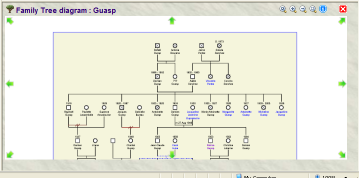
It's apparently not the ideal solution but if the <rect> tag sizes covers well beyond the white part, when viewing the full genomap, I suppose it should then be OK. I voluntarily shown a blue border but it's advisable to remove it because Firefox is showing it: 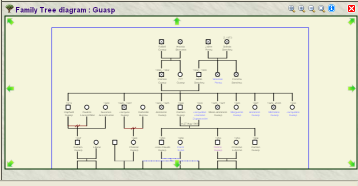
Thanks
|
|
|
|
|
Administrators
Customers
Important Contributors
FamilyTrees.GenoPro.com
GenoPro version: 3.1.0.1
Last Login: Yesterday @ 9:20 PM
Posts: 3,478,
Visits: 27,084
|
Yes I had thought of that approach but discounted it because of the limitations when zooming out. You can of course generate the necessary <rect> tag by adding a large blank text label or shape in GenoPro.
'lego audio video erro ergo disco' or "I read, I listen, I watch, I make mistakes, therefore I learn"
|
|
|
|
|
Customers
Important Contributors
FamilyTrees.GenoPro.com
Translator
GenoPro version: 3.1.0.1
Last Login: Sunday, March 21, 2021
Posts: 716,
Visits: 12,927
|
Ron (8/20/2006)
I wasn't aware that it was possible to change the 'canvas' colour of an SVG image, but after your post I see that changing the 'blackground-color' style attribute in the <svg> element does indeed change the canvas with Mozilla Firefox as you say. But it has no effect with IE/ASV3. Adobe does however support a 'transparent' mode allowing the HTML page content to show through, so a combination of the two techniques may resolve this point. To use Adobe transparent mode add wmode="transparent" to the attribute list of the emitSVG call in genomap.htm.
Have also tried this approach and I must say I like it the same way iaintait likes it.
Edited: Tuesday, August 22, 2006 by
maru-san
|