|
|
|
|
Administrators
Moderators
Customers
Gamma
FamilyTrees.GenoPro.com
Translator
GenoPro version: 3.1.0.1
Last Login: Tuesday, February 3, 2026
Posts: 4,886,
Visits: 22,803
|
cezary (12/3/2006)
Solved my Problem!!!!!!!!!!!!!!!!! I have just ticked only the 3rd Option and now images are displayed. We will fix this for Beta20d. Option #1 and #2 should work too. 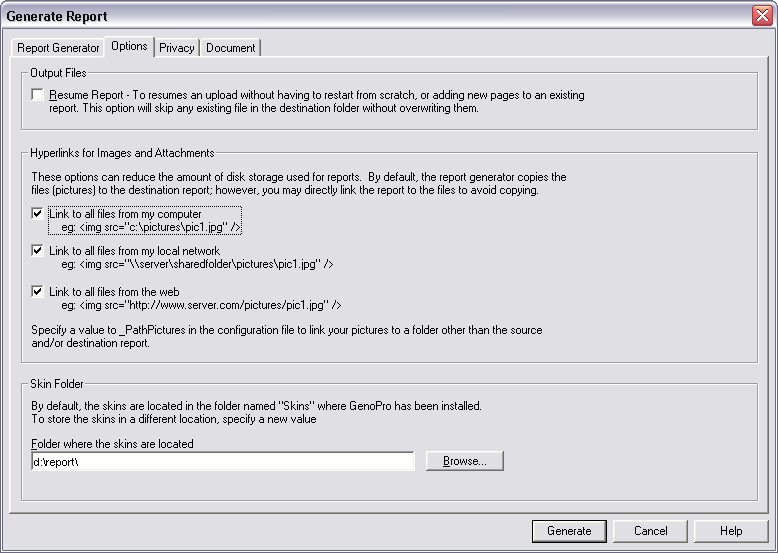
|
|
|
|
|
Customers
GenoPro version: 3.0.1.5
Last Login: Thursday, March 5, 2020
Posts: 31,
Visits: 85
|
Solved my Problem!!!!!!!!!!!!!!!!!
When Generating a Report; Under the Options tab you have 3 selections of linking your images/attachments.
When I downloaded b20b I didnt think to look at these Options to see how they were set.
In fact Option 1 and 3 were set at the same time.
This was the problem!!
I have just ticked only the 3rd Option and now images are displayed.
|
|
|
|
|
Customers
GenoPro version: 3.0.1.5
Last Login: Thursday, March 5, 2020
Posts: 31,
Visits: 85
|
I am using Firefox 2.0.
Now Displaying 19g, jpegs load.
Displaying b20b no jpegs load.
Parameter in firefox to be set???
|
|
|
|
|
Customers
Important Contributors
FamilyTrees.GenoPro.com
GenoPro version: 3.1.0.1
Last Login: Yesterday @ 8:41 PM
Posts: 1,608,
Visits: 33,390
|
Using 20c and FireFox 2.0 - jpgs load
|
|
|
|
|
Customers
GenoPro version: 3.0.1.5
Last Login: Thursday, March 5, 2020
Posts: 31,
Visits: 85
|
Yes, there is a bug with version b20b+ and Firefox.
My Family Tree is divided up into 4 Families/reports..
3 of these families have been generated using 19g and there are no problems displaying jpegs.
1 family I have updated with latest release of genopro since b20b and no jpegs are displayed.
So programmatically something has been changed, but what!!!
Under IE6, the jpegs load ok, but cant load an enlarged jpeg window when clicking the original image.
Edited: Sunday, December 3, 2006 by
cezary
|
|
|
|
|
Administrators
Moderators
Customers
Gamma
FamilyTrees.GenoPro.com
Translator
GenoPro version: 3.1.0.1
Last Login: Tuesday, February 3, 2026
Posts: 4,886,
Visits: 22,803
|
|
|
|
|
|
Customers
Important Contributors
GenoPro version: 2.5.4.0
Last Login: Thursday, January 11, 2024
Posts: 386,
Visits: 4,475
|
fHideNameTreeIndex does not exist in the file config.xml under v2.b20b, the latest version. Below are the variables available to you for change in the config file. These we hope will find their way onto the Report Generator dialog in the future.
"fUseTreeIndexes" controls whether or not 'table of contents' frames appear as expand/collapse lists or as plain lists.
"fHidePictureName" controls whether or not the picture name tag, that GenoPro defaults to filename, is shown
under the pictures (Individual, Spouse, Family, Education, Occupation, Place & Source/Citation) 'fShowPictureDetails' controls whether or not a picture details phrase and any picture notes/description are shown together with the picture on Individual & Family html pages. This information is always shown on on the 'picture-<pictureid>.htm' and 'pictures.htm' pages. "fHideFamilyDetails" controls whether or not family details appear on the 'individual' report pages. If hidden the entry is replaced by a link to the corresponding 'family' page. "fJoinPlaceNames" controls whether or not place names are shown as a comma separated list of all places in a hierarchy.
This will be of use if you have named your places using single element names such as a town, rather than qualified names such as 'town, state, country' "fJoinSourceCitationNames" controls whether or not source and citation names are shown as an @ separated list of all citations/sources in a hierarchy. This will be of use if you have named your sources using single element names such a book, rather than qualified names such 'book on shelf at library etc.' Note that special action is taken if the source title is the same as the parent title, i.e. it is inherited. If the WhereInSource (or 'reference') tag is present it is assumed to be a citation of a source rather than the source itself. In this case the WhereInSource takes the place of the title, so the joined name becomes 'WhereInSource @ source title'. cTocExpand value determines whether or not tree indexes are initally displayed expanded or not. A value of -1 means always expand the index, 0 means never expand the index and a value > 0 indicates expand index if number of entries is less than or equal to that value. The value is initially set at 1000. 'PictureInterval' specifies the picture slideshow interval between pictures in milliseconds in range 1000 to 10,000. 'fUsePictureThumbnails" can be set to Y providing you have created resized pictures in folders directly under the '_PathPictures' folders. These folders have the same names as the 'PictureSizeSmall' and 'PictureSizeLarge' parameter values i..e by default 100x100 & 250x250. Use of this parameter together with the the resized pictures will improve the download spped considerably. Tools such as 'Irfanview' can be used to create the 'thumbnail' pictures required. Pictures should be sized to 'PictureSizeSmall' and 'PictureSizeLarge' sizes and a dpi value of 72 is suggested. 'fUsePictureId' parameter indicates that the Picture 'id' field should be used in place of the Picture Name field a link from pictures to its picture details page. Set fSvgZoomExtent to "Y" if you want the initial view of the SVG graphic to show the whole of the GenoMap. Set fSvgExpandFrame to "Y" if you want to maximise the 'popup'SVF Frame when opened. The parameter GoogleMaps determines whether or not Google Maps are displayed in the 'popup' frame for Places.
The parameter GoogleMapsApiKey is the API key to be used. The default key allows publishing to familytrees.geqnopro.com
The inclusion of these values onto the Report Generator dialog will make the production of the Report much more user friendly.
Poolzone a mere cog in a revolution
|
|
|
|
|
Customers
GenoPro version: 2.5.4.0
Last Login: Sunday, September 20, 2015
Posts: 64,
Visits: 1,814
|
That's it.
Thanks for the link.
Is this the control for Show or Hide the individual tree?
fHideNameTreeIndex="N"
|
|
|
|
|
Customers
Important Contributors
GenoPro version: 2.5.4.0
Last Login: Thursday, January 11, 2024
Posts: 386,
Visits: 4,475
|
Hi Barry, Refer http://support.genopro.com/FindPost9498.aspx in December 2005 to which you replied "Thanks for the reponse. That simple alteration fixed the problem. " Some of my pages when 'expanded' are six screen heights long. The reader gets lost amongst such a huge list of data. My readers are pleased to access the data as required, neatly sorted by descriptive headings. However Dan has forshadowed that he will in future include these variations in the Report Generator dialog, so we can all produce the report of choice without editing files.
Poolzone a mere cog in a revolution
Edited: Friday, December 1, 2006 by
GenoProSupport
|
|
|
|
|
Customers
GenoPro version: 2.5.4.0
Last Login: Sunday, September 20, 2015
Posts: 64,
Visits: 1,814
|
Ron said:
But perhaps we need a help/information button in the heading frame that displays a page for new vistors that explains how best to navigate the pages in the report. i.e. what each button does etc. We are all now used to navigating around the pages of a report but I wonder how a new visitor manages it.
I send reports on CD to my relatives who are of advanced age like myself.
It is much better for them to be able to read the WHOLE report - notes, trees and all.
I can't see why it isn't possible to make the options "Collapse Notes" and "Collapse Tree" options in the Report Generator.
Dan - If you do revert back to All Collapsed by Default could you please provide some clear instructions for those of us that are not programmers on how to configure the report generator so that reports show all details by default.
At the present I can change the fonts from small italic to 10 pt regular so that my relatives can read the report but I can't find how to set the notes and tree to default to visible.
|