|
|
|
|
Customers
Important Contributors
FamilyTrees.GenoPro.com
GenoPro version: 3.1.0.1
Last Login: Yesterday @ 9:32 PM
Posts: 1,614,
Visits: 33,892
|
Some time ago I showed how a djvu image can contain identification of people and also links to web pages. As my ISP lost all my original files, this no longer works. However I have now experimented to see if it is possible to plant an image into a GemoPro Report. If you have the djvu add-in, then try
http://familytrees.genopro.com/appleshaw/djvu/default.htm
If you do not have the browser plug-in it can be obtained from Lizardtech..This is a first attempt - proof of concept if you like. A small image is loaded into the home page and when you move the cursor over it, names appear. Clicking on a name brings the relevant page of data from the report. You have to use the back button to get back to the image - this is only first attempt. Hopefully most of the links work, although there are at least two where I have not yet found the relevant data and so you get an error message. The image is very small on first loading but can be zoomed, or use the 100% button to get a reasonable size. The code to load the image is
This code is based on the example given in the Lizardtech help pages. I had problems getting the image in the correct place so that the URL entered into the djvu image was able to find the report data. The simplest way seems to put the image in the root directory of the customised skin. You need Djvu Solo editor to add the URL, which I obtained by loading the relevant page and copying the link location and cutting it back to the basic data. It would obviously be better to load the image where the .svg image appears so that the data can appear above the picture. This will involve getting to grips with the code.
|
|
|
|
|
Customers
Important Contributors
FamilyTrees.GenoPro.com
GenoPro version: 3.0.1.5
Last Login: Saturday, March 14, 2020
Posts: 365,
Visits: 3,680
|
|
|
|
|
|
Customers
Important Contributors
FamilyTrees.GenoPro.com
Translator
GenoPro version: 3.1.0.1
Last Login: Sunday, March 21, 2021
Posts: 716,
Visits: 12,927
|
Had included a djvu file for some time on my page, however without linking to the individuals.
You have to go to my page "Niels Martensen" and click under sources/citation > Abschlussklasse and then the djvu_media_cg.htm file.
I am not quite sure yet whether I will add the links.
|
|
|
|
|
Customers
Important Contributors
FamilyTrees.GenoPro.com
GenoPro version: 3.1.0.1
Last Login: Yesterday @ 9:32 PM
Posts: 1,614,
Visits: 33,892
|
A very interesting idea, but how do you get the links and popup texts ?
Use Djvu Solo 3.1 editor. This was originally available from Lizardtech but they seem to want money now. However you can get it (legally) from http://www.planetdjvu.com/forum.htm (the Resources page)
The editor will read jpg or bmp files, which you then save as djvu format. You can then edit the file, which is fairly straightforward. Choose a shape for the link (square, oval, polygon) and mark the image. This then opens an editing pane where you can add pop-up text and the hyperlink.
One thing I have noticed is that it has to be a direct hyperlink to a file and so the ability to load into a different area, as Ron's svg graphic does, is probably not an option. Something to explore
Edited: Thursday, March 29, 2007 by
GenoProSupport
|
|
|
|
|
Customers
Important Contributors
FamilyTrees.GenoPro.com
Translator
GenoPro version: 3.1.0.1
Last Login: Sunday, March 21, 2021
Posts: 716,
Visits: 12,927
|
appleshaw (3/29/2007)
A very interesting idea, but how do you get the links and popup texts ? One thing I have noticed is that it has to be a direct hyperlink to a file and so the ability to load into a different area, as Ron's svg graphic does, is probably not an option. Something to explore Just to show that the djvu image can be shown the same way a SVG chart, a google map or a timeline can be seen in the popup frame: 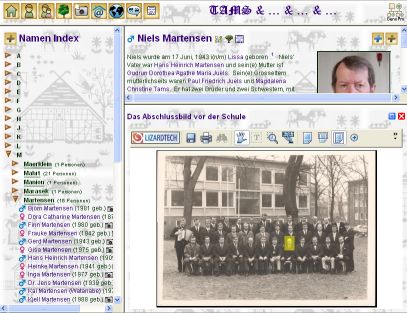
|
|
|
|
|
Customers
Important Contributors
FamilyTrees.GenoPro.com
GenoPro version: 3.0.1.5
Last Login: Saturday, March 14, 2020
Posts: 365,
Visits: 3,680
|
appleshaw (3/29/2007)
Use Djvu Solo 3.1 editor. This was originally available from Lizardtech but they seem to want money now. However you can get it (legally) from http://www.planetdjvu.com/forum.htm (the Resources page) Thanks for the tip I will give it a try this evening.
Edited: Thursday, March 29, 2007 by
GenoProSupport
|
|
|
|
|
Customers
Important Contributors
FamilyTrees.GenoPro.com
GenoPro version: 3.1.0.1
Last Login: Yesterday @ 9:32 PM
Posts: 1,614,
Visits: 33,892
|
Just to show that the djvu image can be shown the same way a SVG chart, a google map or a timeline can be seen in the popup frame:
Have not yet looked at how you did that, but that is not the point I was trying to make. This is that if you add a djvu image in the lower frame, it will normally be replaced by the linked file; not loaded into the top frame as happens from Ron's svg image. Not to say it can not be done, but the only option is to load a file.
However there is a window directing where the loading will take place, which I have never explored, so it may be an option. The options here are 'Same Frame, Same Window, New Window and Other'. If you click 'Other' another box opens allowing you to specify a target. So maybe that is the answer. As I said, it is a learning process
|
|
|
|
|
Customers
Important Contributors
FamilyTrees.GenoPro.com
GenoPro version: 3.1.0.1
Last Login: Yesterday @ 9:32 PM
Posts: 1,614,
Visits: 33,892
|
Maru-san
I have now had a more detailed look at your example image. To prevent me attempting to re-invent the wheel can you set out what is needed to put the djvu image into the lower frame, and the name of the target of the djvu image
|
|
|
|
|
Customers
Important Contributors
FamilyTrees.GenoPro.com
GenoPro version: 3.0.1.5
Last Login: Saturday, March 14, 2020
Posts: 365,
Visits: 3,680
|
I had a go and was pleasantly surprised to find how easy it was to do.I have only managed to add a link in the Comments which links to my "C:\Pictures" folder but I can't yet get the generator to copy it as a photo to the report and to show up in the "pictures" folder of the report.
|
|
|
|
|
Customers
Important Contributors
FamilyTrees.GenoPro.com
GenoPro version: 3.1.0.1
Last Login: Yesterday @ 9:32 PM
Posts: 1,614,
Visits: 33,892
|
I found that the easiest way to get the report generator to find the image was to place it in the top level of the Customised skin that you use. GenoPro itself does not recognise it, so presumably it is not picked up when the report is generated. You can place it in an images directory but this then confused the link from the image in the report
|