GenoPro Home
GenoPro Home  |  Get Started With My Genealogy Tree  |  Buy  |  Login  |  Privacy  |  Search  |  Site Map
 

GenoPro Support Forum


Putting djvu image into a report

Click to view RSS...
Author How to link an image to personal data
Posted Wednesday, March 28, 2007 - Post #17127
Grand Master

Grand MasterGrand MasterGrand MasterGrand MasterGrand MasterGrand MasterGrand MasterGrand MasterGrand Master

Customers
Important Contributors
FamilyTrees.GenoPro.com
GenoPro version: 3.1.0.0

Last Login: Yesterday @ 12:43 PM
Posts: 1,596, Visits: 32,537
Some time ago I showed how a djvu image can contain identification of people and also links to web pages. As my ISP lost all my original files, this no longer works. However I have now experimented to see if it is possible to plant an image into a GemoPro Report. If you have the djvu add-in, then try
http://familytrees.genopro.com/appleshaw/djvu/default.htm
If you do not have the browser plug-in it can be obtained from Lizardtech..

This is a first attempt - proof of concept if you like. A small image is loaded into the home page and when you move the cursor over it, names appear. Clicking on a name brings the relevant page of data from the report. You have to use the back button to get back to the image - this is only first attempt. Hopefully most of the links work, although there are at least two where I have not yet found the relevant data and so you get an error message.

The image is very small on first loading but can be zoomed, or use the 100% button to get a reasonable size. The code to load the image is

This code is based on the example given in the Lizardtech help pages. I had problems getting the image in the correct place so that the URL entered into the djvu image was able to find the report data. The simplest way seems to put the image in the root directory of the customised skin. You need Djvu Solo editor to add the URL, which I obtained by loading the relevant page and copying the link location and cutting it back to the basic data.

It would obviously be better to load the image where the .svg image appears so that the data can appear above the picture. This will involve getting to grips with the code.

Replies
Posted Saturday, March 31, 2007 - Post #17180
Forum Master

Forum MasterForum MasterForum MasterForum MasterForum MasterForum MasterForum MasterForum MasterForum Master

Customers
Important Contributors
FamilyTrees.GenoPro.com
Translator
GenoPro version: 3.1.0.1

Last Login: Sunday, March 21, 2021
Posts: 716, Visits: 12,927
IainTait (3/30/2007)

But it still takes up the whole individual htm instead of opening in a lower frame like your image shows.

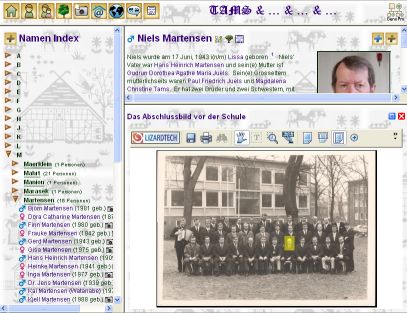
IainTait, if you click this source from the left "toc" frame, it will show up as you are showing, however if you select this source from the family page, this source belongs to, it will show up in the popup frame(as shown in screen shot).
If you enter "detail" into the Target >other> of the djvu file (without the excl. marks), the individual will show up in the upper frame.
It works without having to create the frameset file.

Please also note, that you can set the height to 100%, it all depends how you would like to see it.


Edited: Saturday, March 31, 2007 by maru-san
Posted Sunday, April 1, 2007 - Post #17186
Famous Writer

Famous WriterFamous WriterFamous WriterFamous WriterFamous WriterFamous WriterFamous WriterFamous WriterFamous Writer

Customers
Important Contributors
FamilyTrees.GenoPro.com
GenoPro version: 3.0.1.5

Last Login: Saturday, March 14, 2020
Posts: 365, Visits: 3,680
maru-san (3/31/2007)
IainTait (3/30/2007)

But it still takes up the whole individual htm instead of opening in a lower frame like your image shows.

IainTait, if you click this source from the left "toc" frame, it will show up as you are showing, however if you select this source from the family page, this source belongs to, it will show up in the popup frame(as shown in screen shot).
If you enter "detail" into the Target >other> of the djvu file (without the excl. marks), the individual will show up in the upper frame.
It works without having to create the frameset file.

Please also note, that you can set the height to 100%, it all depends how you would like to see it.
I tried this and it was perfect so will now see if I can get the link to work from the family page.

This is the code I put in the toc_djvu.htm to open the multimedia.htm in the lower frame as you suggested.

<body>
<br><br>
<center>
<p align="center"><font size="5" face="Tolkien" color="#0000ff"><b>Linked Family Portraits</b></font><br>
<div class='nobr'><br>
<ul id='names' class='xT'>
<li class='xT2-o' onclick='xTclk(event,"2");'> <span class='xT-i bold'>S</span><ul><br>
<img src='images/photo.gif' border='0' width='16' height='16' alt='Family Tree'/> <a href='multimedia.htm?x=-849,5,y=-609,5,highlight=false'onclick='showPopUpFrame("");' target='popup'>Sinclair Family Portrait</a><br /></ul></li>
</ul>

<br><br>

</center></p>

</body>

Edited: Sunday, April 1, 2007 by IainTait

Posted Saturday, March 31, 2007 - Post #17181
Famous Writer

Famous WriterFamous WriterFamous WriterFamous WriterFamous WriterFamous WriterFamous WriterFamous WriterFamous Writer

Customers
Important Contributors
FamilyTrees.GenoPro.com
GenoPro version: 3.0.1.5

Last Login: Saturday, March 14, 2020
Posts: 365, Visits: 3,680
Thanks for the tip, I have managed to make a button for the heading.htm and a toc_djvu.htm which opens the multimedia.htm in the lower frame though it doesn't fill it.

I messed around with the links in the finished toc_genomaps.htm and toc_timelines.htm untill I found the combination which worked by trial and error. (mostly error !)

I hadn't been able to open the links in the upper frame so will now try.

I didn't manage to get the link from the sources to work but will also try the family link tomorrow.

Thanks again.

Posted Sunday, April 1, 2007 - Post #17183
Grand Master

Grand MasterGrand MasterGrand MasterGrand MasterGrand MasterGrand MasterGrand MasterGrand MasterGrand Master

Customers
Important Contributors
FamilyTrees.GenoPro.com
GenoPro version: 3.1.0.0

Last Login: Yesterday @ 12:43 PM
Posts: 1,596, Visits: 32,537
In my example there are several attempts to get this working. The link 'framed' is the correct version.
If this is opened from the list of Sources, followed by clicking on 'mixed.html' then the frames are set correctly and the links work as planned.
If you start from the family list then the link 'framed' is still there but within another set of frames. This sequence then opens a new frame, which needs to be resized so that the new information can be seen.
Need to see if it is possible to use the existing frame name, which appears to be 'popup'
Posted Sunday, April 1, 2007 - Post #17192
Forum Master

Forum MasterForum MasterForum MasterForum MasterForum MasterForum MasterForum MasterForum MasterForum Master

Customers
Important Contributors
FamilyTrees.GenoPro.com
Translator
GenoPro version: 3.1.0.1

Last Login: Sunday, March 21, 2021
Posts: 716, Visits: 12,927
appleshaw (4/1/2007)
In my example there are several attempts to get this working. The link 'framed' is the correct version.
If this is opened from the list of Sources, followed by clicking on 'mixed.html' then the frames are set correctly and the links work as planned.
If you start from the family list then the link 'framed' is still there but within another set of frames. This sequence then opens a new frame, which needs to be resized so that the new information can be seen.
Need to see if it is possible to use the existing frame name, which appears to be 'popup'


May be this is something Ron can look into it:
If I open a place from the toc frame, the list appears in the detail frame, if I click then to show the google map, the popup frame comes up.
I would like to see the same procedure with sources:
Open a source from the toc frame, the list appears in the detail frame, if I click the linked file, it will replace the detail frame instead of showing in the popup frame.
The question is, does it makes sense to show this linked file in the popup frame, since it could also be in a different file format than djvu (pdf, doc, xls, etc)?

Threaded View

Expand / Collapse
Threaded View
Forum Post Putting djvu image into a report By appleshaw ( Wednesday, March 28, 2007 )
Forum Post The HTML standard does have a native facility for linking from images... By genome ( Thursday, April 5, 2007 )
Forum Post [quote][b]Ron (4/5/2007)[/b][hr]Of course an editor is still needed to... By GenoProSupport ( Thursday, April 5, 2007 )
Forum Post I just discovered that my djvu images don't work with firefox as there... By IainTait ( Thursday, April 5, 2007 )
Forum Post [quote][b]IainTait (4/5/2007)[/b][hr]I just discovered that my djvu... By maru-san ( Thursday, April 5, 2007 )
Forum Post [quote][b]maru-san (4/5/2007)[/b][hr][quote][b]IainTait... By IainTait ( Friday, April 6, 2007 )
Forum Post Where does djvu fit into GenoPro The djvu file format is a compression... By appleshaw ( Thursday, April 5, 2007 )
Forum Post [quote][b]appleshaw (4/5/2007)[/b][hr]Where does djvu fit into GenoPro... By genome ( Monday, April 9, 2007 )
Forum Post It appears I was not paying attention in class when taught how to show... By Poolzone ( Monday, April 9, 2007 )
Forum Post [quote][b]poolzone (4/9/2007)[/b]It appears I was not paying attention... By genome ( Monday, April 9, 2007 )
Forum Post I downloaded your 3 files and put them in a backup skin but the only... By IainTait ( Tuesday, April 10, 2007 )
Forum Post When I first started putting images on the internet, for a school... By appleshaw ( Tuesday, April 10, 2007 )
Forum Post [quote][b]IainTait (4/10/2007)[/b][hr]Having got my head round... By maru-san ( Tuesday, April 10, 2007 )
Forum Post Ron, This is a fantastic feature, and well implemented. I get the... By Poolzone ( Tuesday, April 10, 2007 )
Forum Post [quote][b]poolzone (4/10/2007)[/b] I get the following fault when... By genome ( Tuesday, April 10, 2007 )
Forum Post [quote] Has anyone got it work? [/quote] Yes. It is very easy to... By Poolzone ( Tuesday, April 10, 2007 )
Forum Post [quote][b]Ron (4/10/2007)[/b][hr] [quote][b]IainTait[/b] I don't see... By IainTait ( Tuesday, April 10, 2007 )
Forum Post [quote]I must admit that not needing a plugin could be... By appleshaw ( Tuesday, April 10, 2007 )
Forum Post [quote][b]appleshaw (4/10/2007)[/b][hr][quote]I must admit that not... By IainTait ( Tuesday, April 10, 2007 )
Forum Post Iain, the tag does not recognise new lines, so when you edit the... By Poolzone ( Tuesday, April 10, 2007 )
Forum Post [quote][b]poolzone (4/10/2007)[/b][hr]Iain, the tag does not... By IainTait ( Wednesday, April 11, 2007 )
Forum Post [quote]I will need to indicate somewhere that this facility is... By Poolzone ( Wednesday, April 11, 2007 )
Forum Post [quote][b]poolzone (4/11/2007)[/b][hr][quote]I will need to indicate... By genome ( Wednesday, April 11, 2007 )
Forum Post [quote][b]Ron (4/11/2007)[/b][hr] If you hover over the thumbnail... By IainTait ( Thursday, April 12, 2007 )
Forum Post Yes, IE picks up the ALT attribute from the image rather than the... By genome ( Thursday, April 12, 2007 )
Forum Post [quote][b]Ron (4/12/2007)[/b][hr]I missed that but is corrected in... By IainTait ( Thursday, April 12, 2007 )
Forum Post [quote]I can't find where you posted 2.0.0.3j[/quote]Same place as... By genome ( Thursday, April 12, 2007 )
Forum Post Thanks Ron, I was a bit dim, but tomorrow I will have some fun with it... By IainTait ( Thursday, April 12, 2007 )
Forum Post See also [url=Topic11544-63-1.aspx]Selecting an individual from a... By GenoProSupport ( Monday, March 10, 2008 )
Forum Post [quote]If you hover over the thumbnail image there is already a... By Poolzone ( Wednesday, April 11, 2007 )
Forum Post I have another suggestion for this feature. Sometimes you just want to... By maru-san ( Wednesday, April 11, 2007 )
Forum Post This feature was something I expected as soon the discussion (way... By maru-san ( Monday, April 9, 2007 )
Forum Post This "area" system is what controls the positions of the linked images... By IainTait ( Monday, April 9, 2007 )
Forum Post I put the djvu images and the htm files in the main skin folder and... By IainTait ( Thursday, April 5, 2007 )
Forum Post This now works at... By appleshaw ( Saturday, March 31, 2007 )
Forum Post I had a go and was pleasantly surprised to find how easy it was to do.... By IainTait ( Thursday, March 29, 2007 )
Forum Post I found that the easiest way to get the report generator to find the... By appleshaw ( Thursday, March 29, 2007 )
Forum Post [quote][b]appleshaw (3/29/2007)[/b][hr]I found that the easiest way to... By IainTait ( Thursday, March 29, 2007 )
Forum Post [quote][b]IainTait (3/29/2007)[/b][hr]I hardly dare ask "Ron the Guru"... By maru-san ( Thursday, March 29, 2007 )
Forum Post [quote][b]maru-san (3/29/2007)[/b][hr]This htm file (please rename) is... By IainTait ( Thursday, March 29, 2007 )
Forum Post Please note that this set up can also be used to publish images, flash... By maru-san ( Thursday, March 29, 2007 )
Forum Post [quote]The 2nd file 'multimedia1.htm' simply has a jpg taken from your... By IainTait ( Thursday, March 29, 2007 )
Forum Post Following is the code from the sample Ron prepared: [quote] "h3... By maru-san ( Friday, March 30, 2007 )
Forum Post [quote][b]maru-san (3/30/2007)[/b][hr]Following is the code from the... By IainTait ( Friday, March 30, 2007 )
Forum Post Sorry I was not more explicit. It needs to be put with the GenoPro2007... By appleshaw ( Thursday, March 29, 2007 )
Forum Post Wow ! :Wow: I'm just getting over the timeline miracle and now... By IainTait ( Wednesday, March 28, 2007 )
Forum Post I am unable to open up the genogram when sending it to myself on the... By 413379 ( Wednesday, March 26, 2008 )
Forum Post [quote][b]413379 (3/26/2008)[/b][hr]I am unable to open up the... By GenoProSupport ( Thursday, March 27, 2008 )
Forum Post Not sure what you mean here. If you can not see the report genogram in... By appleshaw ( Thursday, March 27, 2008 )
Forum Post [quote]A very interesting idea, but how do you get the links and popup... By appleshaw ( Wednesday, March 28, 2007 )
Forum Post [quote][b]appleshaw (3/29/2007)[/b][hr]Use Djvu Solo 3.1 editor. This... By IainTait ( Thursday, March 29, 2007 )
Forum Post [quote]Just to show that the djvu image can be shown the same way a... By appleshaw ( Thursday, March 29, 2007 )
Forum Post Maru-san I have now had a more detailed look at your example image.... By appleshaw ( Thursday, March 29, 2007 )
Forum Post [quote][b]appleshaw (3/29/2007)[/b][hr][quote]A very interesting idea,... By maru-san ( Thursday, March 29, 2007 )
Forum Post [quote][b]maru-san (3/29/2007)[/b][hr][quote][b]Just to show that the... By IainTait ( Friday, March 30, 2007 )
Forum Post Ok, here it goes: 1) Create a htm file with following content by... By maru-san ( Friday, March 30, 2007 )
Forum Post Thanks a lot for this help, I needed some time to type all this in... By IainTait ( Friday, March 30, 2007 )
Forum Post [quote][b]IainTait (3/30/2007)[/b][hr] But it still takes up the whole... By maru-san ( Saturday, March 31, 2007 )
Forum Post [quote][b]maru-san (3/31/2007)[/b][hr][quote][b]IainTait... By IainTait ( Sunday, April 1, 2007 )
Forum Post Thanks for the tip, I have managed to make a button for the... By IainTait ( Saturday, March 31, 2007 )
Forum Post In my example there are several attempts to get this working. The link... By appleshaw ( Sunday, April 1, 2007 )
Forum Post [quote][b]appleshaw (4/1/2007)[/b][hr]In my example there are several... By maru-san ( Sunday, April 1, 2007 )
Forum Post [quote] maru-san Just to show that the djvu image can be shown... By IainTait ( Thursday, March 29, 2007 )
Forum Post Had included a djvu file for some time on my page, however without... By maru-san ( Wednesday, March 28, 2007 )


Similar Topics

Click to view RSS...
Expand / Collapse

Reading This Topic

Expand / Collapse