|
|
|
|
Customers
FamilyTrees.GenoPro.com
GenoPro version: 2.5.4.1
Last Login: Monday, May 5, 2014
Posts: 107,
Visits: 4,280
|
ONLY ONE HALF OF THE PROBLEM HAS BEEN SOLVEDThank you and you're right. The ONLY time when I've imported somenthing at all, was in the beginning, while converting my data from the old program to yours. I think, you should be more rigid in allowing such problematic field names formations during GED import process. After deleting the problematic custom tag a total MESS/DISORDER has been created between all the remained fields !!!  : : In the meanwhile (until the deletion process won't affect the remained database anymore at all), an additional option called "Rename custom tag" is strongly needed ! Please, pay attention at the fact that all the field names - under Column Properties - are strictly protected. The new "Rename custom tag" option shouldn't affect : the remained database in any way !!! Still waiting for your reply, Alfi P.S. Any other problematic names I should be aware to ? : : :
additional email: finkea@mail.biu.ac.il ARIGATO-GOZAIMASU(jp) DAKUJEM(sk) DANKE(d) EVHARISTIES(gr) GRAZIE(it) MERCI(f) MULTUMESC(ro) SPASIVA(ru) THANKS(gb) THODAH(il)
Edited: Sunday, April 29, 2007 by
GenoProSupport
|
|
|
|
|
Gamma
Moderators
Administrators
FamilyTrees.GenoPro.com
Customers
GenoPro version: 3.1.0.1
Last Login: Monday, May 12, 2025
Posts: 952,
Visits: 10,077
|
Alfi (4/28/2007)
The ONLY problem is that the so-called " death.date.comment" field was NEVER defined BY ME, but only by the initial program bought from you. The custom tag has been imported probably from a GEDCOM file. To delete a custom tag, right-click on the column from the table layout and select the menu item Delete Custom Tag. 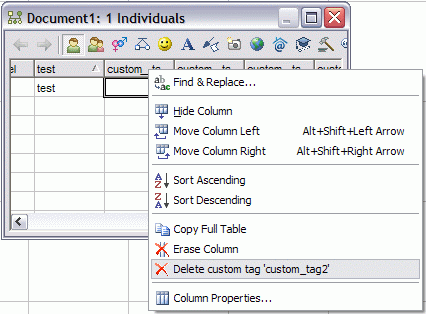
Edited: Sunday, April 29, 2007 by
GenoProSupport
|
|
|
|
|
Customers
FamilyTrees.GenoPro.com
GenoPro version: 2.5.4.1
Last Login: Monday, May 5, 2014
Posts: 107,
Visits: 4,280
|
GenoProSupport (4/22/2007)
[quote][b]If you have something like death.date.comment, just rename your tag to death.date_comment and it will work.The ONLY problem is that the so-called "death.date.comment" field was NEVER defined BY ME, but only by the initial program bought from you. Anyway, even if I wish, I cannot find any place under the TOOLS option, where to change this name. Please answer me urgently, Alfi
additional email: finkea@mail.biu.ac.il ARIGATO-GOZAIMASU(jp) DAKUJEM(sk) DANKE(d) EVHARISTIES(gr) GRAZIE(it) MERCI(f) MULTUMESC(ro) SPASIVA(ru) THANKS(gb) THODAH(il)
Edited: Saturday, April 28, 2007 by
Alfi
|
|
|
|
|
Administrators
Moderators
Customers
Gamma
FamilyTrees.GenoPro.com
Translator
GenoPro version: 3.1.0.1
Last Login: Tuesday, February 3, 2026
Posts: 4,886,
Visits: 22,803
|
Ron (4/25/2007)
I suspect that PAF will still pass Hex(0B) through via UTF-8 however. Such values need to be filtered out before GenoPro converts the data to XML.GenoPro should filter out those values. I verified the code again to confirm all values below Unicode point 32 (space) are replaced by a space except the tab, line feed and carriage return. Of course values already imported into GenoPro are kept as as is. One thing I can do is adding a routine to clean existing .xml files.
|
|
|
|
|
Administrators
Customers
Important Contributors
FamilyTrees.GenoPro.com
GenoPro version: 3.1.0.1
Last Login: 13 hours ago
Posts: 3,487,
Visits: 27,235
|
GenoProSupport (4/24/2007)
UTF-8... by far!I agree, Also I'm not sure what they actually mean by 'UNICODE' as a file encoding, unless they meant to say UTF-16. I suspect that PAF will still pass Hex(0B) through via UTF-8 however. Such values need to be filtered out before GenoPro converts the data to XML. A correction to my earlier posts, the Hex(0B) character is not actually invalid Unicode, but is an invalid XML 1.0 data character. Of the ASCII character codes below decimal 32, XML 1.0 can only legally contain 9 (tab), 10 (linefeed) or 13 (carriage return) I.e. Hex 09, 0A & 0D respectively. These character are valid in XML 1.1 , except NUL i.e. Hex 00. At the moment I am unsure of the implications of using XML 1.1.
'lego audio video erro ergo disco' or "I read, I listen, I watch, I make mistakes, therefore I learn"
Edited: Wednesday, April 25, 2007 by
GenoProSupport
|
|
|
|
|
Administrators
Moderators
Customers
Gamma
FamilyTrees.GenoPro.com
Translator
GenoPro version: 3.1.0.1
Last Login: Tuesday, February 3, 2026
Posts: 4,886,
Visits: 22,803
|
46785 (4/24/2007)
The FamilySearch Personal Ancestral File has different options for exporting GED FILES. In the future which one would be best for GenoPro to import? UTF-8, UNICODE, ANSEL or ANSI UTF-8... by far!
|
|
|
|
|
Customers
GenoPro version: 2.0.0.4
Last Login: Tuesday, April 24, 2007
Posts: 7,
Visits: 24
|
Okay, given your information above, I have one more question. The FamilySearch Personal Ancestral File has different options for exporting GED FILES. In the future which one would be best for GenoPro to import?UTF-8, UNICODE, ANSEL or ANSI
|
|
|
|
|
Customers
GenoPro version: 2.0.0.4
Last Login: Tuesday, April 24, 2007
Posts: 7,
Visits: 24
|
Thanks, I will try this. That explains why some of my files work and some don't. The software I imported from is FamilySearch Personal Ancestral File Ver 5.2.18.0.
|
|
|
|
|
Administrators
Customers
Important Contributors
FamilyTrees.GenoPro.com
GenoPro version: 3.1.0.1
Last Login: 13 hours ago
Posts: 3,487,
Visits: 27,235
|
Hi again Nina, now that I have your file I discover the problem is invalid Unicode characters in your data. Some of the Comment fields contain a Hex(0B) character, encoded by GenoPro to . This is apparently invalid Unicode. In fact if your export your .gno file as an XML file and then try and open it with IE or an XML Editor then they also flag the invalid data. Note that these codes are only visible in the XML, not via the GenoPro Property Dialogues.In ASCII Hex(0B) is a vertical tab, although MS Word uses it as a newline code. One way to correct your data is to export to XML using GenoPro's File, Export Menu item and then edit the XML file with Notepad replacing all  with either (i.e. newline), with 	 (horizontal tab) or a space. Then open this edited file with GenoPro and save again as a .gno. The Report will then be fine. Could you let us know which product the data was imported from in case others hit this issue. Note that you do not need to rename or remove CHAN.DATE or CHAN.DATE.TIME tags. This is because the DATE component here is not a built-in GenoPro Date object, but another Custom Tag. Only the built-in GenoPro Date fields have the problem with Custom Tags below them. Many packages use these CHAN tags to record when an item was last changed. To remove then from the 'Additional Information' in a Report simply move them to a Custom Tag Layout that has an underscore as the 1st character of its description. Perhaps in future Dan can filter out this invalid code on import. meanwhile I am producing a version of the skin that will flag this error but continue without processing any Custom Tags.
'lego audio video erro ergo disco' or "I read, I listen, I watch, I make mistakes, therefore I learn"
Edited: Sunday, April 22, 2007 by
Ron
|
|
|
|
|
Customers
Important Contributors
FamilyTrees.GenoPro.com
GenoPro version: 3.0.1.5
Last Login: Saturday, March 14, 2020
Posts: 365,
Visits: 3,680
|
When I import a new Ged file, I always creat a new file for it before adding it to my tree so that I can check it.I often notice all these chan;date tags which I systemaically remove and then transfer the info from the baptm and occu tags etc and put them in their places in Genopro. This is laborious but I wish to remove all custom tags and I am not sure that Ron's XML Tool does all this even though it does a lot.
|