|
|
|
|
Forum Members
GenoPro version: 2.0.1.4
Last Login: Saturday, March 8, 2008
Posts: 2,
Visits: 4
|
Hi,How can I change the names in the display from: <first name> <middle name> <last name> to: <last name> <middle name> <first name> I am from Vietnam where last names are written first, first names are written last. Thanks, Phil
phil
Edited: Friday, February 15, 2008 by
GenoProSupport
|
|
|
|
|
Administrators
Moderators
Customers
Gamma
FamilyTrees.GenoPro.com
Translator
GenoPro version: 3.1.0.1
Last Login: Tuesday, February 3, 2026
Posts: 4,886,
Visits: 22,803
|
In GenoPro, you can change the formatting of the name to almost whatever you want, including LastName MiddleName FirstName. Just select the Display tab and pick the format you like.Also, you can right-click and select the menu item Set as Default Name Format, so the individuals you will add will inherit this name format. 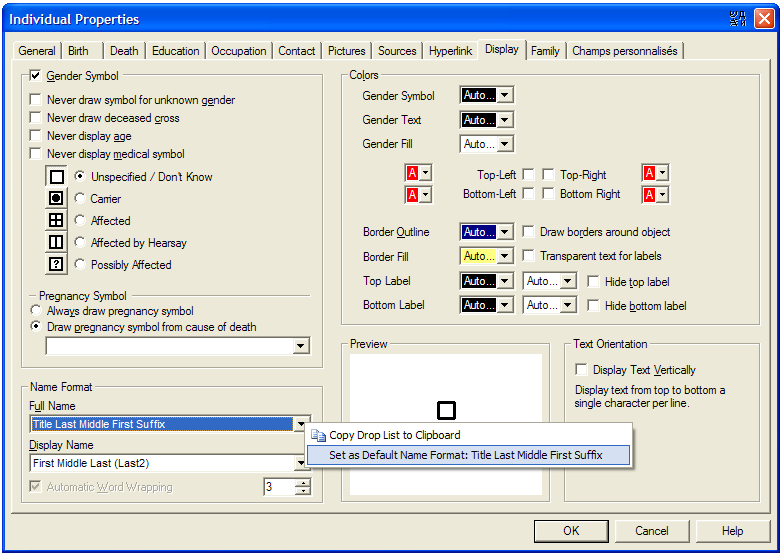
|
|
|
|
|
Forum Members
GenoPro version: 2.0.1.4
Last Login: Saturday, March 8, 2008
Posts: 2,
Visits: 4
|
That works great.Thanks so much for the instructions.
phil
|
|
|
|
|
Customers
GenoPro version: 2.0.0.9
Last Login: Thursday, October 1, 2009
Posts: 1,
Visits: 10
|
Dear GenoPro support team,I am from Taiwan and has the same issue of Phil, where we have our name starting from last name then first name. I followed your instruction opening the individual property dialogue. When I went down the dialogue it basically was frozen- I could not reach the name format section to modify the setting- please help. Thanks a lot! Huichuan
|
|
|
|
|
Administrators
Moderators
Customers
Gamma
FamilyTrees.GenoPro.com
Translator
GenoPro version: 3.1.0.1
Last Login: Tuesday, February 3, 2026
Posts: 4,886,
Visits: 22,803
|
294906 (9/6/2008)
When I went down the dialogue it basically was frozen- I could not reach the name format section to modify the setting- please help. Thanks a lot!
Can you please post a screenshot of the problem?
|