|
|
|
|
Customers
GenoPro version: 2.0.1.4
Last Login: Thursday, June 30, 2016
Posts: 141,
Visits: 294
|
I think we've addressed all my outstanding issues. I've downloaded the latest Narrative V2.0.1.5RC8 and works o/k for me.As always, Ron, thank you very much for all your help. Frank1
|
|
|
|
|
Administrators
Customers
Important Contributors
FamilyTrees.GenoPro.com
GenoPro version: 3.1.0.1
Last Login: 20 minutes ago
Posts: 3,487,
Visits: 27,239
|
Probably will have to wait for GenoPro's improved Privacy before pictures can be fully selectively excluded._PathPictures is a parameter 'builtin' to GenoPro itself and cannot be changed programatically with the present Report Generator. I think it would be better if this field was avaiable under the Options tab of the Generate Report dialog. I will make this suggestion.
Copying any object(s), e.g. a label, from one .gno to another seems to copy all Custom Tag definitions across with it, including Document Custom Tag definitions. But only Custom Tag instances belonging to the copied object(s) are transferred. But AFAIK there is no way to copy Document Custom Tag instances from one .gno to another without messing with the XML directly (e.g. using an editor such as Notepad).
'lego audio video erro ergo disco' or "I read, I listen, I watch, I make mistakes, therefore I learn"
|
|
|
|
|
Customers
GenoPro version: 2.0.1.4
Last Login: Thursday, June 30, 2016
Posts: 141,
Visits: 294
|
Thank you Ron, Custom.css now works also.Thank you also for the info about the _Excluse tag behavior. Will this saving of the excluded pictures be fixed some time in the future? There are 2 other minor things about custom tags: 1) There is a _PathPictures in the config.xml. I cannot find this _PathPictures in the custom tag list. Is there a way to specify this _PathPictures without getting into the config.xml file each time the Narrative changes version? 2) I have copied about 12 custom tags into my .gno file. they work fine. Is there a way to copy all these 12 into another .gno file in one go? It is fairly tedious to copy them one tag at a time and fill them in one at a time. Thanks Frank1
|
|
|
|
|
Administrators
Customers
Important Contributors
FamilyTrees.GenoPro.com
GenoPro version: 3.1.0.1
Last Login: 20 minutes ago
Posts: 3,487,
Visits: 27,239
|
You need to remove @[Report.Write strTextDirection]@ from the style info. i.e. usebody { color: #003000; background-color: #FFFFDD; font-size: 10pt; font-family: Ezra SIL, Times New Roman, Times; background-image: url("images/background.jpg"); margin-top:5px; }
h1 { color: #330077; font-size: 20pt; }
h2 { color: #330077; font-size: 18pt; }
h3 { color: #330077; font-size: 12pt }
h1.heading { font-size: 22pt; text-align:center; } |
Save into a file e.g. Custom.css which should reside in the same folder as your .gno file unless you provide the full path in the custom tag. I also need to bring to your attention an issue with the _Exclude feature. Although this prevents the picture being referenced from the generated HTML pages unfortunately GenoPro still copies '_Excluded' pictures to the pictures folder of the report. If you use familytrees.genopro.com you will need to use the GenoPro FTP client to delete these pictures. If you are using another web site then use any FTP client (or even IE) to delete them.
'lego audio video erro ergo disco' or "I read, I listen, I watch, I make mistakes, therefore I learn"
Edited: Sunday, April 6, 2008 by
GenoProSupport
|
|
|
|
|
Customers
GenoPro version: 2.0.1.4
Last Login: Thursday, June 30, 2016
Posts: 141,
Visits: 294
|
Thanks Ron,I do remember you mentioning that before and I have started using it with _Exclude tag. But, unfortunately I can't find and references to the fonts and font sizes. I still need to resort to making changes to style.css: body { color: #003000; background-color: #FFFFDD; font-size: 10pt; font-family: Ezra SIL, Times New Roman, Times; background-image: url("images/background.jpg"); margin-top:5px; @[Report.Write strTextDirection]@ }
h1 { color: #330077; font-size: 20pt; }
h2 { color: #330077; font-size: 18pt; }
h3 { color: #330077; font-size: 12pt }
h1.heading { font-size: 22pt; text-align:center; } |
I understand that there is a tag for using Custom.css and tried to include the above in the separate file Custom.css but I get errors during report generation. I assume that the file had some incorrect structure. Could you point me to a template of a Custom.css where I could just paste the above into and have it work? Thanks Frank1
Edited: Sunday, April 6, 2008 by
GenoProSupport
|
|
|
|
|
Administrators
Customers
Important Contributors
FamilyTrees.GenoPro.com
GenoPro version: 3.1.0.1
Last Login: 20 minutes ago
Posts: 3,487,
Visits: 27,239
|
Frank1 (4/5/2008)
The 'view and amend Configuration Settings' is good but can't be saved. This is one of the reasons why I provided the facility to hold Configuration Parameters as Document Custom Tags. Create such a tag for any parameter that you wish to change from the default setting and set its value. These tags are saved with your .gno file and will be used each time you run the report on that file.
'lego audio video erro ergo disco' or "I read, I listen, I watch, I make mistakes, therefore I learn"
|
|
|
|
|
Customers
GenoPro version: 2.0.1.4
Last Login: Thursday, June 30, 2016
Posts: 141,
Visits: 294
|
Ron, I think you hit the nail on the head.I reduced the font size in Internet Explorer by View/Font Size to Medium and the timeline problem was fixed. Then I changed tlParam.theme.event.label.width to 500 as per your suggestion and the timeline is correct even at the largest font size in Internet Explorer. I can now archive my V2.0.0.4 Report Generator. V2.0.1.5RC7 works properly with terrific extra features (Timeline and _Exclude tag to name a couple). The 'view and amend Configuration Settings' is good but can't be saved. Since I don't remember all my settings changes, I am unable to use it. I have to change the Report Generator files. But that is no different to V2.0.0.4. I think we have made great progress with GenoPro. Thanks a lot. Frank1
|
|
|
|
|
Administrators
Customers
Important Contributors
FamilyTrees.GenoPro.com
GenoPro version: 3.1.0.1
Last Login: 20 minutes ago
Posts: 3,487,
Visits: 27,239
|
There is a known limitation in the MIT Simile Timeline widget used in the report as reported in this post. A circumvention is given there but the line in script.js is now 1170. I do not know why 2 PCs give different results unless for some reason the font sizes differ.
'lego audio video erro ergo disco' or "I read, I listen, I watch, I make mistakes, therefore I learn"
Edited: Friday, April 4, 2008 by
Ron
|
|
|
|
|
Customers
GenoPro version: 2.0.1.4
Last Login: Thursday, June 30, 2016
Posts: 141,
Visits: 294
|
I can now confirm that the images shown on post #21285 and #21286 used the same Report Generator files (V2.0.1.5RC7) using 2 different computers. The .gno files are one and the same residing on my USB Key that I take with me. The GenoPro program is V2.0.1.4.I don't understand how they can be different, but they are. Frank1
|
|
|
|
|
Customers
GenoPro version: 2.0.1.4
Last Login: Thursday, June 30, 2016
Posts: 141,
Visits: 294
|
I copied the V2.0.1.5RC7 to another computer and ran the report generator on the other computer with different result:
Here only the year is missing. 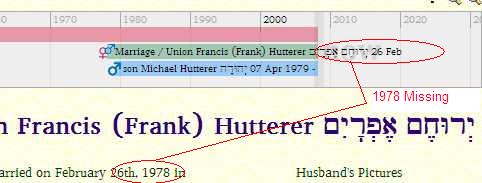
Here also, the year is missing but the double Alternative Name is correct. I will go back to the original computer and see if I can find the cause of this discrepancy. Frank1
|