|
|
|
|
Customers
GenoPro version: 2.0.1.4
Last Login: Thursday, June 30, 2016
Posts: 141,
Visits: 294
|
Report Generator V2.0.1.5RC6a shows a problem displaying the timeline correctly. The Hebrew alternative name is mixed with the dates as shown below: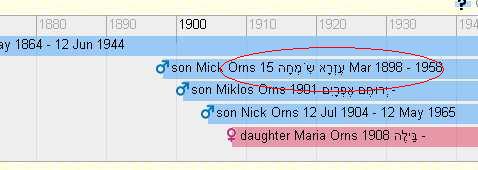
The birth date above is 15-Mar-1898 and the death date is 1958. The son Nick has no alternative name. The daughter Maria has no death date and only the year for the birth date. To prevent confusion, the simplest fix would be to remove the alternative names from the timeline. Frank1
Edited: Wednesday, April 2, 2008 by
GenoProSupport
|
|
|
|
|
Administrators
Moderators
Customers
Gamma
FamilyTrees.GenoPro.com
Translator
GenoPro version: 3.1.0.1
Last Login: Tuesday, February 3, 2026
Posts: 4,886,
Visits: 22,803
|
|
|
|
|
|
Customers
GenoPro version: 2.0.1.4
Last Login: Thursday, June 30, 2016
Posts: 141,
Visits: 294
|
GenoProSupportYou mentioned that before. Maybe the GenoPro program cannot fix this problem, but maybe the report generator can. Or, maybe if it's not fixable it can be overcome. For example Ron suggested a fix for the parenthesis in the other thread which worked. The doubling up I don't know yet. As I understand the report generator, it uses variables to collect the info and if it exists displays it. Therefore, if the reference to the Alternative Name in the Timeline display is removed, the display will not be confusing. I have some very old people looking at my HTML reports. If I can go by some of their questions there is no way they would uinderstand the mixing of dates and Alternative Names. The problem is that I don't know where in the report generator these Timeline section resides so I could look at it. Thanks Frank1
|
|
|
|
|
Administrators
Moderators
Customers
Gamma
FamilyTrees.GenoPro.com
Translator
GenoPro version: 3.1.0.1
Last Login: Tuesday, February 3, 2026
Posts: 4,886,
Visits: 22,803
|
Frank1 (4/1/2008)
You mentioned that before. Maybe the GenoPro program cannot fix this problem, but maybe the report generator can. Or, maybe if it's not fixable it can be overcome. I think it can be overcome. The Unicode standard has special characters to indicate the change in text direction. For your information, you are welcome to read Inheritance of text direction information at http://www.w3.org/TR/html401/struct/dirlang.html#h-8.2.2 Authors may alternatively override the bidirectional algorithm using the Unicode character ‭ to force left-to-right directionality or ‮ to force right-to-left directionality. The character ‬ ends the overriding of the algorithm. These characters should not be used in combination with the DIR attribute.
Edited: Tuesday, April 1, 2008 by
GenoProSupport
|
|
|
|
|
Administrators
Customers
Important Contributors
FamilyTrees.GenoPro.com
GenoPro version: 3.1.0.1
Last Login: 4 hours ago
Posts: 3,487,
Visits: 27,238
|
GenoProSupport (4/1/2008)
Authors may alternatively override the bidirectional algorithm using the Unicode character ‭ to force left-to-right directionality or ‮ to force right-to-left directionality. The character ‬ ends the overriding of the algorithm. These characters should not be used in combination with the DIR attribute.This is the approach I was intending to evaluate. The previous problem of this nature I refered to was with the Calendar page in the Report. This was fixed using the HTML <bdo> tag. The <bdo> tag might also work here. I just need some time to check it all out.
'lego audio video erro ergo disco' or "I read, I listen, I watch, I make mistakes, therefore I learn"
|
|
|
|
|
Administrators
Customers
Important Contributors
FamilyTrees.GenoPro.com
GenoPro version: 3.1.0.1
Last Login: 4 hours ago
Posts: 3,487,
Visits: 27,238
|
Version 2.0.1.5RC7 posted elsewhere has a fix for this by using the unicode literals \u202D and \u202C in the 'JSON' data for the timeline.
'lego audio video erro ergo disco' or "I read, I listen, I watch, I make mistakes, therefore I learn"
|
|
|
|
|
Customers
GenoPro version: 2.0.1.4
Last Login: Thursday, June 30, 2016
Posts: 141,
Visits: 294
|
Ron,That's great. The doubling up is fixed. The parenthesis is fixed. The mixup in the timeline is fixed. There is, however, another minor problem in the timeline: 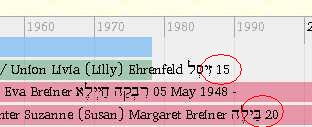
Sometime the full date is not shown. 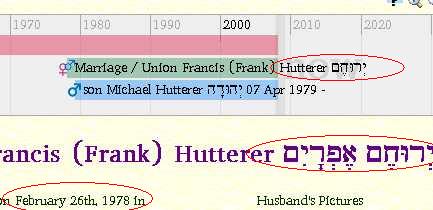
And sometimes only a single word from the 2 word Alternative Name is shown without the date. In this case the date should be Feb 26 1978. I think we are getting close to getting it all right. Thanks a lot Frank1
|
|
|
|
|
Customers
GenoPro version: 2.0.1.4
Last Login: Thursday, June 30, 2016
Posts: 141,
Visits: 294
|
I copied the V2.0.1.5RC7 to another computer and ran the report generator on the other computer with different result:
Here only the year is missing. 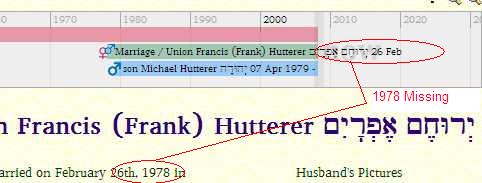
Here also, the year is missing but the double Alternative Name is correct. I will go back to the original computer and see if I can find the cause of this discrepancy. Frank1
|
|
|
|
|
Customers
GenoPro version: 2.0.1.4
Last Login: Thursday, June 30, 2016
Posts: 141,
Visits: 294
|
I can now confirm that the images shown on post #21285 and #21286 used the same Report Generator files (V2.0.1.5RC7) using 2 different computers. The .gno files are one and the same residing on my USB Key that I take with me. The GenoPro program is V2.0.1.4.I don't understand how they can be different, but they are. Frank1
|
|
|
|
|
Administrators
Customers
Important Contributors
FamilyTrees.GenoPro.com
GenoPro version: 3.1.0.1
Last Login: 4 hours ago
Posts: 3,487,
Visits: 27,238
|
There is a known limitation in the MIT Simile Timeline widget used in the report as reported in this post. A circumvention is given there but the line in script.js is now 1170. I do not know why 2 PCs give different results unless for some reason the font sizes differ.
'lego audio video erro ergo disco' or "I read, I listen, I watch, I make mistakes, therefore I learn"
Edited: Friday, April 4, 2008 by
Ron
|