|
|
|
|
Customers
GenoPro version: 2.5.3.8
Last Login: Wednesday, September 7, 2016
Posts: 11,
Visits: 66
|
Success ! (very Smily Face here)
There has been an error message upon starting Word that described an add-in '.dll' was not valid... I've been putting up with this for some time, and your remark gave me the incentive to fix it. I had previously looked at the add-in pull down menu many times, but did not see any 'add-ins'.
This time, I used the registry editor ... found the offending data element - and DELETED it. Wah-Lah !
Good call, nice work, the report looks GREAT.
Thank you
Edited: Sunday, July 20, 2008 by
193947
|
|
|
|
|
Administrators
Customers
Important Contributors
FamilyTrees.GenoPro.com
GenoPro version: 3.1.0.1
Last Login: 20 minutes ago
Posts: 3,487,
Visits: 27,239
|
Unfortunately this looks like it is going to be difficult to solve. Many users have successfully run this report however because of its dependency on the installation of MS Word (or OpenOffice) on the users PC then there are many possibilities for a mismatch & inconsistences were errors can creep in. No meanful error is displayed, as the error number '1' being returned is quite meaningless. Therefore I need to add some additional diagnostic code to the report scripts in order to pin point the error. As I produce and support GenoPro reports in my spare time it will be a feew days before I have something. [10.37] Error: OpenOffice and/or MS Word control could not be initialised (1: )
[8.53] Error: [11.01] Error: [198.44] Error:
The times in front of the error message, e.g. [198.44], indicate that some processing is being carried out by the script. If you could post the full message log it may give more clues. A long shot maybe - do you haver any startup macros in Word? I don't remeber the original title of this post but the Error 429 is a red herring and misleading. It is in a comment message (Note) not an error message and simply indicates that OpenOffice is not installed on your PC, hence the attempt to open MS Word. I think I will remove the message from later versions.
'lego audio video erro ergo disco' or "I read, I listen, I watch, I make mistakes, therefore I learn"
|
|
|
|
|
Customers
GenoPro version: 2.5.3.8
Last Login: Wednesday, September 7, 2016
Posts: 11,
Visits: 66
|
My Privacy....?
|
|
|
|
|
Customers
GenoPro version: 2.5.3.8
Last Login: Wednesday, September 7, 2016
Posts: 11,
Visits: 66
|
Yes, Ive tried that method as well, some new subdirs are created and populated.
Opening -generating rerort several times & closing produces a different begining error code, at the different times.. ?
Note: Auto Select - OpenOffice control could not be initialised (429: Automation server can't create object) - Checking for MS Word
[10.37] Error: OpenOffice and/or MS Word control could not be initialised (1: )
[8.53] Error: [11.01] Error: [198.44] Error:
??
Note: prior to choosing 'NEW' skin (as you described above), I deleted the prior suddir and its contents.
I've since installed Word 2000 with the same pesults...
Edited: Friday, July 18, 2008 by
193947
|
|
|
|
|
Administrators
Customers
Important Contributors
FamilyTrees.GenoPro.com
GenoPro version: 3.1.0.1
Last Login: 20 minutes ago
Posts: 3,487,
Visits: 27,239
|
193947 (7/17/2008)
Copying the skin made no difference. (but this brings up another point. The skins did not get installed from the 'installGenoPro.exe' program nor were they included with ' GenoPro Beta'. I copied them from the dir where I had previously installed ver 1.9) Why does the Word program open after Geno fails create the file ? This seems very odd. It cant find it to start the report, but does find it when its failed to create.. Sorry I should have said click the New Skin button 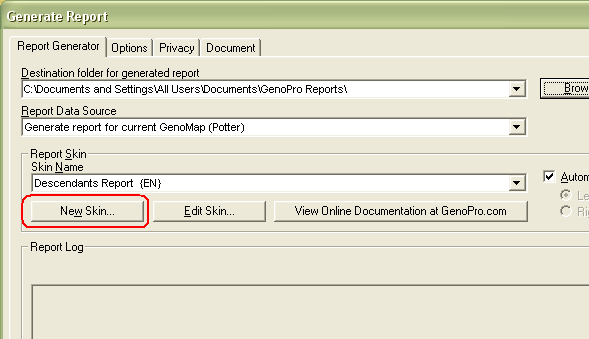
This will create a copy of the report skin (i.e. script files used to generate the report) from within GenoPro.exe to your GenoPro Skins folder. The location of this folder is set under the Options tab of the Generate Report dialog. You should not mix files from GenoPro 1.9 or GenoPro Beta with files for the current version i.e. GenoPro 2007 release 2.0.1.5. The report script starts Word with a blank document and then sends it commands via the API in order to create the report 'on the fly'. You should normally see the report being gradually displayed in the Word window as it is being created. Once the report is created you can then save the report i.e. the Word document to a location of your choice. In your case the generation fails after starting Word but before any report content has been sent to Word. Please try using the New Skin button, then close and reopen the generate Report dialog and choose the Customized skin, and then click Generate button 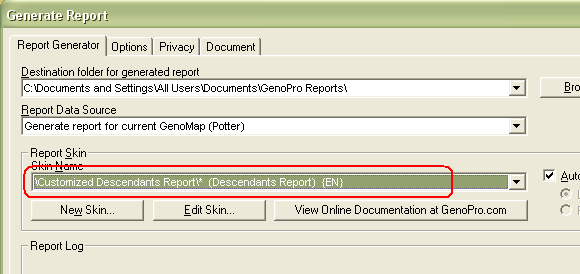
Updated: Corrected the skin name!
'lego audio video erro ergo disco' or "I read, I listen, I watch, I make mistakes, therefore I learn"
Edited: Thursday, July 17, 2008 by
Ron
|
|
|
|
|
Administrators
Moderators
Customers
Gamma
FamilyTrees.GenoPro.com
Translator
GenoPro version: 3.1.0.1
Last Login: Tuesday, February 3, 2026
Posts: 4,886,
Visits: 22,803
|
193947 (7/17/2008)
The skins did not get installed from the 'installGenoPro.exe' program nor were they included with 'GenoPro Beta'. I copied them from the dir where I had previously installed ver 1.9)The report skins are included in the executable GenoPro.exe. This way, it is impossible to corrupt the original report skin - as you can always generate a report using the built-in skin.
|
|
|
|
|
Customers
GenoPro version: 2.5.3.8
Last Login: Wednesday, September 7, 2016
Posts: 11,
Visits: 66
|
I am the Administrator of this PC.
The output dir is local.
Copying the skin made no difference.
(but this brings up another point. The skins did not get installed from the 'installGenoPro.exe' program nor were they included with 'GenoPro Beta'. I copied them from the dir where I had previously installed ver 1.9)
Why does the Word program open after Geno fails create the file ? This seems very odd. It cant find it to start the report, but does find it when its failed to create..
Re: reinstalling word - I'll need to find CD.
|
|
|
|
|
Administrators
Customers
Important Contributors
FamilyTrees.GenoPro.com
GenoPro version: 3.1.0.1
Last Login: 20 minutes ago
Posts: 3,487,
Visits: 27,239
|
I do not believe your Word error message has anything to do with the problem. Whilst the Narrative Report generates web (html) pages, the Descendants Report in which your error occurs produces either a standard MS Word document (.doc) or an OpenOffice.org document (.odt). You have not answered with the results of the suggested actions in my earlier post - please do so in order to progress this issue.
'lego audio video erro ergo disco' or "I read, I listen, I watch, I make mistakes, therefore I learn"
|
|
|
|
|
Customers
GenoPro version: 2.5.3.8
Last Login: Wednesday, September 7, 2016
Posts: 11,
Visits: 66
|
Could this Word error message (using "Open Office Document") be the problem? (while attempting to open a genoxxx.htm in the '..reports' dir)
"Microsoft Word is not your default web page editor. Do you want to make Word your default editor? Note that web pages created in other Office applications will continue to open in the applications they were created in."
I've never created a web page before. The 'Birthday Listings' report creates the '.htm' successfully
Edited: Tuesday, July 15, 2008 by
193947
|
|
|
|
|
Administrators
Customers
Important Contributors
FamilyTrees.GenoPro.com
GenoPro version: 3.1.0.1
Last Login: 20 minutes ago
Posts: 3,487,
Visits: 27,239
|
There is one thing you should check. I.e. The destination folder for report output must be valid and be on your local PC (e.g. not Web/FTP). This is because the script copies the Word template from within GenoPro to the folder specified. If this is already valid then try generating the report from a custom skin. (Instead of clicking Generate, click Copy Skin instead to copy the skin files to your GenoPro skin folder , the close and reopen the Tools/Generate Report dialog, and chose Customized Descendants Report as the skin. With this method the Word template from the custom skin is used.If you still have problems I suggest you try a repair install of Word 2002, as it may well be an incorrect registry entry causing the problem. The report skin uses the ActiveX automation interfaces (or API) of either OpenOffice or MS Word to actually build the report content, and therefore no other Word Processing product can be used.
'lego audio video erro ergo disco' or "I read, I listen, I watch, I make mistakes, therefore I learn"
|