|
|
|
|
Customers
GenoPro version: 2.9.0.6
Last Login: Friday, April 12, 2024
Posts: 53,
Visits: 3,821
|
OK. I am totally confused now...
I swear, it wasn't working yesterday. But, I did it today to take screen shots to show you... And well, uh, it's working just fine. 
So, there IS an index.htm (redirects to default.htm). Check.
You CAN move the folder, as all links ARE relative. Check.
And html vs htm is a mute point, BOTH work just fine. Check.
So, never mind. Nothing to see here. : :
Thanks Ron.
John Fleming
------------------------------------------------------------------------
Family Tree?? Try Family Shrub.
|
|
|
|
|
Administrators
Customers
Important Contributors
FamilyTrees.GenoPro.com
GenoPro version: 3.1.0.1
Last Login: 2 days ago @ 9:23 PM
Posts: 3,464,
Visits: 26,854
|
Johnnycrash (12/6/2009)All those options create absolute links.
This is what I was trying to say in my reply. The only time the script generates absolute links is when one of these options is set. This only affects picture links. All other files are always via relative links. If you don't want absolute link for pictures then don't set these. There should not be a problem if you move the whole report, i.e. all files in the folder. Relative links of course mean the files must stay in the same relative position to each other for the links to work, hence the requirement to move all files. If you still have a problem after checking that all files have been moved then please attach a sample file from your report that you believe contains absolute links to your next post. If you do, NONE of the formatting works very well, even between parts of the report. There is no +/- signs for expanding data, no collapsible name lists, the background image is gone, and timelines are absent. While the main part of the report is usable, it doesn't look very pretty. The links (internal HTML reference calls) are all absolute to the folder specified in the report generator skin setup.
As for index vs default... You can't even just change default to index. If you do, then none of the links in the report can find "home". And even "home" won't load, as it calls a bunch of other html pages. The report skin generates an 'index.html' file that redirects to default.htm, so there should not be a problem even if your web server only accepts index.html as the 'default' page. Renaming default.htm to index.html as you have discovered will not work. The report relies on HTML frames and internally reopens default.htm when the 'home' button is clicked. Also if someone opens an individual page directly (e.g. from a google search) then that page reloads default.htm with a query string to indicate that the individuals page should be opened within the detail frame of the frameset. html as well as htm? - too much water under the bridge. I am looking to redo the Narrative Report in the near future to exploit the knowledge I have gained developing these reports over several years.
'lego audio video erro ergo disco' or "I read, I listen, I watch, I make mistakes, therefore I learn"
Edited: Monday, December 7, 2009 by
Ron
|
|
|
|
|
Customers
GenoPro version: 2.9.0.6
Last Login: Friday, April 12, 2024
Posts: 53,
Visits: 3,821
|
All those options create absolute links. After you generate the report, you can not move it from the folder you specified. If you do, NONE of the formatting works very well, even between parts of the report. There is no +/- signs for expanding data, no collapsible name lists, the background image is gone, and timelines are absent. While the main part of the report is usable, it doesn't look very pretty. The links (internal HTML reference calls) are all absolute to the folder specified in the report generator skin setup.
As for index vs default... You can't even just change default to index. If you do, then none of the links in the report can find "home". And even "home" won't load, as it calls a bunch of other html pages. : : :
As well, the option for HTML or HTM would be nice.
So, we need relative link fix, options for index/default, and html/htm. : :
John Fleming :
John Fleming
------------------------------------------------------------------------
Family Tree?? Try Family Shrub.
|
|
|
|
|
Administrators
Customers
Important Contributors
FamilyTrees.GenoPro.com
GenoPro version: 3.1.0.1
Last Login: 2 days ago @ 9:23 PM
Posts: 3,464,
Visits: 26,854
|
The Narrative Report scripts generate relative links unless you indicate otherwise - e.g. have you set either of the following options?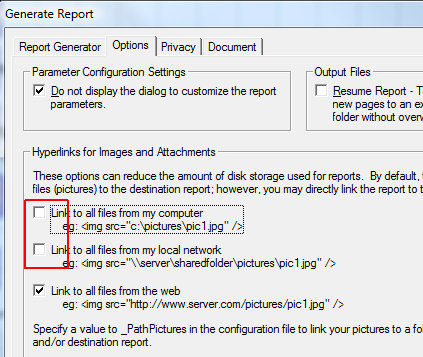
Actually I have just noticed a bug with thumbnails and SVG links when using the 'link to all files from my computer' setting. i.e. they don't work - I'm investigating. Regarding index.html see Index of Default? - it jut depends in which camp you sit.
'lego audio video erro ergo disco' or "I read, I listen, I watch, I make mistakes, therefore I learn"
Edited: Monday, December 7, 2009 by
Ron
|
|
|
|
|
Customers
GenoPro version: 2.9.0.6
Last Login: Friday, April 12, 2024
Posts: 53,
Visits: 3,821
|
Hey all,
I like to fully test/control anything I will be posting to the 'net (HTML). And on many occasions, I will move it about the harddrive to get it into the right folder - for upload, CD/DVD and whatnot. But... The Report Generator seems to create ONLY full paths. With relative paths from the root folder - YourTreeName/, you could move it, post it, burn it... And have NO issues with the data contained within the report. As well, the prime HTML page is set to default.html. Should that not be index.html??
Now, I may have missed (most likely) a settings panel or config screen to do these things. If so, It would be great is someone pointed me in the right direction.  Thanks. And if I haven't missed it, and these things currently can't be done... Why not?? Lets go people!! Make this happen for me. Please. :
John Fleming Thanks. And if I haven't missed it, and these things currently can't be done... Why not?? Lets go people!! Make this happen for me. Please. :
John Fleming
------------------------------------------------------------------------
Family Tree?? Try Family Shrub.
|