|
|
|
|
Customers
GenoPro version: 3.1.0.1
Last Login: Tuesday, July 9, 2024
Posts: 22,
Visits: 279
|
Brilliant, Ron!!
That worked. Many thanks indeed.
Cheers, Jack
|
|
|
|
|
Administrators
Customers
Important Contributors
FamilyTrees.GenoPro.com
GenoPro version: 3.1.0.1
Last Login: 2 days ago @ 9:23 PM
Posts: 3,464,
Visits: 26,854
|
My guess is that when you unzipped the skin you somehow managed to retain an old version of the file Code/Util.vbs. Try emptying or deleting your 'Latest Narrative Report' skin folder and unzip the skin into it again. The function 'ConfigMsg' was added to the later skin(s).
'lego audio video erro ergo disco' or "I read, I listen, I watch, I make mistakes, therefore I learn"
|
|
|
|
|
Customers
GenoPro version: 3.1.0.1
Last Login: Tuesday, July 9, 2024
Posts: 22,
Visits: 279
|
I get an error when I extracted the new skin "Narrative_2.0.1.6_(rev.2010.02.24).zip" to a "Latest Narrative Report" folder under Skins:
Error at Line 73, position 4 (init.htm): Type mismatch: 'ConfigMsg'
Miscrosoft VBScript runtime error 800A000D
When I choose the Skin name "English Narrative Report", there is no problem.
Please advise.
Thanks.
|
|
|
|
|
FamilyTrees.GenoPro.com
Forum Members
GenoPro version: 2.0.1.6
Last Login: Sunday, September 19, 2010
Posts: 3,
Visits: 25
|
That last screen helped me figure it out. I do feel like an idiot working this hard and yet finding such a simple solution. seems I was one directory too far down  Thank you Thank you
|
|
|
|
|
Administrators
Customers
Important Contributors
FamilyTrees.GenoPro.com
GenoPro version: 3.1.0.1
Last Login: 2 days ago @ 9:23 PM
Posts: 3,464,
Visits: 26,854
|
Without being a fly on the wall it is hard to see what you are doing wrong, but this should help.Unpack the skin into a folder below your GenoPro skins folder. The default skins folder is shown under the 'Generate Report' dialogue, Options tab and you can also change it there to whatever you want. 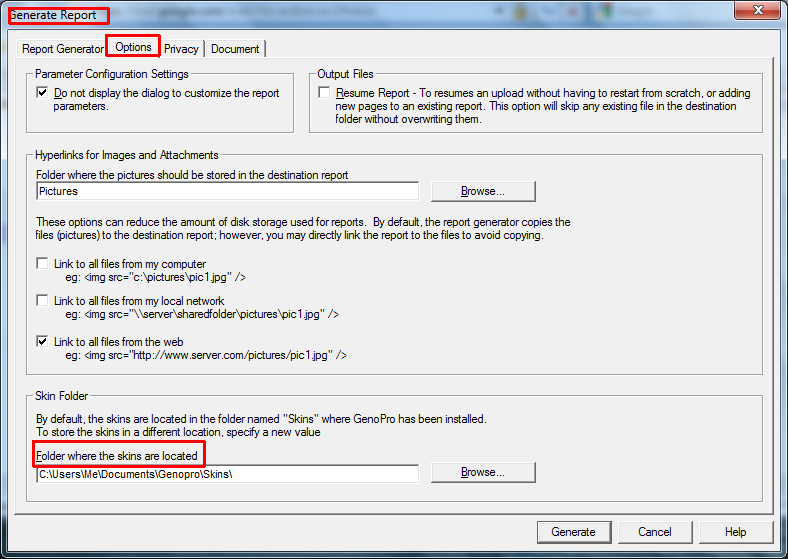
Then when generating the report you must select the folder in which you placed the skin. If your folder does not appear there then you have put it in the wrong place! 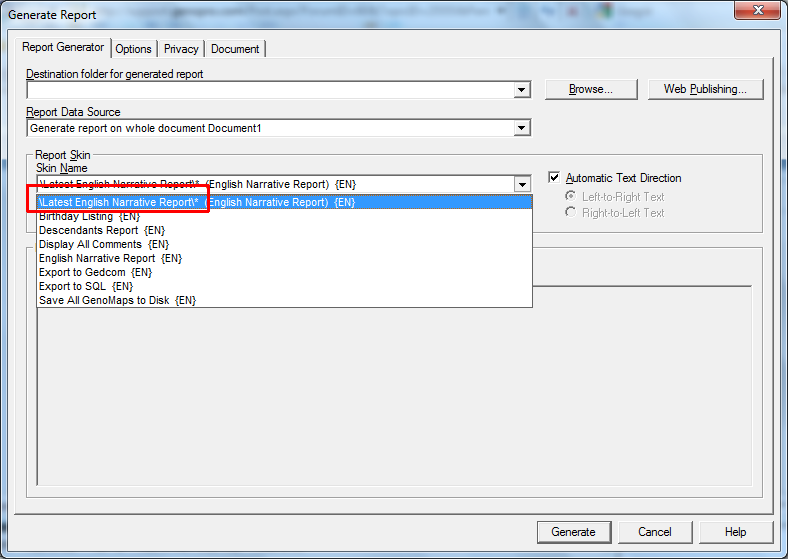
'lego audio video erro ergo disco' or "I read, I listen, I watch, I make mistakes, therefore I learn"
Edited: Tuesday, March 23, 2010 by
Ron
|
|
|
|
|
FamilyTrees.GenoPro.com
Forum Members
GenoPro version: 2.0.1.6
Last Login: Sunday, September 19, 2010
Posts: 3,
Visits: 25
|
yes, I tried both ways. I actually installed Genopro outside of the 'program files' area the 2nd install just to avoid that. When I create a custom skin, it creates the directory in the proper location so I beleive it is finding everything ok, it is just not working.
|
|
|
|
|
Customers
GenoPro version: 3.0.1.0
Last Login: Friday, January 17, 2020
Posts: 2,
Visits: 19
|
Have you tried installing the new narrative under the default skins directory? If not, I would give that a try to see if it works for you. I know there were concerns about permissions and such, but that is where I installed it and I haven't had any issues.
|
|
|
|
|
FamilyTrees.GenoPro.com
Forum Members
GenoPro version: 2.0.1.6
Last Login: Sunday, September 19, 2010
Posts: 3,
Visits: 25
|
ok, this is really driving me nuts. I had troubles getting geocoded locations to work so I searched and found the issue with google maps changing things a bit. I did my part, searched the forums, and found the latest English Narrative report. I placed it in a skins directory under a 'my documents' folder bcause I am runing Windows 7 and I dont want write access issues. I changed the selection inthe generate report options tab. I can see the date created change when I generate a report and generation causes zero errors but no matter what I do I always end up with version " English Narrative Report version 2008.09.14." and I know that is wrong. I am runing Windows 7 64 bit and I have even went to the point of uninstall Genopro, reinstalling. I even went through the regestry and deleted any mention of genopro before reinstalling. I have deleted my local reports directory and recreated everything. I am at a total loss. I dont know why I can not get the latest skin to be applied. It always uses the built in ones. even when I made a 'custom skin' the version info changed to say "custom skin" but the version information was still the old one. someone give me an idea here.
|