|
|
|
|
Administrators
Moderators
Customers
Gamma
FamilyTrees.GenoPro.com
Translator
GenoPro version: 3.1.0.1
Last Login: Tuesday, October 28, 2025
Posts: 4,886,
Visits: 22,799
|
I discovered some code where GenoPro would prompt for a password if the password was blank. I believe I have fixed it now (please upgrade to 2.5.3.6 or later). If you ever see this again, please let me know. I want to make sure this problem does not happen.
|
|
|
|
|
Administrators
Moderators
Customers
Gamma
FamilyTrees.GenoPro.com
Translator
GenoPro version: 3.1.0.1
Last Login: Tuesday, October 28, 2025
Posts: 4,886,
Visits: 22,799
|
I will take a look at the issue. For the collaboration project, we consolidated the login process, and there are probably a few cases where the wrong code is being executed. I had no idea this would affect the report generator.
|
|
|
|
|
FamilyTrees.GenoPro.com
Customers
GenoPro version: 3.1.0.1
Last Login: Thursday, June 2, 2022
Posts: 108,
Visits: 1,280
|
Yep, looks like the thumbnail thing was a red-herring - just a coincidence that it comes up around about the time the thumbnails are being generated. I've seen the prompt come up a bit earlier and a bit later in the generation since my earlier post.
|
|
|
|
|
Administrators
Customers
Important Contributors
FamilyTrees.GenoPro.com
GenoPro version: 3.1.0.1
Last Login: 2 days ago @ 9:23 PM
Posts: 3,464,
Visits: 26,854
|
I have also seen this 'Collaboration' login prompt a couple of times. I do not remember the circumstances for the first time it occurred. However today I had just updated GenoPro to 2.5.3.5 and was generating a 'Harry Potter' report on familytrees using a 'custom' skin (2011.01.25).
I have not added anything to the Narrative Report skin templates relating to the GenoPro Collaboration Project and so it remains a mystery to me. It occurred after the usually password prompt and early in the generation process and did not seem to be connected with thumbnail creation.
'lego audio video erro ergo disco' or "I read, I listen, I watch, I make mistakes, therefore I learn"
|
|
|
|
|
FamilyTrees.GenoPro.com
Customers
GenoPro version: 3.1.0.1
Last Login: Thursday, June 2, 2022
Posts: 108,
Visits: 1,280
|
So I've done some testing...
Using GenoPro 2011- I get the prompt when I run my custom report (based on the narrative report from GenoPro 2007)
- I get the prompt when I run the standard narrative report (from GenoPro 2007)
- I don't get the prompt with the standard GenoPro 2011 narrative report
Using GenoPro 2007- I don't get the prompt when I run my custom report (based on the narrative report from GenoPro 2007)
This suggests it is something to do with running GenoPro 2007 generation reports in GenoPro 2011.
If I have to live with it, then ok. I was just hoping Dan, JC or Ron would be able to check what modifications were made to the report to accomodate collaboration, which would help me trace what specific lines I need to change in my custom report to stop this prompt. I doubt I'm the only person who developed a custom GenoPro 2007 report?
Ron has constantly been developing the narrative report, and I have made numerous modifications since starting to customise it, such that our two skins are now significantly divergent from their common origin. Doing a file comparison between the two reports shows far too many differences to be helpful. Boy am I glad I'm not trying to make a living as a developer :-)
|
|
|
|
|
Customers
Important Contributors
GenoPro version: 3.1.0.1
Last Login: Tuesday, November 25, 2025
Posts: 443,
Visits: 7,821
|
Have you tried generating the report with the standard skin to see whether you get the prompt?
|
|
|
|
|
FamilyTrees.GenoPro.com
Customers
GenoPro version: 3.1.0.1
Last Login: Thursday, June 2, 2022
Posts: 108,
Visits: 1,280
|
I've made some customisations to the English Narrative report, which I've saved with the name \web_report_code\, but I don't believe it is relevant to the login prompt I'm seeing.
|
|
|
|
|
Customers
Important Contributors
GenoPro version: 3.1.0.1
Last Login: Tuesday, November 25, 2025
Posts: 443,
Visits: 7,821
|
Are you using a special skin? When I publish to the web I use 'English Narrative Report (EN)'. According to your screenshot, your Skin Name starts with '\web_report_code\'. What is this?
|
|
|
|
|
FamilyTrees.GenoPro.com
Customers
GenoPro version: 3.1.0.1
Last Login: Thursday, June 2, 2022
Posts: 108,
Visits: 1,280
|
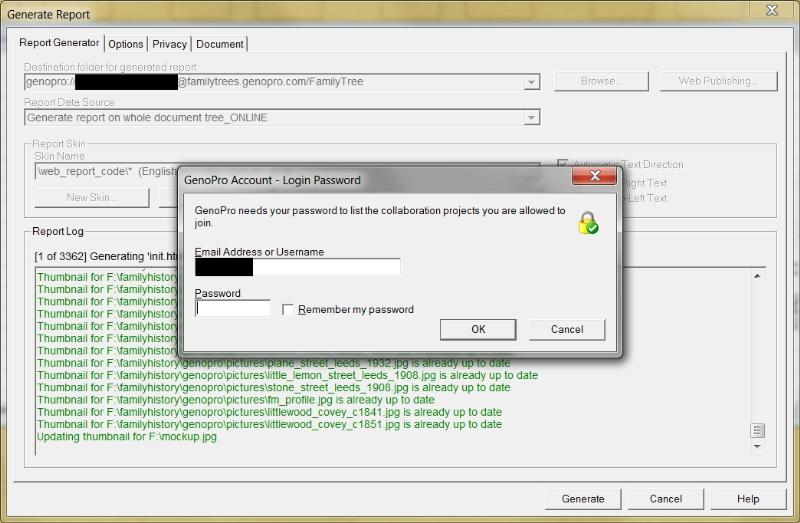
Happy to transfer to a new topic under Report Generator bugs, but it would definitely appear to be related to collaboration projects as well. The message is very specific.
All my pictures are stored on a local hard disk.
The prompt only comes up when a new thumbnail needs to be created.
|
|
|
|
|
Administrators
Customers
Important Contributors
FamilyTrees.GenoPro.com
GenoPro version: 3.1.0.1
Last Login: 2 days ago @ 9:23 PM
Posts: 3,464,
Visits: 26,854
|
HarryCaper (06-Jan-2011)
I'm being asked for my username and password partway through generating a web report so it can find what collaboration projects I'm permissioned to. This occurs after the Thumbnails are generated.
Does your .gno refer to pictures on a password protected web site e.g. family trees? The Narrative Report accesses all pictures to find out if they have been updated since the last thumbnail was produced to see if a new thumbnail is required. It is more usual for the .gno to reference pictures on the local hard disc. If you are referencing pictures on the web on a protected site then yes you will be prompted for username/password.
'lego audio video erro ergo disco' or "I read, I listen, I watch, I make mistakes, therefore I learn"
|