|
|
|
|
FamilyTrees.GenoPro.com
Customers
GenoPro version: 2.5.4.1
Last Login: Sunday, August 5, 2012
Posts: 11,
Visits: 69
|
Hi again Genome !
I would love to have understood what you just wrote !!
Good news ! - I added that line of code and everything seems to be back to normal now. I will give it an extensive test over the next few days to make sure no other functionality has dropped off. It has all been a bit strange as 1and1 must have recently changed something to no longer support .svg and.es. Never mind, all sorted now.
Many Many Thanks for all your hard work, it is much appreciated, I must say the best customer support I have ever experienced 
Thanks once again
Cheers for now
Andy
|
|
|
|
|
Administrators
Customers
Important Contributors
FamilyTrees.GenoPro.com
GenoPro version: 3.1.0.1
Last Login: 2 days ago @ 9:23 PM
Posts: 3,464,
Visits: 26,854
|
This seems to be turning into a bit of a saga with 1and1 (probably not the best web host!). They appear not to support the '.es' filetype as standard either (as well as .svg)
So try adding an extra mimeMap line to your web.config xml file.
| | | <configuration> | | <system.webServer> | | <defaultDocument enabled="true"> | | <files> | | <clear /> | | <add value="index.aspx" /> | | <add value="index.asp" /> | | <add value="index.htm" /> | | <add value="index.html" /> | | <add value="home.aspx" /> | | <add value="home.asp" /> | | <add value="home.htm" /> | | <add value="home.html" /> | | <add value="default.aspx" /> | | <add value="default.asp" /> | | <add value="default.htm" /> | | <add value="default.html" /> | | </files> | | </defaultDocument> | | <security> | | <authentication> | | <basicAuthentication enabled="true" /> | | </authentication> | | </security> | | <httpErrors errorMode="Custom"> | | <remove statusCode="404" subStatusCode="-1" /> | | <error statusCode="404" prefixLanguageFilePath="" path="/OaOInternal/DefaultWebs/sedoCurrent/Error404.aspx" responseMode="ExecuteURL" /> | | </httpErrors> | | <staticContent> | | <mimeMap fileExtension=".svg" mimeType="image/svg+xml" />
<mimeMap fileExtension=".es" mimeType="application/x-javascript" /> | | </staticContent> | | | | </system.webServer> | | </configuration> | |
|
It is historical why I chose the '.es' extension for the svg scripts. At time Adobe was about the only way to render SVG in a browser and they said the script was ecmascript and hence the .es extension was used, but it could easily be .js instead. Little did I know at the time how 'non-standard' many web hosting companies would be. It affects IIS based web servers in the main so I guess Bill Gates should take some of the blame. 
'lego audio video erro ergo disco' or "I read, I listen, I watch, I make mistakes, therefore I learn"
|
|
|
|
|
FamilyTrees.GenoPro.com
Customers
GenoPro version: 2.5.4.1
Last Login: Sunday, August 5, 2012
Posts: 11,
Visits: 69
|
Hi again,
I have attached a couple of screen shots to show that the script.es file seems to be present. The first is a screen shot of the the files that have been uploaded to the website and script.es is in the scripts folder. The second is a screen shot of where it is on my computer in the skins folder.
Are these the files you are talking about ? I notice they appear as 'file' or 'es file' rather than Javascript file, is this how they are supposed to appear ?
Thanks for your help as usual
Cheers
Andy
 script file locations.doc
(33 views,
432.50 KB)
script file locations.doc
(33 views,
432.50 KB)
|
|
|
|
|
Administrators
Customers
Important Contributors
FamilyTrees.GenoPro.com
GenoPro version: 3.1.0.1
Last Login: 2 days ago @ 9:23 PM
Posts: 3,464,
Visits: 26,854
|
Hi Andy,For some reason the file 'scripts/script.es' is missing from your web site. This is the 'ecmascript' file (a.k.a. javacript) used by the svg page (genomap0.svg). My Google Chrome browser reports it as missing 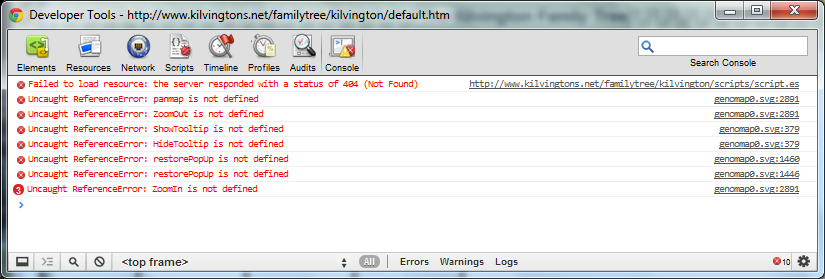 Whilst IE9 strangely substitutes a 'domain parking' page! 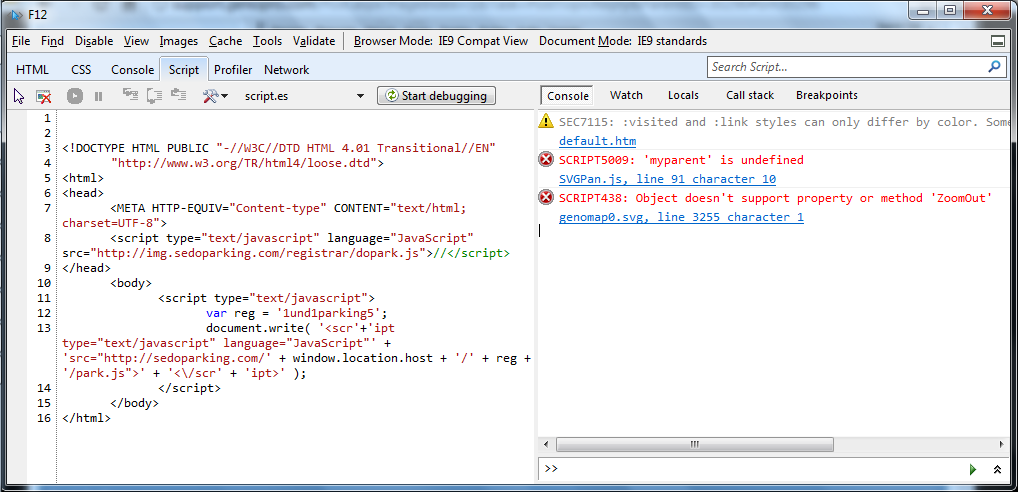 I don't understand why 'scripts/script.es' is missing from the generated report area unless for some reason 1and1 are blocking it. Suggest you try uploading it directly via FTP from your custom skin. Alternatively republish the report in case it was a glitch.
'lego audio video erro ergo disco' or "I read, I listen, I watch, I make mistakes, therefore I learn"
|
|
|
|
|
FamilyTrees.GenoPro.com
Customers
GenoPro version: 2.5.4.1
Last Login: Sunday, August 5, 2012
Posts: 11,
Visits: 69
|
Hi all,
I have heard from 1and1 who sent me a web.config file to upload to my root directory. I have done this and there is some progress, however a new set of problems and error messages. I attach a file with screen shots of the error messages.
The first message appears when I select the family tree genomap (instead of the 120 second pause followed by the old message)
Once I have clicked on this message the genomap family tree appears, 120 seconds later the old message comes up just like before saying "Genomaps may not display correctly as the required SVG interface may not be supported by this browser" (but with the family tree behind it visible)
When I click on that error message the screen just shows the genomap family tree. Then when I hover the mouse over any symbol or line on the genomap the second error message (on the attached file) comes up (it actually appears twicer overlaid as I have to click twice to get rid of it) This error message repeats itself whenever i hover the mouse over any part of the tree.
I have attached the file that 1and1 got me to upload which has done something but obviously not enough. I'm afraid the code means nothing to me so I can't see where it might be at fault.
Would welcome any more help you guys have, thanks in advance
Regards
Andy
 web.config.txt
(27 views,
1.31 KB)
web.config.txt
(27 views,
1.31 KB)
error message 2.doc
(47 views,
551.00 KB)
|
|
|
|
|
FamilyTrees.GenoPro.com
Customers
GenoPro version: 2.5.4.1
Last Login: Sunday, August 5, 2012
Posts: 11,
Visits: 69
|
Hi again,
Making some progress ! Thanks for the script file. I have replaced it as you advised and uploaded the trees again both to the genopro website and my own via 1and1. I also have recently uninstalled and re-installed the svg viewer. I can now view the tree on the genopro website but still get the same message on my own website, but this time after 120 seconds instead of 60 seconds, which is what I would expect with the new script.
So now I am thinking that your original assessment is correct and it is a problem with 1and1 handling the SVG file. I have e-mailed them and wait to see their response. The strange thing is that it used to work fine. I haven't changed the domain or host so I am guessing they must have changed something internally.
If you have any other thoughts or suggestions that may help me discuss this with 1and1 they would be much appreciated, in the mean time, thanks very much for your help so far. At least I have narrowed it down to where the problem is..
Cheers for now
Andy
|
|
|
|
|
Administrators
Customers
Important Contributors
FamilyTrees.GenoPro.com
GenoPro version: 3.1.0.1
Last Login: 2 days ago @ 9:23 PM
Posts: 3,464,
Visits: 26,854
|
Hi Andy,After some searching I finally found the post dealing with the SVG timer issue I have also attached to this post a version of script.js with the timeout doubled to 2 mins. Either place it it the scripts folder of your custom skin and regenerate the report or replace the same file in an already published report (e.g. using FTP)
'lego audio video erro ergo disco' or "I read, I listen, I watch, I make mistakes, therefore I learn"
 script.js
(132 views,
51.33 KB)
Edited: Thursday, June 21, 2012 by
genome
script.js
(132 views,
51.33 KB)
Edited: Thursday, June 21, 2012 by
genome
|
|
|
|
|
FamilyTrees.GenoPro.com
Customers
GenoPro version: 2.5.4.1
Last Login: Sunday, August 5, 2012
Posts: 11,
Visits: 69
|
Hi there,
Thanks for all your efforts in helping me try to get this to work. I have unistalled the genopro software and the SVG viewer. I also cleared the cache by deleting temporary internet files and cookies etc. and started from scratch.
After re-installing genopro and the svg viewer the home page does show the correct verion of genopro and the correct skin. However I am still getting the same message when trying to view the tree. When I say the same message, since reverting back to IE8 I now only get the small box saying "Genomaps may not display correctly as the required SVG interface may not be supported by this browser'. I do not get the server error message any more that I got with IE9. (I use other software programmes that don't work with IE9 so can't change to IE9 - unless I can run both at once ?)
Since you can view the tree ok on familytrees.genopro but I still can't, (I get the same message described above), am I correct in assuming that it is not a server issue but a timeout issue that you referred to ? If so, would you be able to direct me to how solve the timeout issue please ?
Thanks again
Andy
|
|
|
|
|
Administrators
Customers
Important Contributors
FamilyTrees.GenoPro.com
GenoPro version: 3.1.0.1
Last Login: 2 days ago @ 9:23 PM
Posts: 3,464,
Visits: 26,854
|
Andy, like Vittorino I can also view your SVG tree on familytrees using IE9. But suspect it IS the server as the server error only occurs on your web host (1&1). Maybe you should contact their support and ask them to check if it is configured correctly for .svg files.When you say I have tried uploading it to the familytrees.genopro.com and get exactly the same thing do you mean that you get an IIS server error page or do you mean the message box saying the browser does not support svg?
The latter can occur with a slow connection. The script waits around for the svg to load for a period of time and if it does not complete then the error box is displayed. I think somewhere on this forum I gave details of how to increase the delay. If you really must use ie8 or below perhaps removing Adobe SVG Viewer and then re-installing it may help. But I strongly suggest using a modern browser with built-in SVG rendering. (N.B. Make sure your clear the browser cache after re- publishing your tree to ensure you load the later version (check bottom of home page for versdion info)) Ron
'lego audio video erro ergo disco' or "I read, I listen, I watch, I make mistakes, therefore I learn"
Edited: Monday, June 18, 2012 by
genome
|
|
|
|
|
Customers
FamilyTrees.GenoPro.com
Important Contributors
Translator
GenoPro version: 3.1.0.1
Last Login: Thursday, November 6, 2025
Posts: 214,
Visits: 3,645
|
I watched your family tree to FamilyTrees.GenoPro with IE9, and I see perfectly the SVG map.
The problem is not on the server.
Vittorino Lepore
"Se non porti almeno una soluzione, anche tu fai parte del problema" or "If you don't bring at least a solution, even you're a part of the problem"
|