|
|
|
|
Customers
GenoPro version: 3.1.0.1
Last Login: Tuesday, July 8, 2025
Posts: 26,
Visits: 104
|
None of those options seem to work. I brought this file from the Beta version, where the lines are properly behind the text, but anytime I modify the text in the current version it automatically places it behind the line that goes down and across to link to the mate. Is there a way to manually assign the Z order of objects? For what it's worth, when I add new marriages in the current version it displays correctly. I even tried deleting the relationship and recreating it but whenever these Beta-version people are involved in editing it puts the text behind the connecting lines.
|
|
|
|
|
Customers
Important Contributors
FamilyTrees.GenoPro.com
GenoPro version: 3.1.0.1
Last Login: 12 hours ago
Posts: 1,604,
Visits: 33,195
|
Not sure about a setting but you can change this by selecting and right click and choose Position. You can move a line (or object) back or front.
I think if you select all and do this the last option, Restore Z-order, will clean the whole display
|
|
|
|
|
Customers
GenoPro version: 3.1.0.1
Last Login: Tuesday, July 8, 2025
Posts: 26,
Visits: 104
|
I've also noticed that since I switched from the non-Beta version some of the lines coming down from a person are overriding the name of the person below the box instead of the name being on top of the line as it was in the Beta. What setting is causing this?
|
|
|
|
|
Customers
GenoPro version: 3.1.0.1
Last Login: Tuesday, July 8, 2025
Posts: 26,
Visits: 104
|
genome (13-Apr-2014)
I suggest you edit your . ged files before import using an advanced text editor (e.g. NotePad++) that allows search and replace using 'regular expressions'. With Notepad++ you can use the following expressions in its Replace dialog (Ctrl & H) and click 'Replace All' to convert all 3 digit year DATE tags to 4 digits by adding the leading zero. Dates can have optional day and/or month 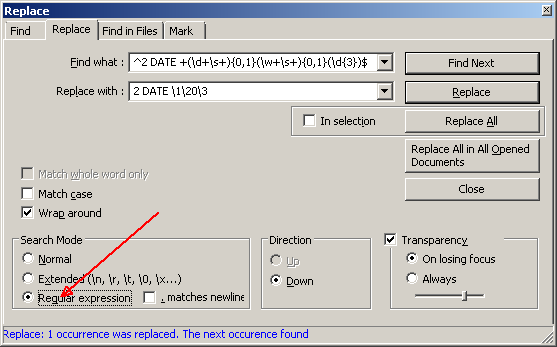 Obviously it is important to get the expressions correct so here they are in plain text so that you can copy them Find what: ^2 DATE +(\d+\s+){0,1}(\w+\s+){0,1}(\d{3})$ Replace with: 2 DATE \1\20\3
Wow. I'll give that a try. Should be interesting.
|
|
|
|
|
Administrators
Customers
Important Contributors
FamilyTrees.GenoPro.com
GenoPro version: 3.1.0.1
Last Login: Thursday, April 30, 2026
Posts: 3,482,
Visits: 27,149
|
I suggest you edit your .ged files before import using an advanced text editor (e.g. NotePad++) that allows search and replace using 'regular expressions'.
With Notepad++ you can use the following expressions in its Replace dialog (Ctrl & H) and click 'Replace All' to convert all 3 digit year DATE tags to 4 digits by adding the leading zero. Dates can have optional day and/or month Obviously it is important to get the expressions correct so here they are in plain text so that you can copy them Find what: ^2 DATE +(\d+\s+){0,1}(\w+\s+){0,1}(\d{3})$ Replace with: 2 DATE \1\20\3
'lego audio video erro ergo disco' or "I read, I listen, I watch, I make mistakes, therefore I learn"
Edited: Sunday, April 13, 2014 by
genome
|
|
|
|
|
Customers
GenoPro version: 3.1.0.1
Last Login: Tuesday, July 8, 2025
Posts: 26,
Visits: 104
|
Thanks for that information. Things have moved around a bit from the old Beta version I was using. I really need to learn some of the basics about this software as I'm probably doing things the hard way.
Another date issue I noticed: I'm importing GED files which have many dates pre-1000 A.D. which means they are only a 3 digit year, e.g. 4 JUL 875. For each of these, and there are a lot, I have to go in and manually add a leading zero to get GenoPro to accept it. Is there a way to make it recognize a 3-digit date without me having to do this manually to possibly hundreds of entries?
|
|
|
|
|
Customers
Important Contributors
GenoPro version: 3.1.0.1
Last Login: Today @ 1:47 AM
Posts: 448,
Visits: 7,956
|
Yes, it's still there - see here and here
|
|
|
|
|
Customers
GenoPro version: 3.1.0.1
Last Login: Tuesday, July 8, 2025
Posts: 26,
Visits: 104
|
The Beta version I have doesn't have that option so I downloaded the latest version to try. The Beta version had an option to set a specific date, which I often used as I was working on medieval genealogy. Is that option gone from version GenoPro 2011?
|
|
|
|
|
Customers
Important Contributors
GenoPro version: 3.1.0.1
Last Login: Today @ 1:47 AM
Posts: 448,
Visits: 7,956
|
|
|
|
|
|
Customers
GenoPro version: 3.1.0.1
Last Login: Tuesday, July 8, 2025
Posts: 26,
Visits: 104
|
Is there a way to configure how things appear on the screen for new charts? I'm particularly interested in the mate connector. Every time I link someone as a mate it uses a gray line. Is there anyway to make it default to the black marriage line since that is what I use 99.99% of the time?
Edited: Friday, April 11, 2014 by
JeffGeorge
|