|
|
|
|
Gamma
GenoPro version: 3.0.1.0
Last Login: Sunday, March 1, 2020
Posts: 2,
Visits: 4
|
i used to be able to select the individual tabs for genomaps on the toolbar at the bottom of the screen, and now i cannot. although i can move between the genomaps if i select the appropriate hyperlink member.
|
|
|
|
|
Administrators
Moderators
Customers
Gamma
FamilyTrees.GenoPro.com
Translator
GenoPro version: 3.1.0.1
Last Login: Tuesday, February 3, 2026
Posts: 4,886,
Visits: 22,803
|
You mean when you click on a GenoMap (the tab at the bottom) nothing happens?
|
|
|
|
|
Gamma
GenoPro version: 3.0.1.0
Last Login: Sunday, March 1, 2020
Posts: 2,
Visits: 4
|
I'm having the same problem. I cannot navigate when I select a genomap tab at the bottom of the screen, nor use the arrow buttons to move left or right. It does not work with mouse right click nor left click. In order to navigate to other tabs, i have to select File> Page Setup , then select which genomap i want to use. I am also not able to right click and thus move or rename a genomap tab. I have searched the support forum and only found a similar question for person using windows 7. The reply for fix reference was a broken link and the suggested search topic had no results . I am using GenoPro 2016 and windows 10 pro.
|
|
|
|
|
Gamma
GenoPro version: 3.1.0.0
Last Login: Saturday, April 18, 2020
Posts: 1,
Visits: 1
|
Did you get this answered? Because i was having a similar problem with moving the scroll from left to right or up and down.
|
|
|
|
|
Administrators
Customers
Important Contributors
FamilyTrees.GenoPro.com
GenoPro version: 3.1.0.1
Last Login: Yesterday @ 6:06 AM
Posts: 3,487,
Visits: 27,235
|
I vaguely recollect this being an issue many years ago and I too searched the forum and found a couple of reports with broken links. 
The only suggestions I have are to make sure you are running the latest version , currently GenoPro 2020 version 3.1.0.0, (click Help on GenoPro menu then About GenoPro to check this) and to perhaps try running genopro.exe in say Windows 8 Compatibility mode. Right click on your genopro.exe in Program Files and choose Properties to get this:
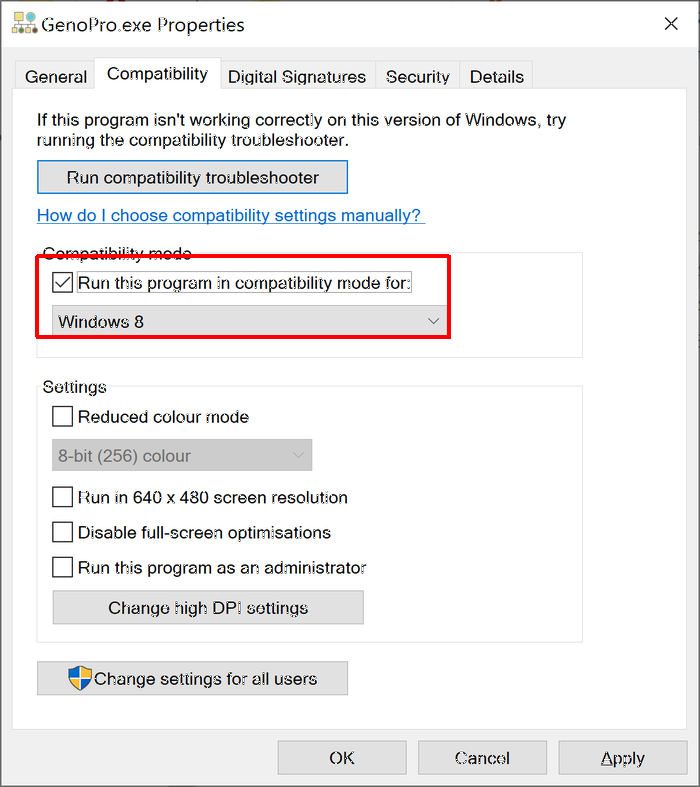
I don't know why some users are still experiencing this issue.
I also found this under https://www.genopro.com/setup/history/ indicating that the problem was solved over 9 years ago 
'lego audio video erro ergo disco' or "I read, I listen, I watch, I make mistakes, therefore I learn"
Edited: Tuesday, April 21, 2020 by
genome
|