|
|
|
|
Gamma
Customers
GenoPro version: 3.1.0.1
Last Login: Sunday, September 6, 2026
Posts: 2,
Visits: 10
|
|
|
|
|
|
Administrators
Customers
Important Contributors
FamilyTrees.GenoPro.com
GenoPro version: 3.1.0.1
Last Login: 2 days ago @ 10:12 PM
Posts: 3,503,
Visits: 27,512
|
After downloading your linked .gno, use GenoPro menu option Tools / Relink Pictures to access the pictures stored on familytrees
i.e. enter folder names as shown below then click the relink button. 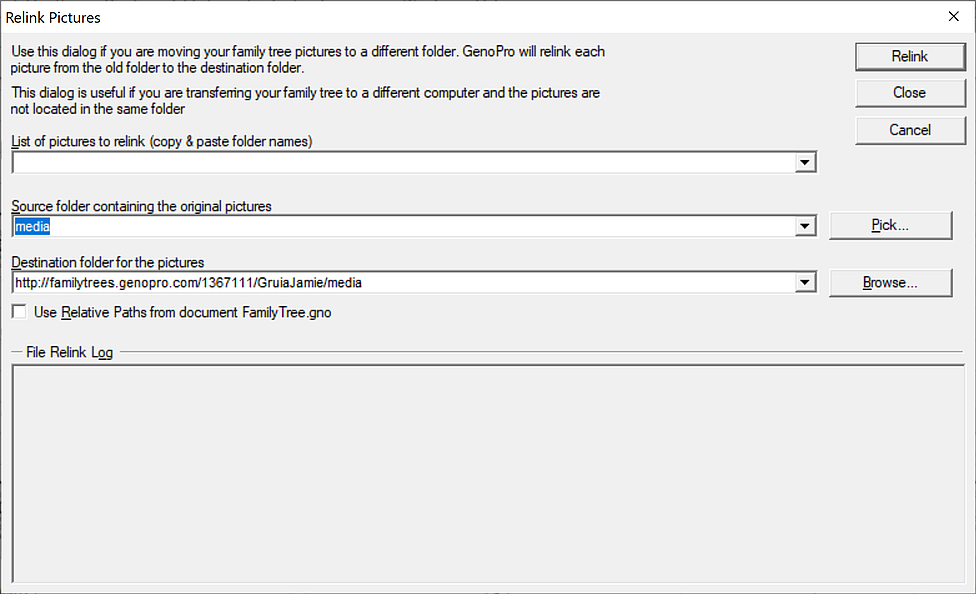
'lego audio video erro ergo disco' or "I read, I listen, I watch, I make mistakes, therefore I learn"
|
|
|
|
|
Gamma
Customers
GenoPro version: 3.1.0.1
Last Login: Sunday, September 6, 2026
Posts: 2,
Visits: 10
|
Thank you, that did work! Now, when I try to generate a web report with that newly saved file, I get this Message. Any tips?
|
|
|
|
|
Administrators
Customers
Important Contributors
FamilyTrees.GenoPro.com
GenoPro version: 3.1.0.1
Last Login: 2 days ago @ 10:12 PM
Posts: 3,503,
Visits: 27,512
|
The report has actually been generated under your user id folder, not your email. see http://familytrees.genopro.com/1367111/Leach/
When generating a report, use your user id, not your email to log in to avoid the Report Generator attempting to use the wrong url to display the report.
'lego audio video erro ergo disco' or "I read, I listen, I watch, I make mistakes, therefore I learn"
|