|
|
|
|
Administrators
Customers
Important Contributors
FamilyTrees.GenoPro.com
GenoPro version: 3.1.0.1
Last Login: Yesterday @ 6:34 AM
Posts: 3,504,
Visits: 27,491
|
I now have a revised version of the script linkcode.js used in the bootstrap process that I have attached to this post.
It uses the standard Windows executable mklink.exe instead of the SysInternals/Windows Resource Kit junction.exe to create the Code junction link between the report skin folder and that in Common folder. Hopefully this will run without any special policy setting or any need to copy the Code folder. If not too inconvenient perhaps you would try unzipping the skins again and then replace the file linkcode.js in the Common\Code folder with the attached version and trying to run the report once more. If this works for you I will revise the skins bundle to include this fix. Thanks
'lego audio video erro ergo disco' or "I read, I listen, I watch, I make mistakes, therefore I learn"
 linkcode.js
(92 views,
8.52 KB)
linkcode.js
(92 views,
8.52 KB)
|
|
|
|
|
Customers
GenoPro version: 3.0.1.0
Last Login: Sunday, May 4, 2025
Posts: 35,
Visits: 98
|
In my personal account I have to unlock my Software policy as well - I had tried this previously but it looks as if the junction function had not been executed
|
|
|
|
|
Customers
GenoPro version: 3.0.1.0
Last Login: Sunday, May 4, 2025
Posts: 35,
Visits: 98
|
I ran the junction function under my admin account and unlocked my Software policy which gave me the screen shot below. I was then able to successfully generate the Narrative Report - the setup should now be OK for me to return to my non admin account
|
|
|
|
|
Administrators
Customers
Important Contributors
FamilyTrees.GenoPro.com
GenoPro version: 3.1.0.1
Last Login: Yesterday @ 6:34 AM
Posts: 3,504,
Visits: 27,491
|
I really do not understand why in your first step the file file version.txt was reported as not found. The folder Common\Code does contain a folder NarrativeReport that does contain a file version.txt:
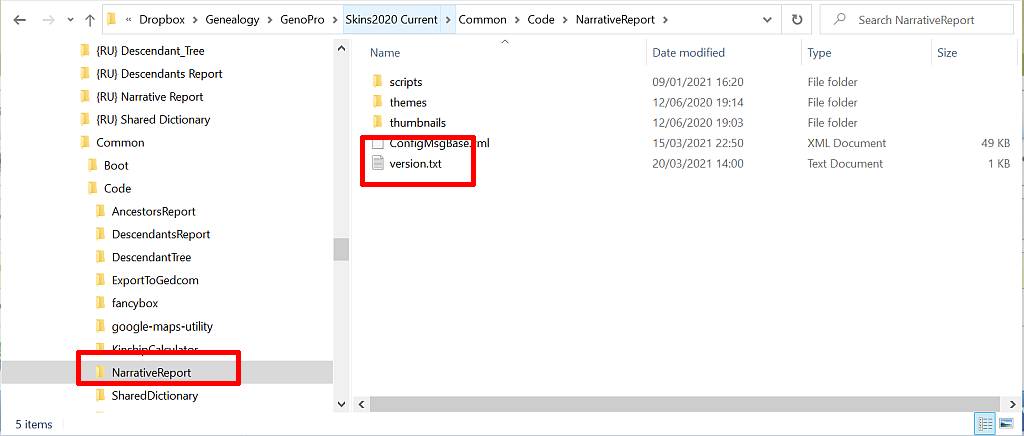 and so if you had copied ALL the contents of Code including subfolders that error should not arise. Unless I am missing something  Also you have not shown the result of running the junction.exe command in a command prompt. For example this is what I get: 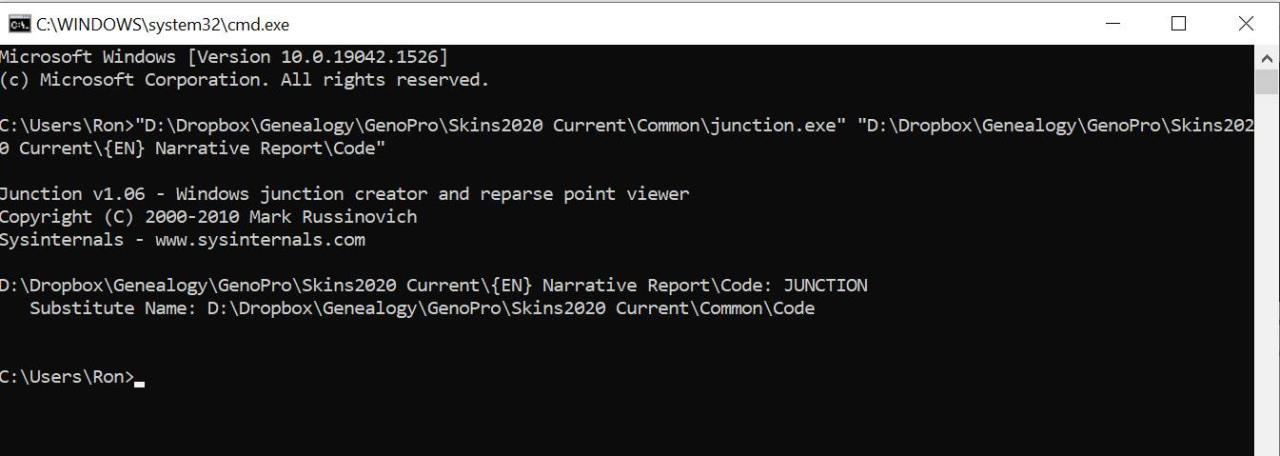 I am interested to know of any errors are produced when running junction.exe via the command lines I have given you, as these appear to fail when you run them via the Narrative Report bootstrap script.
'lego audio video erro ergo disco' or "I read, I listen, I watch, I make mistakes, therefore I learn"
Edited: Friday, February 25, 2022 by
genome
|
|
|
|
|
Customers
GenoPro version: 3.0.1.0
Last Login: Sunday, May 4, 2025
Posts: 35,
Visits: 98
|
I deleted the code folder then ran C:\Users\philip dunlop\Documents\Family Tree\Skins\Common\junction.exe" "C:\Users\philip dunlop\Documents\Family Tree\Skins\{EN} Narrative Report\Code" "C:\Users\philip dunlop\Documents\Family Tree\Skins\Common\Code |
|
|
|
|
Customers
GenoPro version: 3.0.1.0
Last Login: Sunday, May 4, 2025
Posts: 35,
Visits: 98
|
When I ran C:\Users\philip dunlop\Documents\Family Tree\Skins\Common\junction.exe" "C:\Users\philip dunlop\Documents\Family Tree\Skins\{EN} Narrative Report\Code
The following was the result I will now do the next suggestion |
|
|
|
|
Customers
GenoPro version: 3.0.1.0
Last Login: Sunday, May 4, 2025
Posts: 35,
Visits: 98
|
First step move code folder to Narrative Report, delete common folder and rerun - nocheck.txt is there I will now try your other requests
|
|
|
|
|
Administrators
Customers
Important Contributors
FamilyTrees.GenoPro.com
GenoPro version: 3.1.0.1
Last Login: Yesterday @ 6:34 AM
Posts: 3,504,
Visits: 27,491
|
You said:
'After copying Common to Narrative report' Just to be clear, for the work-around solution you need to copy just the Code folder and its contents from Common to replace the dummy Code folder under {EN} Narrative Report. You also need the nocheck.txt file to be present. Your screen print suggests nocheck.txt was not present, hence the script then checks for the linked folder. Perhaps you could try this again. As to the original problem, i.e. the utility junction.exe does not appear to be working as I expect it to. Could you try running it from a command prompt please. i.e. press Windows key & R to get the Windows Run prompt and type cmd and press OK. Then copy and paste the following in the cmd.exe window to check for a link:
"C:\Users\philip dunlop\Documents\Family Tree\Skins\Common\junction.exe" "C:\Users\philip dunlop\Documents\Family Tree\Skins\{EN} Narrative Report\Code"and then press Enter Please report the result of this. Could you also try first deleting the Code folder from C:\Users\philip dunlop\Documents\Family Tree\Skins\{EN} Narrative Report and then copy and paste the following in the cmd.exe window to try and create the link:
"C:\Users\philip dunlop\Documents\Family Tree\Skins\Common\junction.exe" "C:\Users\philip dunlop\Documents\Family Tree\Skins\{EN} Narrative Report\Code" "C:\Users\philip dunlop\Documents\Family Tree\Skins\Common\Code"
and then press Enter Please report the result of this.
'lego audio video erro ergo disco' or "I read, I listen, I watch, I make mistakes, therefore I learn"
|
|
|
|
|
Customers
GenoPro version: 3.0.1.0
Last Login: Sunday, May 4, 2025
Posts: 35,
Visits: 98
|
After copying Common to Narrative report
|
|
|
|
|
Customers
GenoPro version: 3.0.1.0
Last Login: Sunday, May 4, 2025
Posts: 35,
Visits: 98
|
I have started again - the code folder has Placeholder.txt in it, I am using 7Zip to unzip the skins, Report output same as first time I re-extracted the skins and added the nocheck.txt file and turned off the Do not display dialog,
|