|
|
|
|
Customers
FamilyTrees.GenoPro.com
GenoPro version: 3.1.0.1
Last Login: Sunday, December 7, 2025
Posts: 9,
Visits: 107
|
Hi, I cannot refresh my family trees on genopro.com. I've been using Genopro for years, this has never happened before. I generate the report with {EN} Narrative Report, is ends with 'Report ready' (with one Google API mistake). So far so good. Then I check the web page on genopro.com and find the earlier version there. And this goes for all my trees in different directories. (It might not be obvious, but on the right side of the pic the result is the old version.) Any ideas, anyone? Thanks Dezső
|
|
|
|
|
Administrators
Customers
Important Contributors
FamilyTrees.GenoPro.com
GenoPro version: 3.1.0.1
Last Login: Yesterday @ 6:34 AM
Posts: 3,504,
Visits: 27,491
|
Quite often the issue here is that your browser is caching the pages so that you do not see the updated pages. Please try clearing your browser cache and check again. Google how to do this for your browser.
Also if you have errors relating to Google Maps then you are not using my latest Report Skins Templates, which now use OpenStretMap and not Google Maps.
|
|
|
|
|
Customers
FamilyTrees.GenoPro.com
GenoPro version: 3.1.0.1
Last Login: Sunday, December 7, 2025
Posts: 9,
Visits: 107
|
Thank you, trying, come back when ready.
|
|
|
|
|
Customers
FamilyTrees.GenoPro.com
GenoPro version: 3.1.0.1
Last Login: Sunday, December 7, 2025
Posts: 9,
Visits: 107
|
Thanks for the hints. Emptying the chache has solved the problem, but only for once. Every time I upload a new version, I need to empty the chace again to see the changes. Ctrl-F5 cannot do the trick. I can live with it, but what about the other visitors? - Granny, please check out the new version, but empty the chache first! - Empty what?...
|
|
|
|
|
Customers
FamilyTrees.GenoPro.com
GenoPro version: 3.1.0.1
Last Login: Sunday, December 7, 2025
Posts: 9,
Visits: 107
|
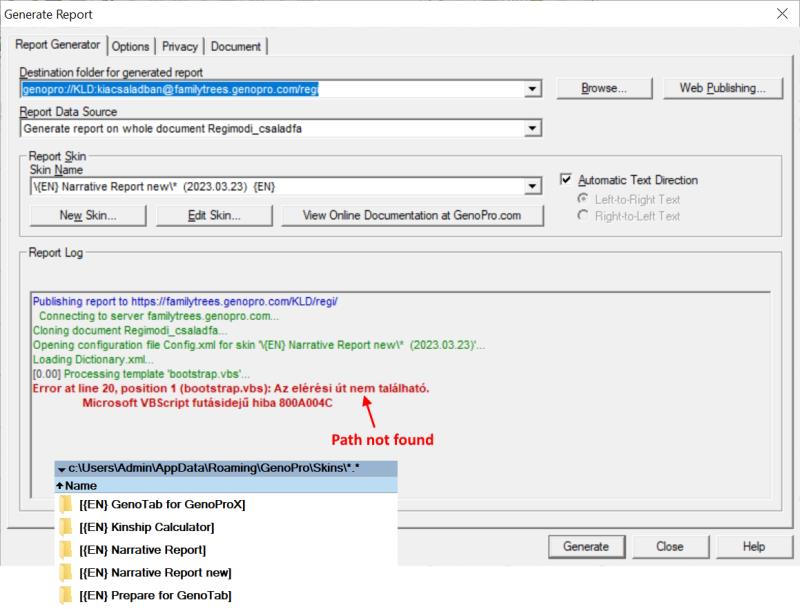
Trying to iuse a new skin makes a Path not found error. Did I copy the new skin to a wrong folder?
|
|
|
|
|
Administrators
Customers
Important Contributors
FamilyTrees.GenoPro.com
GenoPro version: 3.1.0.1
Last Login: Yesterday @ 6:34 AM
Posts: 3,504,
Visits: 27,491
|
Please follow the instructions in my post. i.e. Unzip the full contents of the downloaded file into a new empty folder e.g. C:\Users\Admin\Documents\My Skins 230911
Instruct GenoPro to use this folder for Report Skin Templates by setting this path under the Options tab of the Generate Report dialogue. Do not try to copy individual folders as this may destroy the linkage to the Common\Code folder. As to emptying the cache, there are batch scripts that can be used that make make the task simpler.
'lego audio video erro ergo disco' or "I read, I listen, I watch, I make mistakes, therefore I learn"
|
|
|
|
|
Customers
FamilyTrees.GenoPro.com
GenoPro version: 3.1.0.1
Last Login: Sunday, December 7, 2025
Posts: 9,
Visits: 107
|
Hi, everything works great. The new skins are available now, and the Google Maps API messages have gone.
Thank you for your help!
|
|
|
|
|
Customers
FamilyTrees.GenoPro.com
GenoPro version: 3.1.0.1
Last Login: Sunday, December 7, 2025
Posts: 9,
Visits: 107
|
Just one more: is there a way to put line breaks in tooltip texts? Here is the list I have tried, but no banana:
<br/>


<br />


|
|
|
|
|
Administrators
Customers
Important Contributors
FamilyTrees.GenoPro.com
GenoPro version: 3.1.0.1
Last Login: Yesterday @ 6:34 AM
Posts: 3,504,
Visits: 27,491
|
Hmm, Currently GenoPro converts newlines in comments etc. (added by using Ctrl & Enter) to <b /> when generating an HTML Reports. What we really want with comments in SVG tooltips is 
I've tested this with Chrome by generating a report locally an then editing the genomaps\genomap0.htm file produced replacing all <br /> between <title> </title> with the said 
 Now just need to work out how to change the report generator script to do this. I think <br /> used to work with IE 
'lego audio video erro ergo disco' or "I read, I listen, I watch, I make mistakes, therefore I learn"
|
|
|
|
|
Customers
FamilyTrees.GenoPro.com
GenoPro version: 3.1.0.1
Last Login: Sunday, December 7, 2025
Posts: 9,
Visits: 107
|
Thank you for checking. Is there a way to access the GenoPro report so that I could make this < b / > → & # x A replacement manually?
I'm trying to publish one of my trees in the coming months. It belongs to a popular family novel, and tooltips contain quotations from the book refering to the specific person. You can imagine how handy a line break feature could be.  Edited: Monday, November 6, 2023 by
KLD
Edited: Monday, November 6, 2023 by
KLD
|