|
Customers
FamilyTrees.GenoPro.com
GenoPro version: 3.1.0.1
Last Login: Sunday, August 9, 2026
Posts: 66,
Visits: 1,610
|
Nachdem ich jetzt nur noch mit Win 11 arbeiten kann, muss ich wieder um Hilfe bitten! Ich Arbeite mit dem Skin Skins2024.09.09a. Der neueste Skin macht mit 'Kingship Calculator' Ärger, ich arbeite aber viel damit. Die neue Skin rechnet nichtmal bis zu den Großeltern richtig, irgendein Loop verirrt sich im Nirwana. (siehe Bilder) 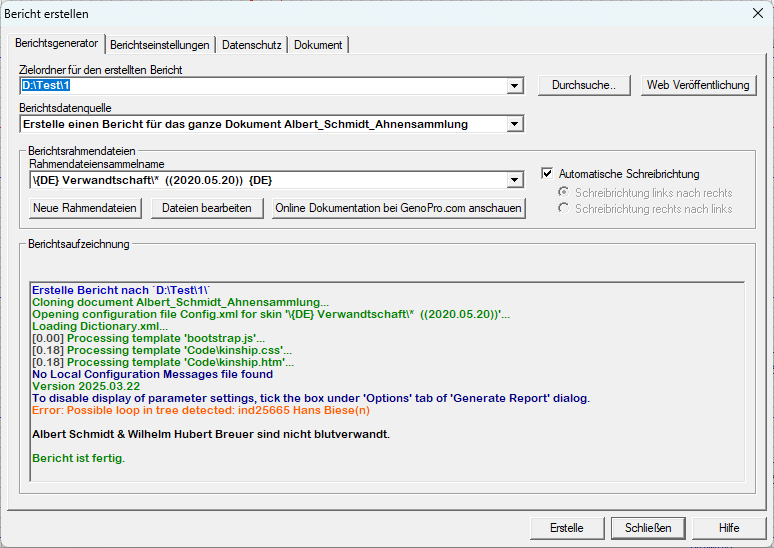 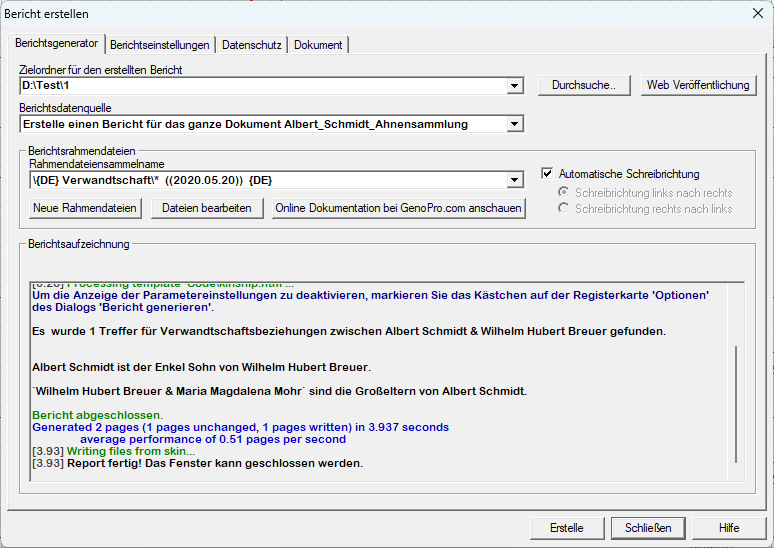 Ich habe z.Z. ca. 23.000 Personen in meinem Stammbaum und es scheinen zu viele Personen für den neuesten Skin zu sein. Der ältere Skin kommt damit zurecht. Mit Win 11 kann ich keine 'Descendand Tree' mehr rechnen. Bis jetzt habe ich sie mit Win 10 gerechnet. Jetzt habe ich kein Win 10 mehr. Könnte dies an der Personenzahl in meinem Stammbaum liegen, fehlen Speicherfreigaben im System, oder verarbeitet WIN 11 Javaspript anders als Win 10? Skin bricht immer mit der Fehlermeldung - Code from a shared script cannot be executed - ab. Siehe Fehlermeldung auf meinem Bild. 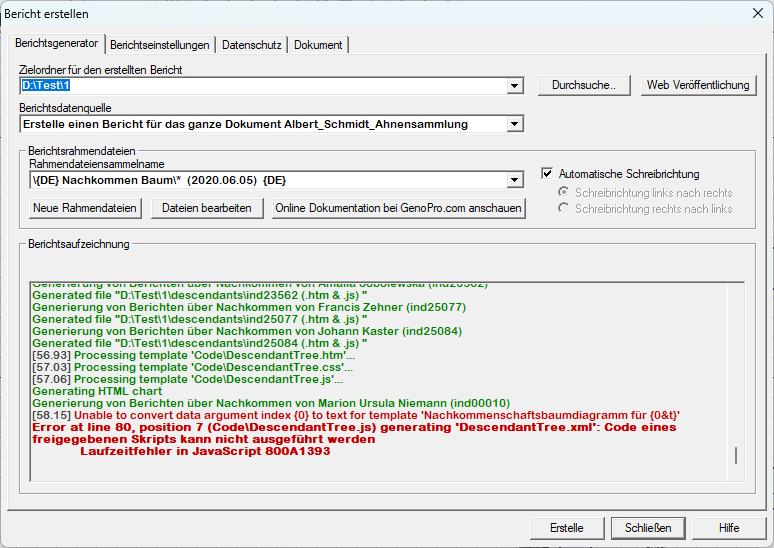 Mir ist noch etwas aufgefallen, sicher nicht ganz so wichtig. Alle GenoMaps auf Diskette Speichern bricht bei mir spätestens nach 174 Maps ab. 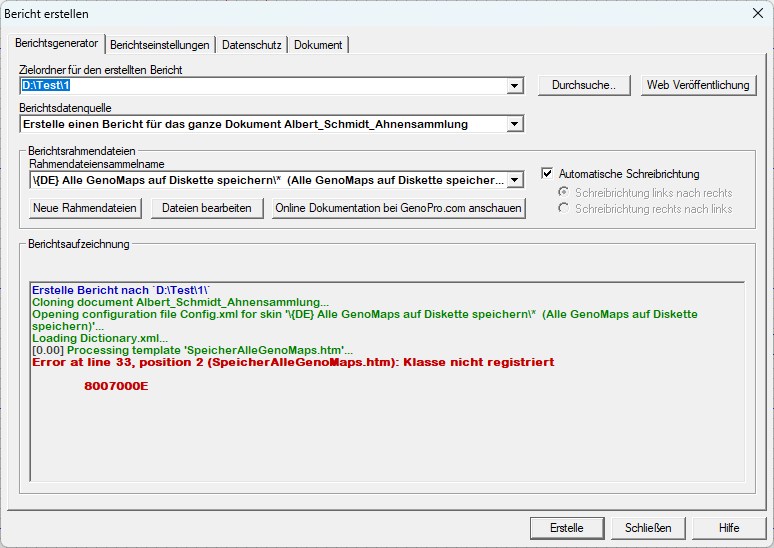 Merry Christmas and a Happy New Year!
Edited: Tuesday, July 14, 2026 by
genome
|
|
Administrators
Customers
Important Contributors
FamilyTrees.GenoPro.com
GenoPro version: 3.1.0.1
Last Login: Yesterday @ 10:53 AM
Posts: 3,502,
Visits: 27,500
|
Apologies, I was under the impression that Report Skin Templates under Windows 11 worked exactly the same as under Windows 10.
But on investigation following your post here I find that once again Microsoft has changed all that by updating JScript in a recent Windows 11 24H2 update. !! This update plays havoc with GenoPro Report Skin Templates written in JScript !!To reinstate the previous version of JScript you'll need to apply a Windows Registry fix. i.e. Windows Registry Editor Version 5.00
[HKEY_LOCAL_MACHINE\Software\Policies\Microsoft\Internet Explorer\Main] "JScriptReplacement"=dword:00000000 |
the attached file contains this fix, download it, rename to JscriptFix.reg and double click it in Window Explorer to apply it.
Below is what Google's AI mode gives to the query 'jscript windows 11 changes' :
In Windows 11, specifically with the version 24H2 update, Microsoft has made a significant change by enabling the more secure and modern JScript9Legacy scripting engine by default, replacing the outdated JScript engine that had been part of Windows since 1996. Key Changes to JScript in Windows 11 (Version 24H2 and Later) - Default Engine Shift: The operating system now loads
JScript9Legacy.dll instead of the older JScript.dll for scripting processes that rely on the Windows Scripting Host (WSH). - Enhanced Security: The JScript9Legacy engine, based on JScript9 (Chakra), offers improved performance and security features, such as stricter execution policies and better handling of JavaScript objects, to mitigate modern threats like cross-site scripting (XSS) and memory corruption vulnerabilities.
- Backward Compatibility (Mostly): The change is designed to maintain compatibility with existing legacy scripts, and for the vast majority of users, no additional action is required.
- Potential Incompatibility Issues: While generally compatible, some legacy applications, especially those using specific COM interactions or relying on very particular, non-standard behaviors of the old engine (like conditional compilation or 64-bit integer handling), may experience errors or regressions.
Impact and Workarounds - No User Action Required: The transition happens automatically on affected systems (Windows 11 version 24H2 and above).
- Application-Specific Errors: Users of certain professional software (e.g., specific versions of CaseWare or FinalBuilder) have reported script errors.
- Rollback Option: If incompatibility issues arise, administrators can force the use of the classic JScript engine by modifying the Windows Registry. This involves creating a specific DWORD value named
JScriptReplacement and setting its value to 0 in the HKEY_LOCAL_MACHINE\SOFTWARE\Policies\Microsoft\Internet Explorer\Main or HKEY_CURRENT_USER\SOFTWARE\Policies\Microsoft\Internet Explorer\Main key. - Modern Development: For modern JavaScript development, technologies like Node.js are the standard and are fully supported on Windows 11.
'lego audio video erro ergo disco' or "I read, I listen, I watch, I make mistakes, therefore I learn"
 JscriptFix.txt
(57 views,
150 bytes)
Tags:
Edited: Sunday, July 12, 2026 by
genome
JscriptFix.txt
(57 views,
150 bytes)
Tags:
Edited: Sunday, July 12, 2026 by
genome
|
|
Customers
FamilyTrees.GenoPro.com
GenoPro version: 3.1.0.1
Last Login: Sunday, August 9, 2026
Posts: 66,
Visits: 1,610
|
Danke Ron,
Descendant Tree läuft jetzt ohne Fehler 
Der Kinship Calculator im Skin2025.03.30 noch nicht. Ich vermute, es ist nicht genug Buffer für die Berechnung einprogrammiert worden. |