|
|
|
|
Customers
Last Login: Monday, September 26, 2005
Posts: 40,
Visits: 61
|
Ok thanks I will try that
|
|
|
|
|
Customers
Important Contributors
Translator
GenoPro version: 3.1.0.1
Last Login: Friday, November 25, 2022
Posts: 334,
Visits: 7,574
|
doakey
the reason I tried to put them all in one tree, is so that when I put them on the web or produce a report, all the persons on my tree will be shown in that web or report. You can do it even if you use different GenoMaps on the same .gno document, by asking the report generator to make the report on the document and not on a single GenoMap.
|
|
|
|
|
Customers
Last Login: Monday, September 26, 2005
Posts: 40,
Visits: 61
|
Hi Yes I will do that, the reason I tried to put them all in one tree, is so that when I put them on the web or produce a report, all the persons on my tree will be shown in that web or report. Thanks for looking at it though Dave
|
|
|
|
|
Gamma
Customers
Important Contributors
FamilyTrees.GenoPro.com
Translator
GenoPro version: 3.1.0.1
Last Login: Tuesday, December 2, 2025
Posts: 257,
Visits: 2,863
|
doakey (9/7/2005)
Sorry Dan I do not agree with you regarding the help button as in 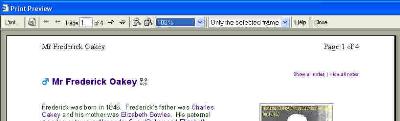
All the other button on this tool bar work with genopro, navigation, size, drop down list for view, so why does not the help button work, it is definiatly not part of my normal browser As I mentioned it few posts above,Help not working in Print preview, is an WinXP issue, not having anything with Genopro. Have you tried to click on it during "regular" web browsing... On my comp it doesn't work at all!!!
|
- "εν οιδα οτι ουδεν οιδα" (Σωκρατησ) - "The only thing that I know is that I don't know anything" (Socrates)
Edited: Thursday, September 8, 2005 by
V.L.o
|
|
|
|
|
Administrators
Moderators
Customers
Gamma
FamilyTrees.GenoPro.com
Translator
GenoPro version: 3.1.0.1
Last Login: Tuesday, October 28, 2025
Posts: 4,886,
Visits: 22,799
|
doakey (9/8/2005)
have you any other suggestions, to better it, or noticed any other things I am doing wrong.  I have not noticed anything at first, however I would recommend to split your tree into multiple GenoMaps. Select one branch of your tree, right-click and select "Move to GenoMap". Your tree will be much easier to manage. For instance, select "Robert Eustace", click on the toolbar button "Select Ancestor Tree" to select all its ancestors, right-click to get the context menu, select "Move to GenoMap" and pick "<New GenoMap>". Repeat this process for other branches of your tree. For instance, you may move "Henry Eustace" and its descendents to a new GenoMap. In this case, you will have to use the toolbar button "Select Descendent Tree" and manually select his wife before moving to a new GenoMap. If you don't have to select his wife, it's no big deal as you can always move her later...
Edited: Thursday, September 8, 2005 by
GenoProSupport
|
|
|
|
|
Customers
Last Login: Monday, September 26, 2005
Posts: 40,
Visits: 61
|
I have altered the child number and that works fine, thanks, having had a look at my efforts, have you any other suggestions, to better it, or noticed any other things I am doing wrong.
|
|
|
|
|
Customers
Last Login: Monday, September 26, 2005
Posts: 40,
Visits: 61
|
Ok DanI see, I put that number in there so that it the individuals corresponded to to the numbers in my original book and index of my family researches, as I could not see where else to put it, I suppose I could put it in the notes. but if that is the problem, and I can well see that it is, then I will set and alter them all. Thanks
|
|
|
|
|
Administrators
Moderators
Customers
Gamma
FamilyTrees.GenoPro.com
Translator
GenoPro version: 3.1.0.1
Last Login: Tuesday, October 28, 2025
Posts: 4,886,
Visits: 22,799
|
doakey (9/6/2005)
5. On one report it says: He was the 39th of nine children.On the Birth of Frederick Oakey, it is written 39 as the Child Number. Delete this value and GenoPro will automatically re-compute the Child Number based on his date of birth. The report generator will produce the following output: He was the oldest of nine children.. I noticed you have used the Child Number to enter large numbers, up to 153. May I ask what is the meaning of those numbers? I can create a new field to "number" individuals. The Child Number is used to sort children from oldest to youngest.
Edited: Wednesday, September 7, 2005 by
GenoProSupport
|
|
|
|
|
Customers
Last Login: Monday, September 26, 2005
Posts: 40,
Visits: 61
|
Sorry Dan I do not agree with you regarding the help button as in
All the other button on this tool bar work with genopro, navigation, size, drop down list for view, so why does not the help button work, it is definiatly not part of my normal browser
|
|
|
|
|
Customers
Important Contributors
FamilyTrees.GenoPro.com
Translator
GenoPro version: 3.1.0.1
Last Login: Sunday, March 21, 2021
Posts: 716,
Visits: 12,927
|
To MR,
since I work with IE and Mozilla I always test in both and your case is exactly what I have described. The family page just shows up in a different way, but can be corrected in the template, so the report comes out the same way in both browsers.
Picture and text of the child display next to each other only if there is enough text in the comment fields of the marriage in order to push the text of the child down.
I hope GenoPro will move my comments and the two from MR to the topic "Some bugs in the report template"
Edited: Wednesday, September 7, 2005 by
maru-san
|