|
|
|
|
Administrators
Moderators
Customers
Gamma
FamilyTrees.GenoPro.com
Translator
GenoPro version: 3.1.0.1
Last Login: Tuesday, October 28, 2025
Posts: 4,886,
Visits: 22,799
|
|
|
|
|
|
Customers
Last Login: Monday, September 26, 2005
Posts: 40,
Visits: 61
|
Ok Dan thanksbut why can I not find the genomaps to change their names, right clicking on them does not give the option of changing the name
|
|
|
|
|
Administrators
Moderators
Customers
Gamma
FamilyTrees.GenoPro.com
Translator
GenoPro version: 3.1.0.1
Last Login: Tuesday, October 28, 2025
Posts: 4,886,
Visits: 22,799
|
doakey (9/22/2005)
right clicking on them does not give the option of changing the nameSure it does. 
|
|
|
|
|
Gamma
Customers
Important Contributors
FamilyTrees.GenoPro.com
Translator
GenoPro version: 3.1.0.1
Last Login: Tuesday, December 2, 2025
Posts: 257,
Visits: 2,863
|
You're talking about GenoMaps so you must have used GenoPro Beta, and not viewing them is caracteristical for GenoPro v1.x (1.91, or maybe 1.99) lookup under Help -> about what is the version you're talking about. GenoMaps are available ONLY with beta! GenoPro v1.x AND Beta can be present at the same time on same computer, you might be opening different program from ocasion to ocasion...
- "εν οιδα οτι ουδεν οιδα" (Σωκρατησ) - "The only thing that I know is that I don't know anything" (Socrates)
|
|
|
|
|
Customers
Last Login: Monday, September 26, 2005
Posts: 40,
Visits: 61
|
Yes I do have beta,there is no change name that I can see when I right click on a map as in below the right click menu is shown 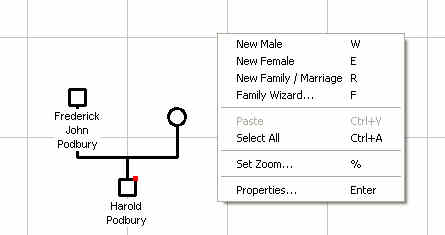
And if I fo to file propertiss and get a list of geomaps, right clicking on one does not show a name change option there either
|
|
|
|
|
Customers
Important Contributors
GenoPro version: 3.1.0.1
Last Login: Tuesday, November 25, 2025
Posts: 443,
Visits: 7,821
|
You must right-click the GenoMap TAB not the GenoMap itself.
|
|
|
|
|
Customers
Last Login: Monday, September 26, 2005
Posts: 40,
Visits: 61
|
Yes that works great thanksDave
|