|
|
|
|
Administrators
Customers
Important Contributors
FamilyTrees.GenoPro.com
GenoPro version: 3.1.0.1
Last Login: Today @ 6:06 AM
Posts: 3,487,
Visits: 27,235
|
The waiting is over! Attached is the 1st beta version of a new Descendants Report skin. First a prerequisite: The report relies on OpenOffice Writer API to actually generate the report. There you must first install OpenOffice (see http://www.openoffice.org) on your system. At a later date I hope to have a version that uses the MS Word COM automation facilities. I chose OOo first, although it was quite difficult to find documentation on the API, as OOo is easily available to all at no or little cost. The Report can be saved in any format supported by OpenOffice. This includes MS Word format and OpenOffice also has an 'Export to PDF' facility. The script produces a descendants report for each selected individual in the GenoPro file. Ensure that only the individuals required are selected before opening the Report Generator dialogue. If multiple individuals are selected then a multi-section report is produced, although you will be prompted before each section allowing you to omit that individual if required. This is the first beta and there is still much work to do. At present only the bare esssentials are reported, 'bells & whistles' will come later. The Dictionary needs pruning - it is basically the same one as the Narrative Report with some minor changes but has a lot of dead wood that needs removing. I suggest that no attempt is made just yet to translate this report. I have added a feature to improve readability of the report that I will be adding to the Narrative Report as well. This involves having a Custom Tag 'Style' that defines a variation of the Dictionary phrase. At present this is only implemented for Occupations. There are currently two extra PhOccupation phrases, PhOccupationWorkAs and PhOccupationIs that are triggered when an Occupation has the Custom Tag Style set to WorkAs or Is respectively. So you can now say 'John worked as a plumber from 1901 to 1930' or 'John was a soldier in the army' instead of 'John's occupation was ....'. This is complemented by two other Custom Tags, Title.Prefix and Company.Prefix that allow the occupation title prefix to be set (e.g. 'A' or 'An') and the company prefix (e.g. With, InThe). The actual text (English: a, an, with , in the) is via a Dictionary lookup to allow language translation. Suggestions for other phrase variations are welcome. I will add the facility to Education and Occupancy as well and so please submit suggestions for these as well. I also invite suggestions for a wish list of features to be developed next. Update 21/11/2007 attachment removed following release of beta 2 within GenoPro 2007 version 2.0.1.2
'lego audio video erro ergo disco' or "I read, I listen, I watch, I make mistakes, therefore I learn"
Edited: Wednesday, November 21, 2007 by
Ron
|
|
|
|
|
Gamma
Moderators
Administrators
FamilyTrees.GenoPro.com
Customers
GenoPro version: 3.1.0.1
Last Login: Monday, May 12, 2025
Posts: 952,
Visits: 10,077
|
Congratulation Ron, I downloaded and installed the OpenOffice suite (~120 meg) and it was worth it to see the result. I generated the report in "book" format.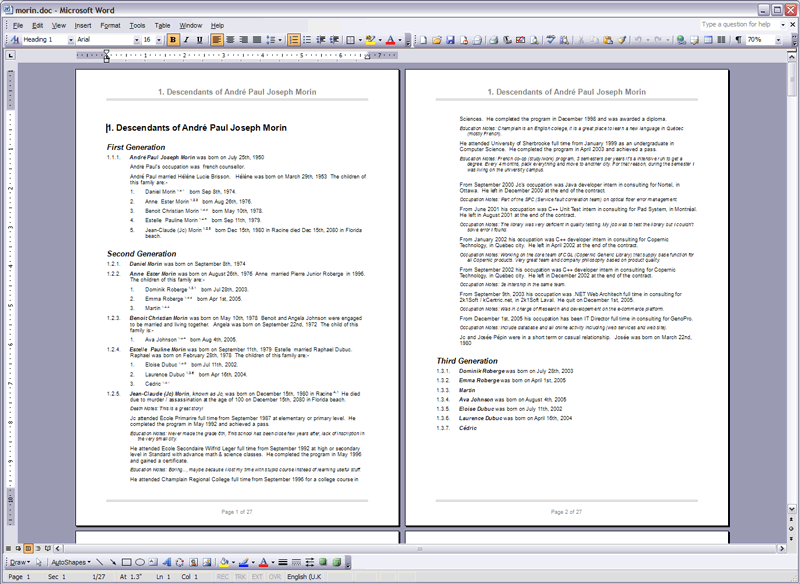
Edited: Tuesday, October 16, 2007 by
GenoProSupport
|
|
|
|
|
Customers
Important Contributors
FamilyTrees.GenoPro.com
GenoPro version: 3.1.0.1
Last Login: 3 hours ago
Posts: 1,608,
Visits: 33,390
|
Ron
As the sort of user who collects all sorts of free programs, I had already installed both Open Office but also Star Office. This has caused two problems. First the skin uses Star Office and loads Standard .ott. This would not be such a problem but the message log shows
Cloning document BeavenEvans2007-97...
Opening configuration file Config.xml for skin '\Descendants\* (Descendants Report)'...
Loading Dictionary.xml...
[0.00] Processing template 'Main.js'...
Generating report on descendants of Mary Ethel Leyland Marsh
Error at line 106, position 18 (Code/OOWriter.js): com.sun.star.lang.IllegalArgumentException:
[automation bridge] 800A03E9
In addition the person shown was not the person I had selected before generating the report. She is a similar position on a different GenoMap and I think it is unlikely that she was selected.
I have not used Star Office for ages so could remove it and try again
As you say, this is Beta 1.
|
|
|
|
|
Customers
Important Contributors
FamilyTrees.GenoPro.com
GenoPro version: 3.1.0.1
Last Login: 3 hours ago
Posts: 1,608,
Visits: 33,390
|
Have moved to a different bug. Uninstalled Star Office and have Open Office 2,2 but file version
1.9.9153.500
Error message
Cloning document BeavenEvans2007-97...
Opening configuration file Config.xml for skin '\Descendants\* (Descendants Report)'...
Loading Dictionary.xml...
[0.00] Processing template 'Main.js'...
Error at line 3, position 1 (Code/OOWriter.js):
80070002
|
|
|
|
|
Administrators
Customers
Important Contributors
FamilyTrees.GenoPro.com
GenoPro version: 3.1.0.1
Last Login: Today @ 6:06 AM
Posts: 3,487,
Visits: 27,235
|
Looks like having both Star Office & OpenOffice was a bad idea as they share some bits, as it appears removing Star Office has removed parts of OpenOffice, probably Registry settings. The error shows that the Report is now not getting as far as it was before. I suggest reinstalling OpenOffice.The script parses the GenoPro XML to detect selected individuals. I have also noticed that occasionally it detects individuals who are not actually shown as selected on the GenoMap. Selecting and deselecting the individual appears to clear it. Maybe this is a GenoPro 'bug' or maybe something in my script. I'll do some more testing.
'lego audio video erro ergo disco' or "I read, I listen, I watch, I make mistakes, therefore I learn"
|
|
|
|
|
Administrators
Moderators
Customers
Gamma
FamilyTrees.GenoPro.com
Translator
GenoPro version: 3.1.0.1
Last Login: Tuesday, February 3, 2026
Posts: 4,886,
Visits: 22,803
|
Ron (10/16/2007)
that occasionally it detects individuals who are not actually shown as selected on the GenoMap.Each GenoMap maintains a list of selected objects (mostly individuals), and if an individual is deleted from a GenoMap, then it is also removed from the GenoMap's selection. I am not excluding the possibility of a bug however...
Edited: Tuesday, October 16, 2007 by
GenoProSupport
|
|
|
|
|
Customers
Important Contributors
FamilyTrees.GenoPro.com
GenoPro version: 3.1.0.1
Last Login: 3 hours ago
Posts: 1,608,
Visits: 33,390
|
I have run the Open Office install program and used the repair option. Still get the error
[0.00] Processing template 'Main.js'...
Error at line 3, position 1 (Code/OOWriter.js):
80070002
Do I need to uninstall completely and do a clean install?
|
|
|
|
|
Customers
Translator
GenoPro version: 3.1.0.1
Last Login: Wednesday, June 25, 2025
Posts: 103,
Visits: 2,092
|
Congratulations Ron it's Excellent! Ron (10/16/2007)
The waiting is over! Attached is the 1st beta version of a new Descendants Report skin . ... The Dictionary needs pruning - it is basically the same one as the Narrative Report with some minor changes but has a lot of dead wood that needs removing. I suggest that no attempt is made just yet to translate this report. I only suggest one thing, could it be possible to use only one dictionary file for the narrative and descendants reports? I mean a shared file; I know that there will be a lot of dead wood for some skins, but... in the translations it would avoid maintaining multiple files... I think that this would encourage the skin's translations. Best Regards, Hugo
|
|
|
|
|
Administrators
Customers
Important Contributors
FamilyTrees.GenoPro.com
GenoPro version: 3.1.0.1
Last Login: Today @ 6:06 AM
Posts: 3,487,
Visits: 27,235
|
appleshaw (10/16/2007)
Do I need to uninstall completely and do a clean install?I can't answer that. But it is failing at the very first statement that involves OpenOffice, attempting to load the ActiveX control.
'lego audio video erro ergo disco' or "I read, I listen, I watch, I make mistakes, therefore I learn"
|
|
|
|
|
Customers
Important Contributors
GenoPro version: 2.5.4.0
Last Login: Thursday, January 11, 2024
Posts: 386,
Visits: 4,475
|
Good report Ron,Well done. I carry OOo on my laptop and so downloaded and created the report without error. Obviously we need to remember to select an individual prior to entering the report dialog, other than that it works seamlessly. I would need an option to remove 'notes' as mine are extensive and occupy too much of the report. I note that if a member is selected that is not a member of the source selected in the report generator, then the report will not generate. If 'Whole of document' isn't selected then only members from the selected genomap are included. Thanks Ron
Poolzone a mere cog in a revolution
Edited: Tuesday, October 16, 2007 by
poolzone
|