|
|
|
|
Customers
FamilyTrees.GenoPro.com
GenoPro version: 3.1.0.1
Last Login: Wednesday, July 29, 2026
Posts: 272,
Visits: 1,795
|
I've tried various methods to highlight Y-DNA (passed from a father to each son) and mt-DNA (passed from each mother to each child).
I've tried changing the colours inside a gender shape, changing the gender shape outline, changing the colour of the box surrounding a gender shape, changing the colour of drop, marriage, and child lines. They all end up making it complicated to figure out what is going on in the GenoMap, and what DNA was passed from which person to another, and who might be good candidates for future DNA testing. My most recent idea is to create a shape (created by hand) that runs down the left side of individuals that inherited a particular Y-DNA, see imagine below: 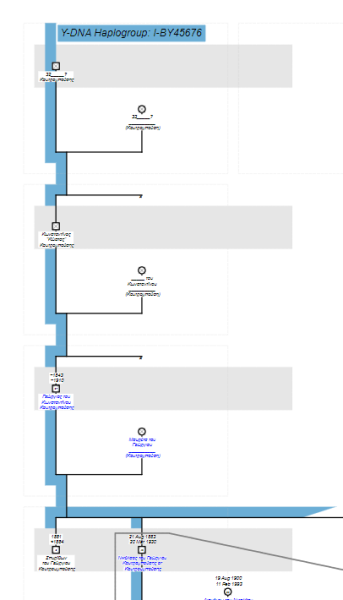 The shape for mt-DNA would run down the right side and be in a different colour. My question is, can I create 3 Layers that I can toggle through? (It would be great if additional layers could be added to the transmission of other types of DNA)Layer 1 would be the normal GenoMapLayer 2 would be the Y-DNA, for exampleLayer 3 would be the mt-DNA
Layer 1 would always appear, and I could add in Layer 2 or 3, or both Layer 2 and 3.Here's an example of an easy to follow mt-DNA transmission from this magazine article: Macleans Article on King Richard III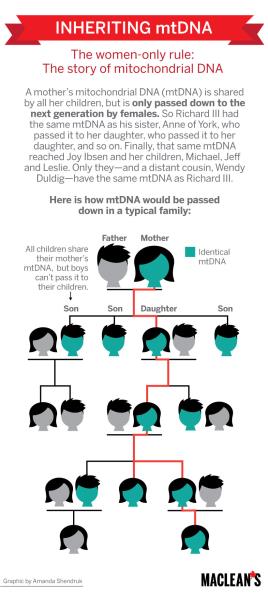 Here's a less clear diagram from this site: MI Teaching Tool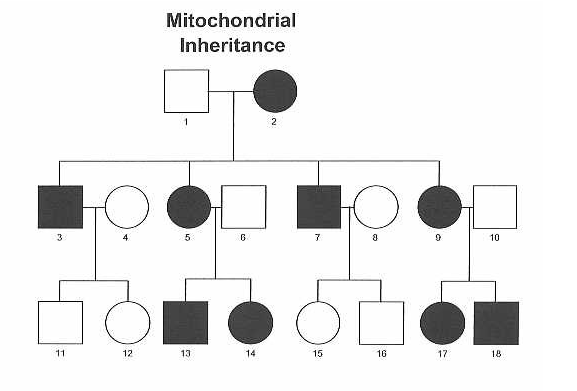 And here's my attempt at using Dark Green inside a gender shape to show Y-DNA, and light green to show mt-DNA transmission. Colour choices could be better, but it's still difficult to follow how the DNA is passed, and where it gets cut off.
|
|
|
|
|
Administrators
Customers
Important Contributors
FamilyTrees.GenoPro.com
GenoPro version: 3.1.0.1
Last Login: Yesterday @ 6:34 AM
Posts: 3,504,
Visits: 27,491
|
Yes I think this can be achieved in the Narrative Report using for example CSS Classes. Objects in each layer will have a particular class name e.g. Y-DNA defined in a Custom Tag e.g. _Layer
A drop down list of layers would need to be added to the Narrative Report genomap pages. Clicking a name in this list would toggle that layer on or off by setting the style display attribute of objects in that Class to inline or none. I think this would a a very good general feature e.g. layering different centuries or decades. I'd like to have a stab at scripting this but I'm pretty full on with a Home DIY project at present so it will go on the back burner for now.
'lego audio video erro ergo disco' or "I read, I listen, I watch, I make mistakes, therefore I learn"
|
|
|
|
|
Customers
FamilyTrees.GenoPro.com
GenoPro version: 3.1.0.1
Last Login: Wednesday, July 29, 2026
Posts: 272,
Visits: 1,795
|
That would be pretty incredible and very helpful! 
Hope your DIY projects go well, and I'm happy to wait until you can get around to it.
|
|
|
|
|
Administrators
Customers
Important Contributors
FamilyTrees.GenoPro.com
GenoPro version: 3.1.0.1
Last Login: Yesterday @ 6:34 AM
Posts: 3,504,
Visits: 27,491
|
Spent some time 'relaxing' in the evenings away from the DIY stuff looking into this. Turns out is was reasonably straight forward but as usual I make many stupid mistakes along the way but got there in the end. So release 2023.09.22 has this functionality, available as usual at Updates to Report Skin Templates since GenoPro 2020 version 3.1.0.1
Just use the GenoPro Tag Editor to create custom Tags for all object types you wish yo include in a 'layer' with a Tag Permanent Name of _Layers. The Tag Display Name can be anything you like e.g. 'GenoMap Layers'. The Tag Description is not used by the skin at present but I may use it for a tooltip on the Layers dropdown list. Then set a value of your chosen layer name in the _Layers Custom Tag of the objects to be included in that layer. The Narrative Report skin will generate a layer for each unique value of the _layers custom tag. I've included an example in the Potter genomap at https://familytrees.genopro.com/genome/HarryPotter/default.htmStill has an issue or two, e.g. the layers dropdown does not slide over the content below it but just pushes it down the screen. If any CSS gurus out there can tell me how toget over this that would be great.
Made a silent update to version 2023.09.22 to fix issue of layer dropdown not floating over content below it. (Googled and found some CSS magic using position:absolute and z-index:100 with some top and right positioning with left: inherit)
'lego audio video erro ergo disco' or "I read, I listen, I watch, I make mistakes, therefore I learn"
Edited: Friday, September 22, 2023 by
genome
|
|
|
|
|
Customers
FamilyTrees.GenoPro.com
GenoPro version: 3.1.0.1
Last Login: Sunday, August 9, 2026
Posts: 66,
Visits: 1,610
|
Könnte man die Arbeitsschritte des benutzerdefinierten Tags '_Layer' näher beschreiben, damit auch ein 'Laie' nachvollziehen kann, wie dies geht.Oder auch die neueste HarryPotter.gno zum download einstellen, um darin die Arbeitsschritte nachzusehen.'Normale' Benutzertags hab ich einige gemacht, aber hier blicke ich nicht durch,... sorry
|
|
|
|
|
Administrators
Customers
Important Contributors
FamilyTrees.GenoPro.com
GenoPro version: 3.1.0.1
Last Login: Yesterday @ 6:34 AM
Posts: 3,504,
Visits: 27,491
|
I will put together more detailed instructions on producing layers.
I also realize there may be an issue with non-ascii characters in the layer names. e.g. German eszett and umlaut. I'll look into this and hopefully provide a solution.
'lego audio video erro ergo disco' or "I read, I listen, I watch, I make mistakes, therefore I learn"
|
|
|
|
|
Administrators
Customers
Important Contributors
FamilyTrees.GenoPro.com
GenoPro version: 3.1.0.1
Last Login: Yesterday @ 6:34 AM
Posts: 3,504,
Visits: 27,491
|
I have added more detailed instructions on the Potter GenoMap at https://familytrees.genopro.com/genome/HarryPotter/default.htm and also included a download link on the homepage for the .gno
Using Non-ASCII layer names seems to be Ok, I've added a layer Großraumbüroklimagerätestörung that works fine.
'lego audio video erro ergo disco' or "I read, I listen, I watch, I make mistakes, therefore I learn"
|
|
|
|
|
Customers
FamilyTrees.GenoPro.com
GenoPro version: 3.1.0.1
Last Login: Wednesday, July 29, 2026
Posts: 272,
Visits: 1,795
|
WOW!!!! That looks and works amazingly well!!! Thank you!!
|
|
|
|
|
Customers
FamilyTrees.GenoPro.com
GenoPro version: 3.1.0.1
Last Login: Sunday, August 9, 2026
Posts: 66,
Visits: 1,610
|
Danke, danke jetzt hab auch ich es kapiert. Hat alles geklappt
|
|
|
|
|
Administrators
Customers
Important Contributors
FamilyTrees.GenoPro.com
GenoPro version: 3.1.0.1
Last Login: Yesterday @ 6:34 AM
Posts: 3,504,
Visits: 27,491
|
Version 2023.10.05 fo the Narrative Report Skin template allows drawing objects to be part of more than one layer. Such objects will be displayed unless all of the layers of which it is a member are turned off. Layer names set in the _Layers custom tag for such objects must be separated by the vertical bar character i.e. |
For example in the sample Potter genomap the Emotional Relationships from Lord Voldemort towards James Potter and Lily Evans are in a layer named 'Emotional Relationships' and also in a layer named 'Violence' 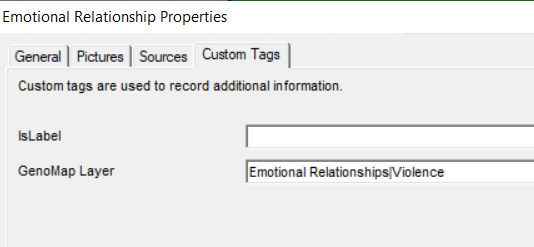 I have also added a background to the dropdown list and made the layer names clickable as well as the checkbox to make it easier to use.
'lego audio video erro ergo disco' or "I read, I listen, I watch, I make mistakes, therefore I learn"
|